Understanding of Network Address Translation (NAT)
 Chan
Chan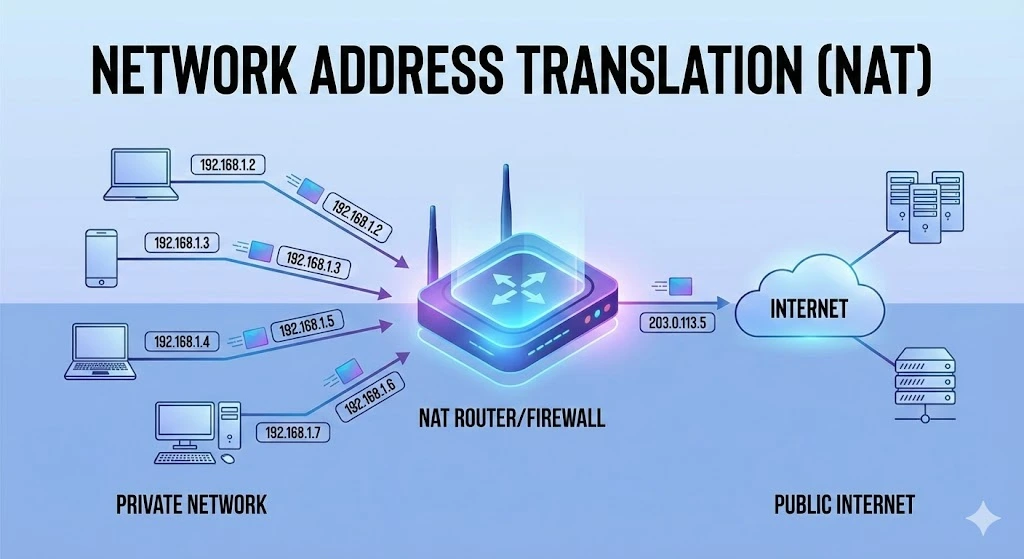
In networking, managing IP addresses efficiently ensures seamless communication between devices. One key technology that has emerged to address this challenge is Network Address Translation (NAT). This article explores what NAT is, how it works, its types, and its benefits and limitations.
Table of Contents
What is Network Address Translation (NAT)?
Network Address Translation (NAT) is a method used in networking to modify network address information in the IP header of packets while they are in transit. This technique allows multiple devices on a local network to share a single public IP address. NAT is commonly used to improve security and conserve the limited IPv4 addresses.
How Does NAT work?
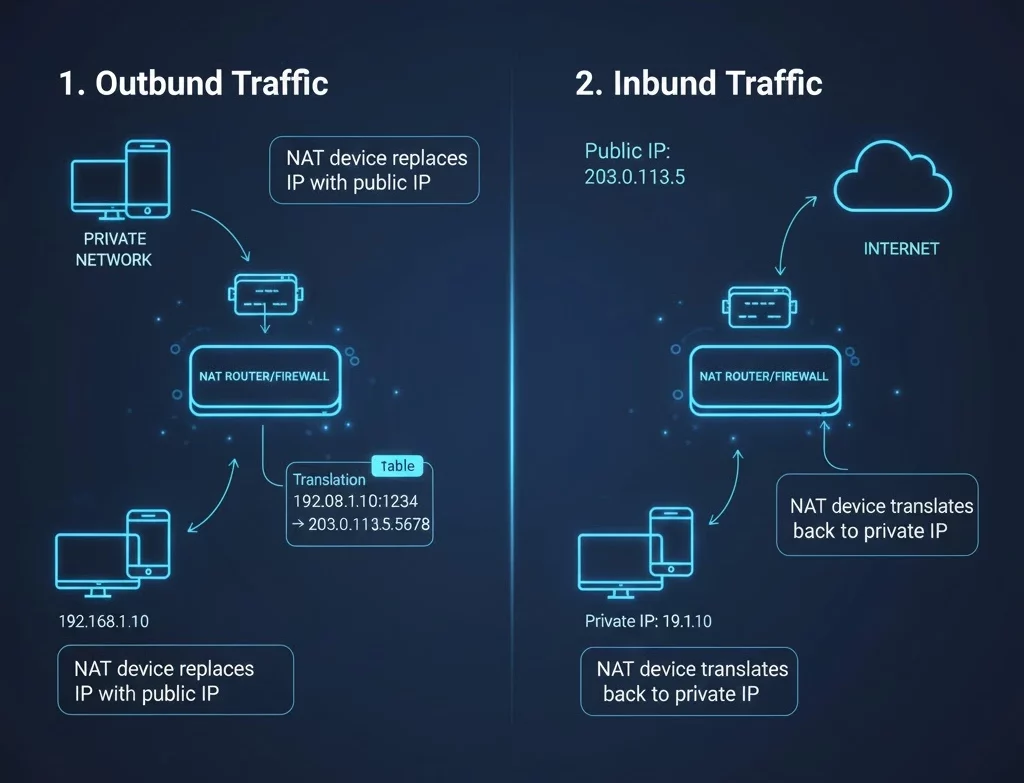
NAT operates by modifying the source or destination IP addresses of packets as they pass through a router or firewall. Here’s a simplified explanation of the process:
1. Outbound Traffic:
When a device on a local network (with a private IP address) sends a packet to the internet, the NAT device (usually a router) replaces the private IP address in the packet’s header with the router’s public IP address.
The NAT device also records this translation in a table, mapping the private IP address and port number to the public IP address and a unique port number.
2. Inbound Traffic:
When a response packet is received from the internet, the NAT device checks its translation table to determine the corresponding private IP address and port number. The NAT device then replaces the destination public IP address and port number in the packet’s header with the private IP address and port number and forwards the packet to the appropriate local device.
This translation process allows multiple devices on a private network to access the internet using a single public IP address, effectively hiding the internal network structure from external observers.
Types of NAT
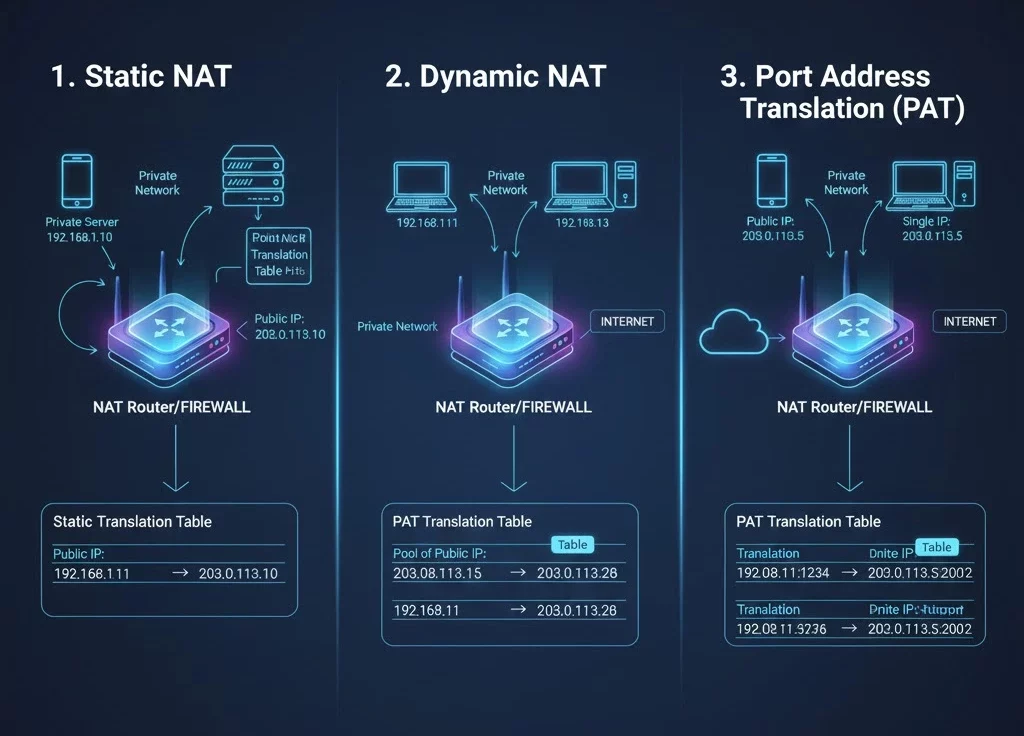
There are several types of NAT, each with specific use cases and functionalities:
1. Static NAT:
Also known as one-to-one NAT, static NAT maps a single private IP address to a single public IP address. This type is useful for hosting servers that need to be accessible from the internet.
2. Dynamic NAT:
Dynamic NAT maps a private IP address to a public IP address from a pool of available addresses. This type of NAT does not guarantee the same public IP address for each session.
3. Port Address Translation (PAT):
Also known as overload or many-to-one NAT, PAT allows multiple private IP addresses to be mapped to a single public IP address, but with a unique port number for each session. This is the most common type of NAT used in home and small office networks.
Benefits of NAT
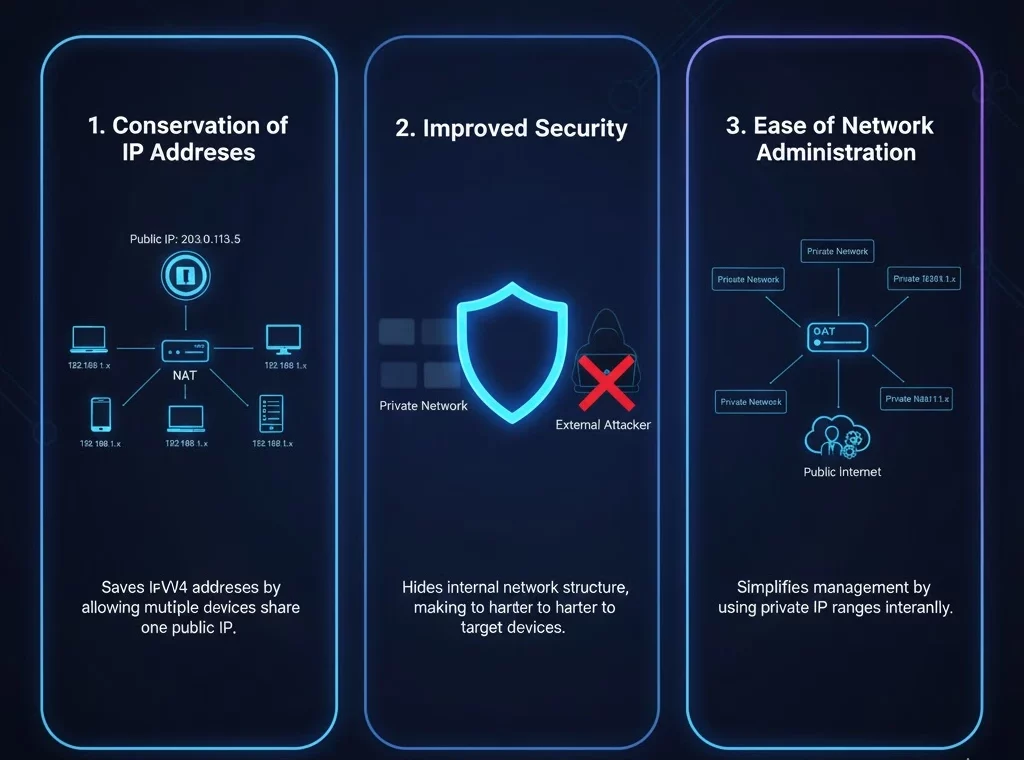
NAT offers several advantages that make it a valuable tool in modern networking:
1. Conservation of IP Addresses:
By allowing multiple devices to share a single public IP address, NAT helps to conserve the limited number of available IPv4 addresses.
2. Improved Security:
NAT adds a layer of security by hiding the internal network structure from external observers. This makes it more difficult for attackers to target specific devices on the network.
3. Ease of Network Administration:
NAT simplifies network management by allowing private IP address ranges to be used internally, reducing the need for public IP addresses.
Limitations of NAT
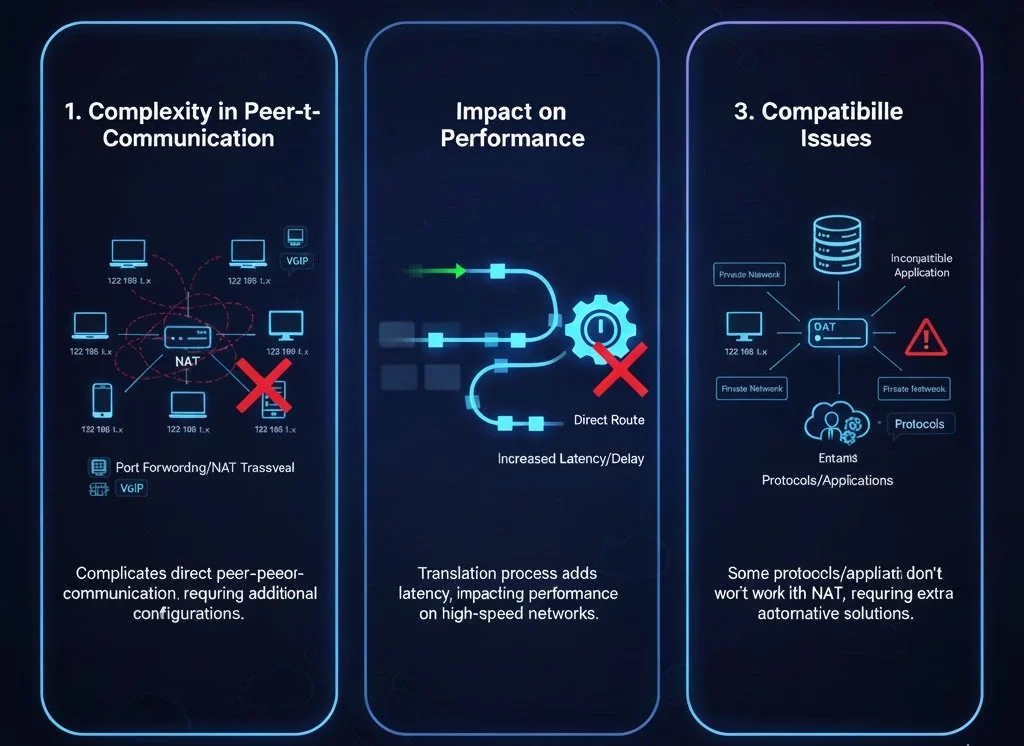
Despite its benefits, NAT has some limitations that need to be considered:
1. Complexity in Peer-to-Peer Communication:
NAT can complicate direct peer-to-peer communication, such as VoIP and online gaming, as it requires additional configurations like port forwarding or the use of NAT traversal techniques.
2. Impact on Performance:
The translation process adds a small amount of latency to network traffic, which could impact performance on high-speed networks.
3. Compatibility Issues:
Some protocols and applications may not work correctly with NAT, requiring additional configuration or alternative solutions.
NAT in a nutshell
Network Address Translation (NAT) is a fundamental technology that plays a crucial role in modern networking. By allowing multiple devices to share a single public IP address, NAT conserves IP addresses and enhances network security. However, it also introduces some challenges, particularly in peer-to-peer communication and application compatibility. Understanding how NAT works and its benefits and limitations is essential for effective network management and optimization.
Trusted IPv4 Leasing for Business Growth
Get enterprise-grade IPv4 space quickly, with seamless deployment and end-to-end management.
Get Started with i.leaseFAQs
Is NAT the same as a Firewall?
No, but they often work together. NAT hides your internal IP addresses from the public internet, which provides a basic level of privacy. A Firewall actively inspects and blocks malicious traffic based on security rules. Think of NAT as frosting glass windows (privacy) and a firewall as locking the doors (security).
Does NAT slow down my internet speed?
In most home networks, the impact is negligible. However, because the router has to rewrite the header of every data packet (a process called “translation overhead”), older or overloaded routers may introduce slight latency (lag) during heavy usage, such as 4K streaming or competitive gaming.
What is "Double NAT" and why is it bad?
Double NAT occurs when you have two routers connected in a row (e.g., an ISP modem/router combo connected to your own personal router), both trying to perform NAT. This causes connection issues for VPNs, online gaming, and port forwarding. You can fix this by enabling “Bridge Mode” on your ISP’s modem.
What is the difference between NAT and PAT?
NAT (Network Address Translation) typically maps one IP address to another (1-to-1). PAT (Port Address Translation), also called “NAT Overload,” allows multiple devices on your home network to share a single public IP address by assigning each device a unique “port” number. PAT is what almost all home Wi-Fi networks use.
Articles connexes

Pourquoi le sous-réseautage est crucial pour une gestion de réseau efficace
Le rôle du sous-réseautage dans les réseaux modernes Le sous-réseautage consiste à diviser un grand réseau IP en parties plus petites. Il est essentiel à la gestion de réseau, car il permet aux administrateurs d’attribuer les adresses IP de manière judicieuse. Cela réduit le gaspillage et prévient les conflits. Le sous-réseautage contribue également à une organisation claire du réseau. Aujourd’hui, de nombreux appareils se connectent aux réseaux. Sans sous-réseaux,Read more Related Posts Pourquoi le sous-réseautage est crucial pour une gestion de réseau efficace Le rôle du sous-réseautage dans les réseaux modernes Le sous-réseautage consiste à diviser un grand réseau IP en parties plus Read more Histoire des adresses IP : des débuts d’Internet à l’IPv6 Le protocole Internet (IP) est l'épine dorsale de l'Internet moderne, permettant aux appareils de communiquer sur de vastes réseaux. Mais Read more Comprendre les différents types d’attaques DDoS Avec l'essor d'Internet dans les opérations commerciales quotidiennes, les menaces de cybersécurité gagnent en complexité et en impact. Parmi les Read more .related-post {} .related-post .post-list { text-align: left; } .related-post .post-list .item { margin: 5px; padding: 10px; } .related-post .headline { font-size: 18px !important; color: #999999 !important; } .related-post .post-list .item .post_thumb { max-height: 220px; margin: 10px 0px; padding: 0px; display: block; } .related-post .post-list .item .post_title { font-size: 16px; color: #3f3f3f; margin: 10px 0px; padding: 0px; display: block; text-decoration: none; } .related-post .post-list .item .post_excerpt { font-size: 13px; color: #3f3f3f; margin: 10px 0px; padding: 0px; display: block; text-decoration: none; } @media only screen and (min-width: 1024px) { .related-post .post-list .item { width: 30%; } } @media only screen and (min-width: 768px) and (max-width: 1023px) { .related-post .post-list .item { width: 90%; } } @media only screen and (min-width: 0px) and (max-width: 767px) { .related-post .post-list .item { width: 90%; } }

Histoire des adresses IP : des débuts d’Internet à l’IPv6
Le protocole Internet (IP) est l’épine dorsale de l’Internet moderne, permettant aux appareils de communiquer sur de vastes réseaux. Mais vous êtes-vous déjà demandé comment les adresses IP ont évolué ? Explorons l’histoire des adresses IP, de leur création aux protocoles IPv4 et IPv6 largement utilisés, et levons le voile sur le sort des mystérieux IPv1, IPv2 et IPv3. Que sont les adresses IP ? Une adresse IP est un identifiantRead more Related Posts Pourquoi le sous-réseautage est crucial pour une gestion de réseau efficace Le rôle du sous-réseautage dans les réseaux modernes Le sous-réseautage consiste à diviser un grand réseau IP en parties plus Read more Histoire des adresses IP : des débuts d’Internet à l’IPv6 Le protocole Internet (IP) est l'épine dorsale de l'Internet moderne, permettant aux appareils de communiquer sur de vastes réseaux. Mais Read more Comprendre les différents types d’attaques DDoS Avec l'essor d'Internet dans les opérations commerciales quotidiennes, les menaces de cybersécurité gagnent en complexité et en impact. Parmi les Read more .related-post {} .related-post .post-list { text-align: left; } .related-post .post-list .item { margin: 5px; padding: 10px; } .related-post .headline { font-size: 18px !important; color: #999999 !important; } .related-post .post-list .item .post_thumb { max-height: 220px; margin: 10px 0px; padding: 0px; display: block; } .related-post .post-list .item .post_title { font-size: 16px; color: #3f3f3f; margin: 10px 0px; padding: 0px; display: block; text-decoration: none; } .related-post .post-list .item .post_excerpt { font-size: 13px; color: #3f3f3f; margin: 10px 0px; padding: 0px; display: block; text-decoration: none; } @media only screen and (min-width: 1024px) { .related-post .post-list .item { width: 30%; } } @media only screen and (min-width: 768px) and (max-width: 1023px) { .related-post .post-list .item { width: 90%; } } @media only screen and (min-width: 0px) and (max-width: 767px) { .related-post .post-list .item { width: 90%; } }
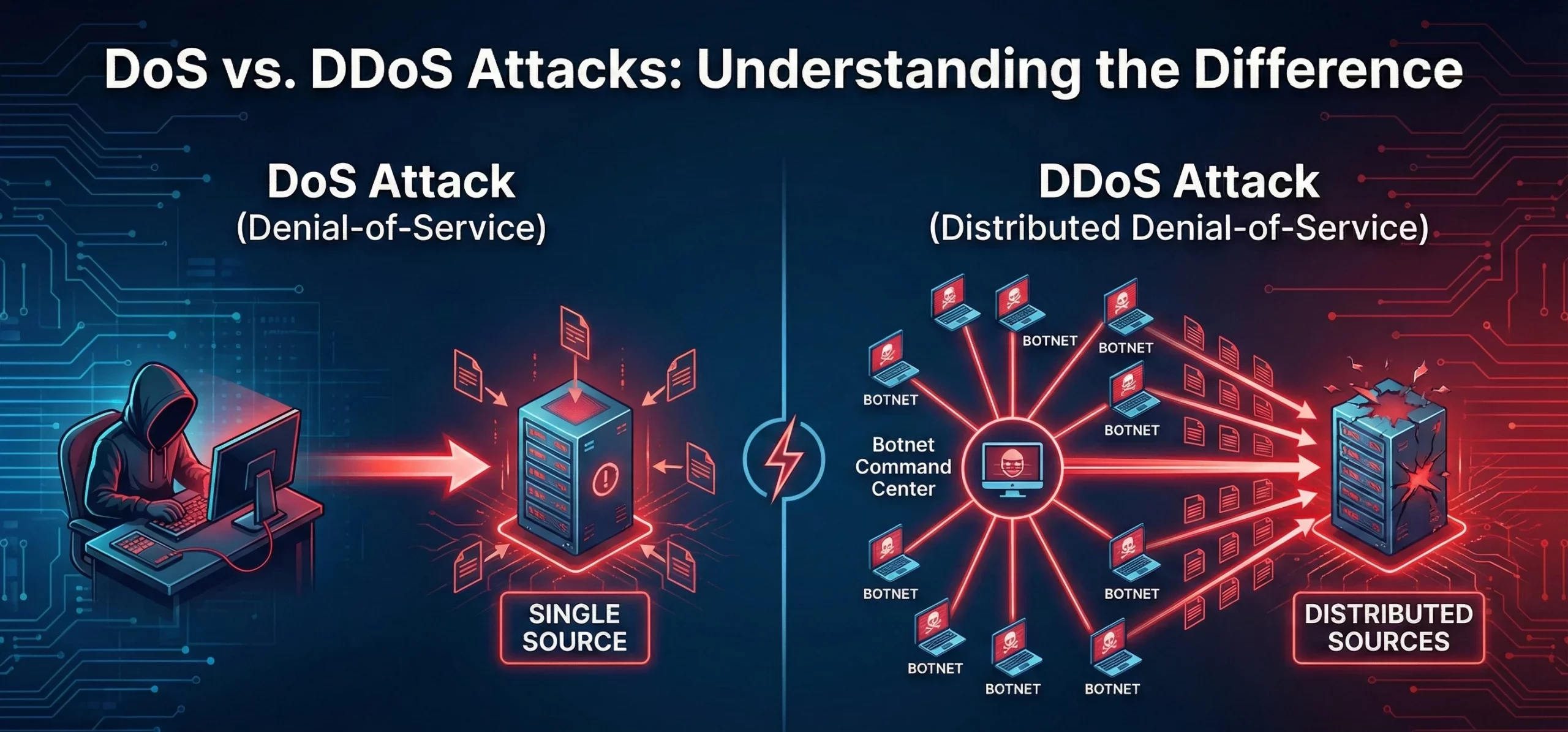
Différence entre les attaques DoS et DDoS
Que sont les attaques DoS et DDoS ? Une attaque par déni de service (DoS) vise à rendre une machine, un réseau ou un service inaccessible aux utilisateurs en saturant le trafic ou les requêtes. Elle provient généralement d’une source unique. Une attaque par déni de service distribué (DDoS) a une intention similaire, mais implique plusieurs systèmes (souvent un réseau de zombies) ciblant simultanément la victime, ce quiRead more Related Posts Pourquoi le sous-réseautage est crucial pour une gestion de réseau efficace Le rôle du sous-réseautage dans les réseaux modernes Le sous-réseautage consiste à diviser un grand réseau IP en parties plus Read more Histoire des adresses IP : des débuts d’Internet à l’IPv6 Le protocole Internet (IP) est l'épine dorsale de l'Internet moderne, permettant aux appareils de communiquer sur de vastes réseaux. Mais Read more Comprendre les différents types d’attaques DDoS Avec l'essor d'Internet dans les opérations commerciales quotidiennes, les menaces de cybersécurité gagnent en complexité et en impact. Parmi les Read more .related-post {} .related-post .post-list { text-align: left; } .related-post .post-list .item { margin: 5px; padding: 10px; } .related-post .headline { font-size: 18px !important; color: #999999 !important; } .related-post .post-list .item .post_thumb { max-height: 220px; margin: 10px 0px; padding: 0px; display: block; } .related-post .post-list .item .post_title { font-size: 16px; color: #3f3f3f; margin: 10px 0px; padding: 0px; display: block; text-decoration: none; } .related-post .post-list .item .post_excerpt { font-size: 13px; color: #3f3f3f; margin: 10px 0px; padding: 0px; display: block; text-decoration: none; } @media only screen and (min-width: 1024px) { .related-post .post-list .item { width: 30%; } } @media only screen and (min-width: 768px) and (max-width: 1023px) { .related-post .post-list .item { width: 90%; } } @media only screen and (min-width: 0px) and (max-width: 767px) { .related-post .post-list .item { width: 90%; } }
