SOLD:/24 ARIN @ $32/IP
LEASED:/18 RIPE @ $0.45/IP
SOLD:/24 ARIN @ $32/IP/Mo
SOLD:/24 ARIN @ $32/IP
LEASED:/18 RIPE @ $0.45/IP
SOLD:/24 ARIN @ $32/IP/Mo
SOLD:/24 ARIN @ $32/IP

What is Ping?

ChanChan
What is Ping?

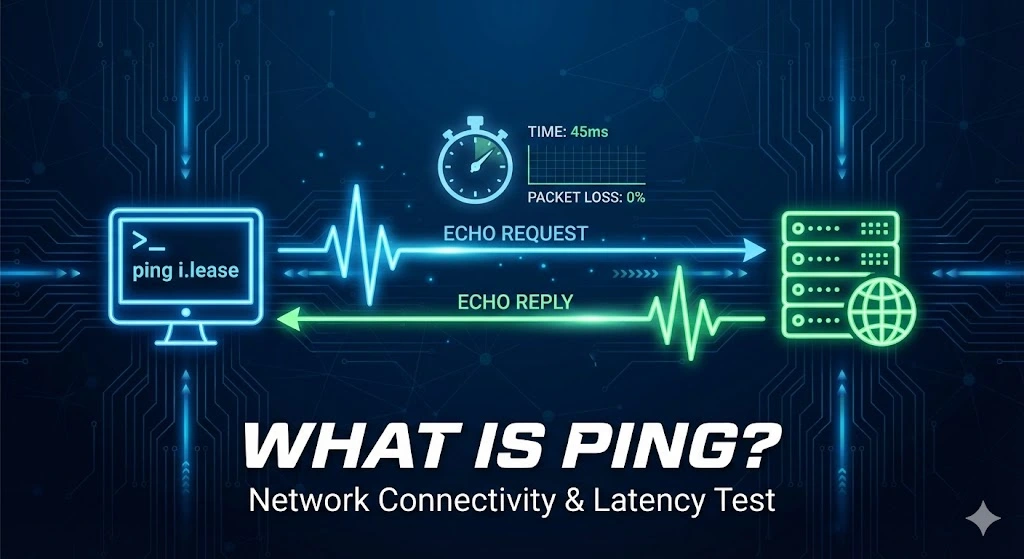
Ping is a network diagnostic tool used to test the connection between your device and another on a network, typically the Internet. It is named after the sound made by sonar in submarines, where a signal is sent out, and the echo is awaited. In networking terms, it sends out packets of data to a specific IP address and waits for a response, telling you if the destination is reachable and how long it takes for data to travel back and forth.

How Does Ping Work?

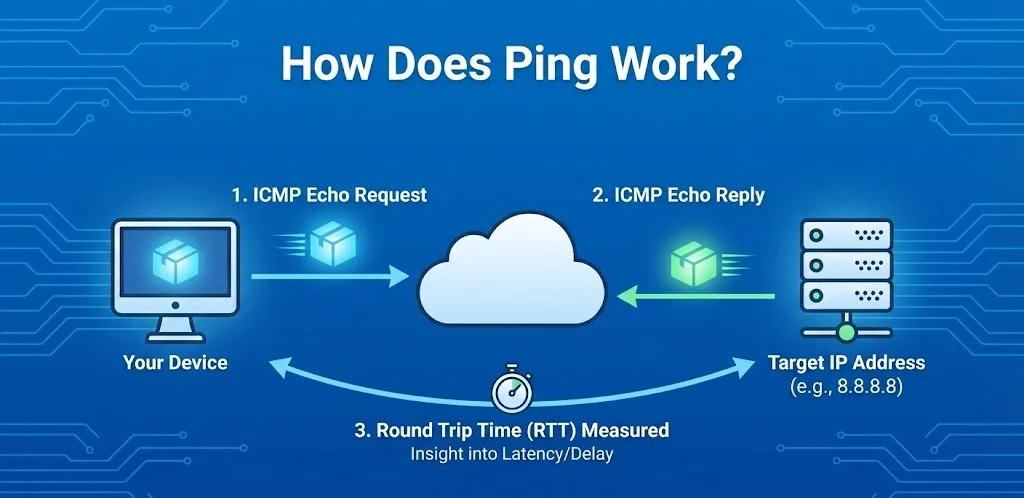
Ping operates using the Internet Control Message Protocol (ICMP). When you run a ping command, your device sends ICMP Echo Request1 packets to the target IP address. If the target is reachable, it responds with an ICMP Echo Reply2. The time for this round trip3 (sending and receiving packets) is measured, giving insight into the connection’s latency or delay.

How to Use Ping Commands

Using ping is straightforward:

    1. Windows: Open Command Prompt (cmd).
    2. macOS/Linux: Open Terminal.
    3. Type ping followed by the domain name or IP address you want to check.

For example, typing ping google.com will send ping requests to Google’s servers, showing how quickly you can connect to it.

How to Run a Ping Network Test
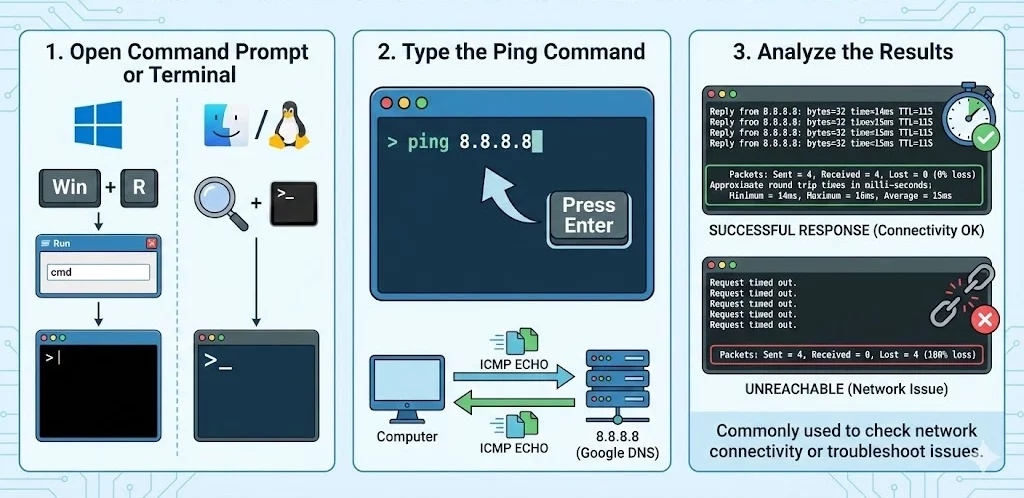
1. Open a Command Prompt or Terminal:

  • Windows: Press Win + R, type cmd, and press Enter.
  • macOS/Linux: Open the Terminal from the Applications or search it in Spotlight (macOS) or from the applications menu (Linux).

2. Type the Ping Command:

  • In the command prompt or terminal, type ping followed by the IP address you want to test.
  • Example: ping 8.8.8.8 (This is Google’s public DNS server).
  • Press Enter, and the command will send several packets to the IP address and display the response time in milliseconds (ms).

3. Analyze the Results:

If the packets are received, you’ll see the time it took for the round-trip in milliseconds. If the destination is unreachable, you’ll see a message indicating that the request timed out.

This method is commonly used to check network connectivity or troubleshoot network issues.

When Would Using the Ping Command Be Useful?

1. Troubleshooting Connectivity: If you’re having issues with Internet access, Ping can tell you if the problem lies with your Internet connection or the specific website you’re trying to reach.


2. Checking Latency: If you notice lag or slowness while using an app or website, ping can help determine if the issue is due to network delays.


3. Testing Network Devices: Ping can test if devices like printers, routers, or other network resources are reachable.

What Does the Ping Test Tell You?

1. Packet Loss: If some packets are lost in transit, it might indicate an unstable connection.


2. Latency: The time taken for data to travel to the target and back. High latency means slower performance, especially for real-time applications like gaming or video conferencing.


3. Unreachable Host: If a host doesn’t respond, it could indicate the target is down, the IP address is incorrect, or network/firewall settings are blocking the request.

Ping Flood and Ping Spoofing

Ping Flood: A ping flood (also known as a DDoS attack) overwhelms a target with an excessive number of ping requests, causing network congestion or even taking the target down. This is usually a malicious action to disrupt services.


Ping Spoofing: This involves sending ping requests that appear to come from a legitimate source, fooling the target into responding. Spoofing is t

Trusted IPv4 Leasing for Business Growth

Get enterprise-grade IPv4 space quickly, with seamless deployment and end-to-end management.

Get Started with i.lease

FAQs

What is considered a "good" ping speed?

Generally, a ping under 20 ms is considered excellent, ideal for competitive gaming and high-quality streaming.

  • 20-50 ms: Great for most online activities.
  • 50-100 ms: Acceptable for web browsing but may cause noticeable lag in gaming.
  • Over 150 ms: Considered high latency; you will likely experience delays, buffering, or “rubber-banding” in games.
How is Ping different from Latency?

While often used interchangeably, there is a slight difference. Latency is the time it takes for data to travel from your device to the server. Ping is the measurement tool used to calculate the round-trip time (latency) of that journey. Think of latency as the distance and ping as the speedometer reading.

Does high ping affect download speed?

Not necessarily. You can have a fast download speed (high bandwidth) but still have high ping (high latency). For example, satellite internet often has fast download speeds but very high ping due to the distance the signal travels. High ping affects responsiveness (how fast a page starts loading), while bandwidth affects throughput (how fast a file downloads once it starts).


Related Posts

ipv4-leasing

Inbound vs. Outbound IPv4 Leasing: A Complete Guide for Enterprises

Understanding IPv4 leasing helps enterprises manage scarce address space, reducing risk and unlocking strategic growth opportunities in today’s digital economy.   Key points Distinguishes between inbound (leasing in) and outbound (leasing out) IPv4 approaches and their strategic implications. Highlights contract structures, registry risk management and continuity considerations affecting global number resources. Inbound vs. outbound IPv4 leasing: complete enterprise guide In the post-exhaustion era of Internet Protocol version 4 (IPv4),Read more Related Posts Inbound vs. Outbound IPv4 Leasing: A Complete Guide for Enterprises Understanding IPv4 leasing helps enterprises manage scarce address space, reducing risk and unlocking strategic growth opportunities in today’s digital economy. Key Read more Common Myths About Selling IP Addresses The IPv4 secondary market is often shrouded in mystery, leading many organizations to sit on valuable digital assets because they Read more How to turn idle IPv4 addresses into a recurring revenue stream with iLease Unlock the hidden value of unused IPv4 addresses with iLease, turning dormant digital infrastructure into a recurring revenue stream while Read more .related-post {} .related-post .post-list { text-align: left; } .related-post .post-list .item { margin: 5px; padding: 10px; } .related-post .headline { font-size: 18px !important; color: #999999 !important; } .related-post .post-list .item .post_thumb { max-height: 220px; margin: 10px 0px; padding: 0px; display: block; } .related-post .post-list .item .post_title { font-size: 16px; color: #3f3f3f; margin: 10px 0px; padding: 0px; display: block; text-decoration: none; } .related-post .post-list .item .post_excerpt { font-size: 13px; color: #3f3f3f; margin: 10px 0px; padding: 0px; display: block; text-decoration: none; } @media only screen and (min-width: 1024px) { .related-post .post-list .item { width: 30%; } } @media only screen and (min-width: 768px) and (max-width: 1023px) { .related-post .post-list .item { width: 90%; } } @media only screen and (min-width: 0px) and (max-width: 767px) { .related-post .post-list .item { width: 90%; } }

selling-ip-addresses

Common Myths About Selling IP Addresses

The IPv4 secondary market is often shrouded in mystery, leading many organizations to sit on valuable digital assets because they fear the perceived complexity or legal “gray areas.” As IPv4 exhaustion becomes a permanent reality, the value of these addresses has skyrocketed, yet misconceptions continue to stall potential transactions. At i.lease, powered by the real-world expertise of LARUS, we’ve seen how these myths prevent companies from unlocking significant capital.Read more Related Posts Inbound vs. Outbound IPv4 Leasing: A Complete Guide for Enterprises Understanding IPv4 leasing helps enterprises manage scarce address space, reducing risk and unlocking strategic growth opportunities in today’s digital economy. Key Read more Common Myths About Selling IP Addresses The IPv4 secondary market is often shrouded in mystery, leading many organizations to sit on valuable digital assets because they Read more How to turn idle IPv4 addresses into a recurring revenue stream with iLease Unlock the hidden value of unused IPv4 addresses with iLease, turning dormant digital infrastructure into a recurring revenue stream while Read more .related-post {} .related-post .post-list { text-align: left; } .related-post .post-list .item { margin: 5px; padding: 10px; } .related-post .headline { font-size: 18px !important; color: #999999 !important; } .related-post .post-list .item .post_thumb { max-height: 220px; margin: 10px 0px; padding: 0px; display: block; } .related-post .post-list .item .post_title { font-size: 16px; color: #3f3f3f; margin: 10px 0px; padding: 0px; display: block; text-decoration: none; } .related-post .post-list .item .post_excerpt { font-size: 13px; color: #3f3f3f; margin: 10px 0px; padding: 0px; display: block; text-decoration: none; } @media only screen and (min-width: 1024px) { .related-post .post-list .item { width: 30%; } } @media only screen and (min-width: 768px) and (max-width: 1023px) { .related-post .post-list .item { width: 90%; } } @media only screen and (min-width: 0px) and (max-width: 767px) { .related-post .post-list .item { width: 90%; } }

buy-ip-addresses

How to buy IPv4 addresses through a certified IP broker

Buying IPv4 space requires policy compliance, verified need, and registry approval, making certified IP brokers essential guides through complex global transfers. IPv4 transactions are regulated transfers, not simple purchases — registries must approve documentation, justification and registration changes. Certified brokers reduce risk and delay by aligning buyers with registry policy, routing legitimacy and cross-region requirements. Why companies still need to buy IPv4 addresses The global supply of IPv4 addressesRead more Related Posts Inbound vs. Outbound IPv4 Leasing: A Complete Guide for Enterprises Understanding IPv4 leasing helps enterprises manage scarce address space, reducing risk and unlocking strategic growth opportunities in today’s digital economy. Key Read more Common Myths About Selling IP Addresses The IPv4 secondary market is often shrouded in mystery, leading many organizations to sit on valuable digital assets because they Read more How to turn idle IPv4 addresses into a recurring revenue stream with iLease Unlock the hidden value of unused IPv4 addresses with iLease, turning dormant digital infrastructure into a recurring revenue stream while Read more .related-post {} .related-post .post-list { text-align: left; } .related-post .post-list .item { margin: 5px; padding: 10px; } .related-post .headline { font-size: 18px !important; color: #999999 !important; } .related-post .post-list .item .post_thumb { max-height: 220px; margin: 10px 0px; padding: 0px; display: block; } .related-post .post-list .item .post_title { font-size: 16px; color: #3f3f3f; margin: 10px 0px; padding: 0px; display: block; text-decoration: none; } .related-post .post-list .item .post_excerpt { font-size: 13px; color: #3f3f3f; margin: 10px 0px; padding: 0px; display: block; text-decoration: none; } @media only screen and (min-width: 1024px) { .related-post .post-list .item { width: 30%; } } @media only screen and (min-width: 768px) and (max-width: 1023px) { .related-post .post-list .item { width: 90%; } } @media only screen and (min-width: 0px) and (max-width: 767px) { .related-post .post-list .item { width: 90%; } }

Tags

#What is Ping?