What is a Firewall? Definition and Types of Firewalls

ChanChan
What is a Firewall? Definition and Types of Firewalls

Cybersecurity is a top priority for individuals and organizations alike. Protecting networks and systems from unauthorized access is crucial as cyber threats evolve. One of the most fundamental tools for achieving this protection is a firewall. This article explores what a firewall is, how it works, and the different types of firewalls available.

What is a Firewall?

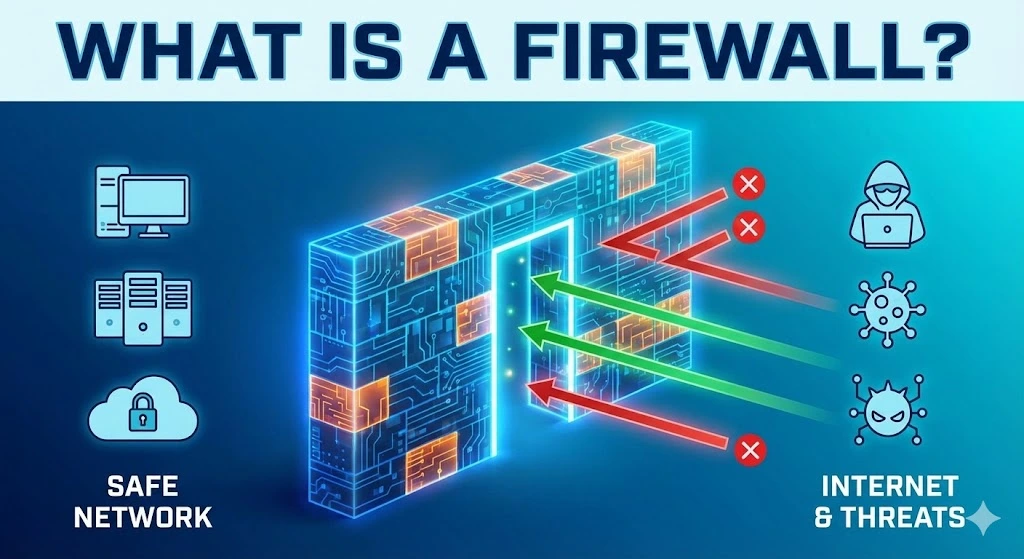
A firewall is a security device or piece of software that monitors and controls incoming and outgoing network traffic based on predetermined security rules. Acting as a barrier between a trusted internal network and untrusted external networks, such as the Internet, a firewall’s primary purpose is to prevent unauthorized access while allowing legitimate communication to pass through.

How does a firewall work?

Firewalls work by analyzing network traffic and determining whether it should be allowed or blocked based on a set of rules. These rules can be configured to filter traffic by IP addresses, domain names, protocols, ports, or specific applications. By examining data packets, firewalls can make real-time decisions to protect the network from potential threats.

Types of Firewalls
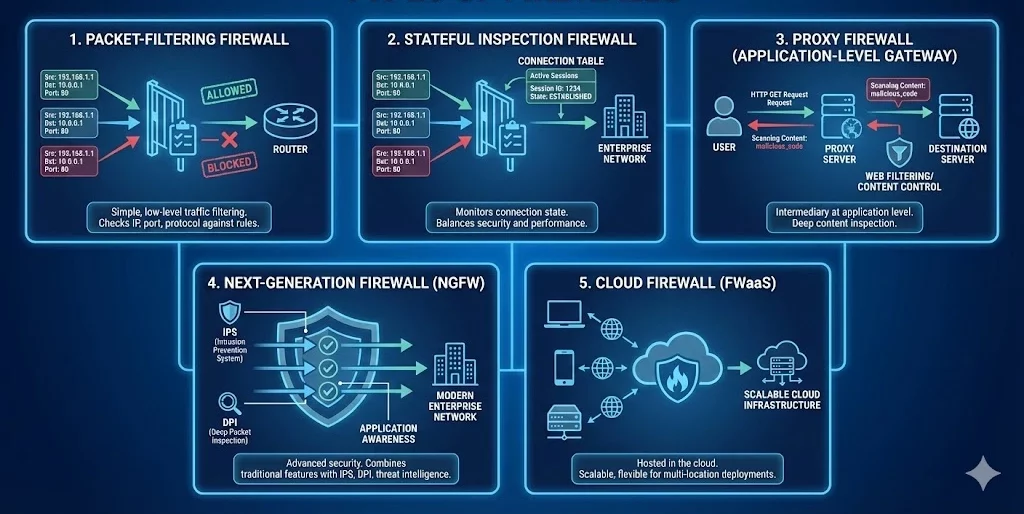
There are several types of firewalls, each offering different levels of protection and functionality. Here are the most common types:

1. Packet-Filtering Firewall

Definition: A packet-filtering firewall is one of the oldest and simplest types of firewalls. It inspects individual data packets and compares them against a set of rules before allowing or blocking them.

How It Works: The firewall examines the source and destination IP addresses, port numbers, and protocol types of each packet. If the packet matches the firewall’s rules, it is allowed to pass; otherwise, it is blocked.

Use Case: Packet-filtering firewalls are commonly used in routers and are ideal for simple, low-level traffic filtering.

2. Stateful Inspection Firewall

Definition: A stateful inspection firewall, also known as a dynamic packet-filtering firewall, offers more advanced security than a packet-filtering firewall by monitoring the state of active connections.

How It Works: This firewall not only checks the header information of each packet but also keeps track of the state of network connections. It can determine whether a packet is part of an established session or an unsolicited request, allowing it to make more informed decisions.

Use Case: Stateful inspection firewalls are widely used in enterprise networks to provide a balance between security and performance.

3. Proxy Firewall

Definition: A proxy firewall, also known as an application-level gateway, acts as an intermediary between users and the internet by filtering traffic at the application level.

How It Works: The proxy firewall intercepts all requests from users and forwards them to the destination server. It examines the content of the data packets and applies security rules based on the application layer protocols (e.g., HTTP, FTP).

Use Case: Proxy firewalls are used in environments where deep inspection of application-level traffic is required, such as in web filtering and content control systems.

4. Next-Generation Firewall (NGFW)

Definition: A Next-Generation Firewall (NGFW) is an advanced type of firewall that combines traditional firewall capabilities with additional security features, such as intrusion prevention systems (IPS), deep packet inspection (DPI), and application awareness.

How It Works: NGFWs offer more granular control over network traffic by analyzing data packets at multiple layers (network, transport, and application) and incorporating threat intelligence to detect and block sophisticated cyberattacks.

Use Case: NGFWs are ideal for modern enterprise networks that require comprehensive security measures to protect against advanced threats.

5. Cloud Firewall

Definition: A cloud firewall, also known as a firewall-as-a-service (FWaaS), is a firewall that is hosted in the cloud rather than on-premises hardware.

How It Works: Cloud firewalls provide similar functionality to traditional firewalls but are delivered as a service. They are scalable and can be easily deployed across multiple locations or cloud environments.

Use Case: Cloud firewalls are suitable for organizations that rely on cloud-based infrastructure and need flexible, scalable security solutions.

Where to purchase firewall service

To purchase a firewall service, consider reputable vendors like Cisco, Palo Alto Networks, Fortinet, or Check Point for enterprise-grade solutions. For small to medium businesses, SonicWall and WatchGuard offer reliable options. Cloud-based firewalls are available from providers like Amazon Web Services (AWS), Microsoft Azure, and Google Cloud. Always compare features, pricing, and support before making a decision.


Firewalls are a critical component of network security, serving as the first line of defense against cyber threats. By understanding the different types of firewalls—packet-filtering, stateful inspection, proxy, next-generation, and cloud firewalls—you can make informed decisions about which firewall best suits your needs. Whether you’re protecting a small home network or a large enterprise infrastructure, implementing the right firewall is essential for safeguarding your digital assets.

Trusted IPv4 Leasing for Business Growth

Get enterprise-grade IPv4 space quickly, with seamless deployment and end-to-end management.

Get Started with i.lease

FAQs

Do I need a firewall if I have an antivirus?

Yes, you need both. They serve different purposes. A firewall acts as a gatekeeper, monitoring network traffic to block unauthorized access before it reaches your computer. Antivirus software scans files already inside your computer to detect and remove malware.

Does Windows 10/11 come with a built-in firewall?

Yes, modern Windows operating systems come with Microsoft Defender Firewall pre-installed and enabled by default. It provides solid protection for most home users. However, enterprise environments often require more advanced third-party solutions (NGFWs) for granular control.

Can a firewall block a specific website?

Yes. Most firewalls allow you to create “Access Control Rules” or “Blocklists” to prevent users on your network from visiting specific IP addresses or domain names. This is commonly used in offices to block social media or dangerous sites.

Why is my firewall blocking a program I trust?

Firewalls sometimes generate “false positives,” blocking legitimate software because its behavior looks suspicious (e.g., trying to access the internet unexpectedly). You can fix this by adding the program to the firewall’s “Allow list” or “Exclusions list” in your settings.

Related Posts

rir-policy

How RIR Policy Differences Shape IPv4 Transactions Across Regions

Two IPv4 blocks can have the same prefix size, similar market value, and equally willing buyers and sellers—yet require different transaction preparation. The reason is that an IPv4 transaction does not exist only at the commercial layer. The address block is also registered within a Regional Internet Registry framework, and the applicable policies can affect whether the resource is currently transferable, what the recipient must prepare, which records needRead more Related Posts How RIR Policy Differences Shape IPv4 Transactions Across Regions Two IPv4 blocks can have the same prefix size, similar market value, and equally willing buyers and sellers—yet require different What Is CGNAT (Carrier-Grade NAT)? Why It Breaks Hosting, Gaming, and Inbound Services CGNAT (Carrier-Grade NAT) is a technique that lets an Internet service provider share a single public IPv4 address among many RPKI and ROA Explained: How Route Origin Authorization Protects Your IPv4 Prefixes RPKI (Resource Public Key Infrastructure) is a security framework that lets IP address holders publish cryptographically signed statements about who .related-post {} .related-post .post-list { text-align: left; } .related-post .post-list .item { margin: 5px; padding: 10px; } .related-post .headline { font-size: 18px !important; color: #999999 !important; } .related-post .post-list .item .post_thumb { max-height: 220px; margin: 10px 0px; padding: 0px; display: block; } .related-post .post-list .item .post_title { font-size: 16px; color: #3f3f3f; margin: 10px 0px; padding: 0px; display: block; text-decoration: none; } .related-post .post-list .item .post_excerpt { font-size: 13px; color: #3f3f3f; margin: 10px 0px; padding: 0px; display: block; text-decoration: none; } @media only screen and (min-width: 1024px) { .related-post .post-list .item { width: 30%; } } @media only screen and (min-width: 768px) and (max-width: 1023px) { .related-post .post-list .item { width: 90%; } } @media only screen and (min-width: 0px) and (max-width: 767px) { .related-post .post-list .item { width: 90%; } }

Proxy Vs VPN

Proxy vs VPN: What’s the Difference and Which Do You Need?

A proxy reroutes traffic for a specific application through an intermediary server, while a VPN routes and encrypts all of a device’s traffic through a secure tunnel. The short version: a proxy changes the apparent source of some of your traffic; a VPN changes and protects the source of all of it. That difference in scope and encryption is the core of the comparison, and it usually points clearlyRead more Related Posts How RIR Policy Differences Shape IPv4 Transactions Across Regions Two IPv4 blocks can have the same prefix size, similar market value, and equally willing buyers and sellers—yet require different Proxy vs VPN: What’s the Difference and Which Do You Need? A proxy reroutes traffic for a specific application through an intermediary server, while a VPN routes and encrypts all of What Is CGNAT (Carrier-Grade NAT)? Why It Breaks Hosting, Gaming, and Inbound Services CGNAT (Carrier-Grade NAT) is a technique that lets an Internet service provider share a single public IPv4 address among many .related-post {} .related-post .post-list { text-align: left; } .related-post .post-list .item { margin: 5px; padding: 10px; } .related-post .headline { font-size: 18px !important; color: #999999 !important; } .related-post .post-list .item .post_thumb { max-height: 220px; margin: 10px 0px; padding: 0px; display: block; } .related-post .post-list .item .post_title { font-size: 16px; color: #3f3f3f; margin: 10px 0px; padding: 0px; display: block; text-decoration: none; } .related-post .post-list .item .post_excerpt { font-size: 13px; color: #3f3f3f; margin: 10px 0px; padding: 0px; display: block; text-decoration: none; } @media only screen and (min-width: 1024px) { .related-post .post-list .item { width: 30%; } } @media only screen and (min-width: 768px) and (max-width: 1023px) { .related-post .post-list .item { width: 90%; } } @media only screen and (min-width: 0px) and (max-width: 767px) { .related-post .post-list .item { width: 90%; } }

CGNAT Carrier-Grade NAT

What Is CGNAT (Carrier-Grade NAT)? Why It Breaks Hosting, Gaming, and Inbound Services

CGNAT (Carrier-Grade NAT) is a technique that lets an Internet service provider share a single public IPv4 address among many customers at once, instead of giving each customer their own. It adds a second layer of network address translation inside the provider’s network, so hundreds or thousands of subscribers sit behind one public address that the outside Internet sees. For ordinary browsing, streaming, and app use, CGNAT usually worksRead more Related Posts 什么是 CGNAT(运营商级 NAT)?它为何会影响主机托管、游戏和入站服务? CGNAT(Carrier-Grade NAT,运营商级网络地址转换)是一种技术,它允许互联网服务提供商让多个客户同时共享同一个公共 IPv4 地址,而不是为每位客户单独分配一个公共 IPv4 地址。 它会在服务提供商的网络内部增加第二层网络地址转换,因此数百甚至数千名用户都位于同一个公共地址之后,而外部互联网看到的只是这个共享的公共地址。对于日常网页浏览、流媒体播放和应用程序使用来说,CGNAT 通常不会被用户察觉。问题会在外部网络需要主动连接到你时出现,例如托管服务器、进行端口转发、运行游戏服务器、接收 VoIP 或 VPN 连接,或启用远程访问。由于你不再拥有属于自己的公共地址——而是与其他陌生用户共享同一个地址——传入连接无法明确知道应该被转发到哪一个用户,因此这些服务可能无法正常工作或变得不稳定。CGNAT 并不是程序错误或配置错误。它是针对一个结构性现实而采取的有意解决方案:全球 IPv4 地址已经不足,而互联网服务提供商仍需要在公共地址数量有限的情况下继续连接新的客户。这使 CGNAT 成为普通用户最容易接触到的一个明显迹象,说明公共 IPv4 地址是一种有限且竞争激烈的资源;同时也清楚说明了为什么运行对外服务的企业需要拥有自己的专用公共地址空间。本文将介绍什么是 CGNAT、它如何运作、具体会影响哪些功能、如何判断自己是否处于 How RIR Policy Differences Shape IPv4 Transactions Across Regions Two IPv4 blocks can have the same prefix size, similar market value, and equally willing buyers and sellers—yet require different Proxy vs VPN: What’s the Difference and Which Do You Need? A proxy reroutes traffic for a specific application through an intermediary server, while a VPN routes and encrypts all of .related-post {} .related-post .post-list { text-align: left; } .related-post .post-list .item { margin: 5px; padding: 10px; } .related-post .headline { font-size: 18px !important; color: #999999 !important; } .related-post .post-list .item .post_thumb { max-height: 220px; margin: 10px 0px; padding: 0px; display: block; } .related-post .post-list .item .post_title { font-size: 16px; color: #3f3f3f; margin: 10px 0px; padding: 0px; display: block; text-decoration: none; } .related-post .post-list .item .post_excerpt { font-size: 13px; color: #3f3f3f; margin: 10px 0px; padding: 0px; display: block; text-decoration: none; } @media only screen and (min-width: 1024px) { .related-post .post-list .item { width: 30%; } } @media only screen and (min-width: 768px) and (max-width: 1023px) { .related-post .post-list .item { width: 90%; } } @media only screen and (min-width: 0px) and (max-width: 767px) { .related-post .post-list .item { width: 90%; } }

Tags

#What is a Firewall?