

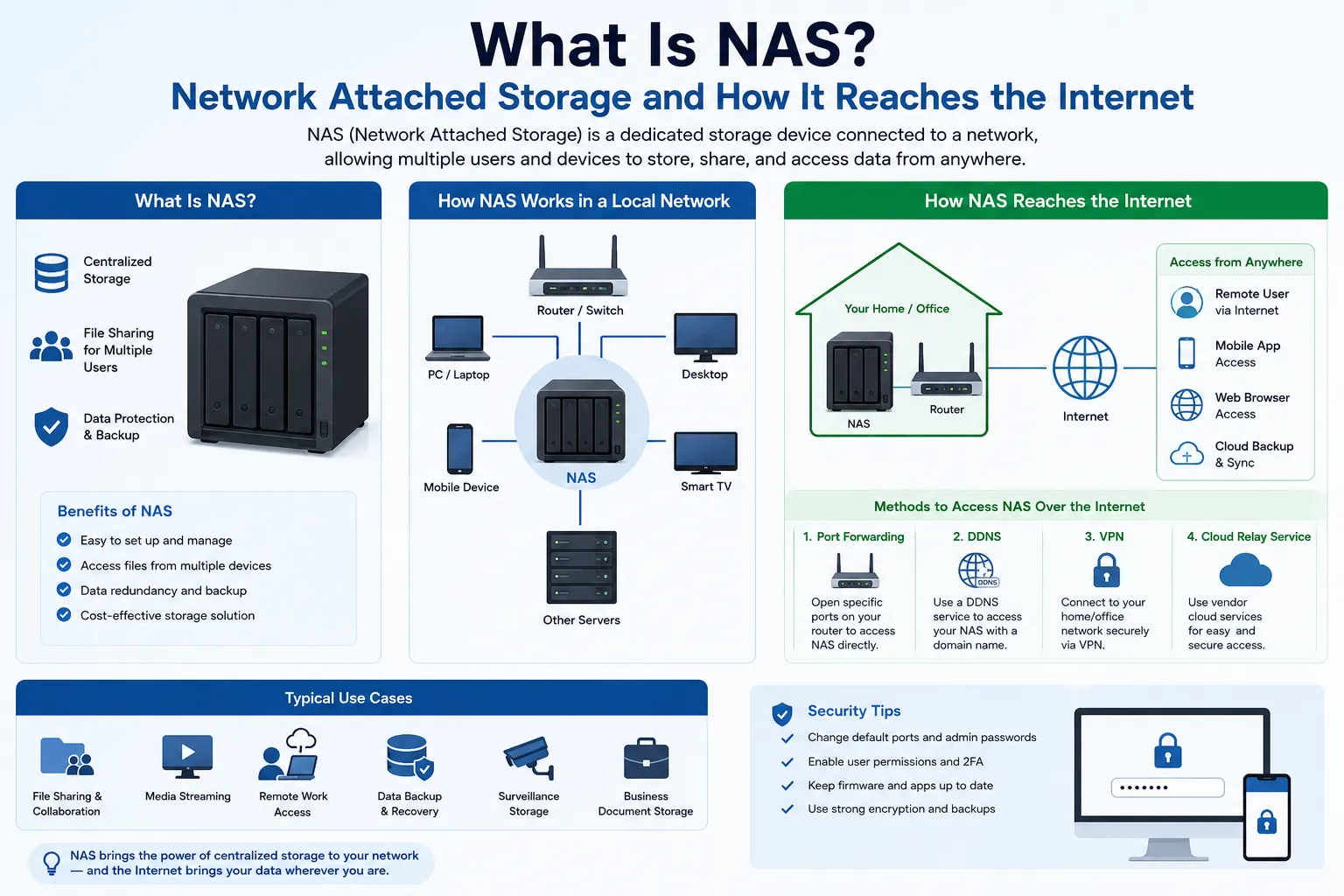
NAS stands for Network Attached Storage. It is a dedicated storage device that connects to a network and serves files to every authorised computer, server, or application on that network, instead of storing data on individual machines. Where a normal external drive belongs to one computer, a NAS belongs to the whole network.
Table of Contents
For a business, that difference matters operationally. A NAS turns storage from a per-device problem into a shared service: one place for project files, backups, database dumps, media archives, and surveillance footage, with centralised permissions and redundancy. But a NAS is also a network device, and it inherits every constraint that comes with that. It sits on a private IP address, behind NAT, invisible to the public internet by default.
That last point is where most NAS deployments run into trouble. The disks work, the shares mount, everything is fine in the office and then someone tries to reach the NAS from another site and nothing connects. This guide covers what a NAS is, how it compares to the alternatives, and what actually has to happen at the IP layer before a NAS becomes reachable from outside.
What is NAS
A NAS is a file-level storage appliance that attaches to a network and provides shared file access to multiple clients at once. It runs its own operating system, manages its own drives, handles user accounts and permissions, and speaks standard file-sharing protocols so that Windows, macOS, and Linux clients can all mount the same storage.
Physically, a NAS is a purpose-built box with two, four, eight, or more drive bays, a network interface, a modest CPU, and firmware focused on storage rather than general computing. Small units serve a single office. Rackmount units with 10GbE interfaces serve production environments handling video, virtual machine images, or large datasets.
The defining characteristic is not the hardware. It is that the storage is addressed over the network rather than over a cable to one machine. Any client with an IP address and the right credentials can reach it.
How a NAS Works
A NAS presents shared folders usually called shares or volumes to clients over file-sharing protocols. The client sees a mounted drive or mount point. The NAS handles the underlying filesystem, block layout, and redundancy.
Common protocols
| Protocol | Primary use | Typical clients |
|---|---|---|
| SMB / CIFS | General file sharing | Windows, macOS, Linux |
| NFS | File sharing in Unix and virtualisation environments | Linux, BSD, hypervisors |
| iSCSI | Block-level volumes presented over IP | Servers, hypervisors, databases |
| SFTP / FTPS | File transfer, often with external parties | Scripts, transfer clients |
| WebDAV / HTTPS | Browser and application access | Web clients, mobile apps |
| rsync | Scheduled replication and backup | Other NAS units, servers |
Note that many modern NAS units also expose iSCSI, which is block-level rather than file-level. The classic textbook boundary between NAS and SAN has blurred in practice, though the default mode of a NAS remains file access.
Redundancy
Drives inside a NAS are normally grouped into a RAID array or an equivalent redundancy scheme, so that the failure of one drive does not lose data. This is worth stating precisely, because it is widely misunderstood: RAID protects against drive failure. It is not a backup. It does not protect against accidental deletion, ransomware, filesystem corruption, fire, or theft. A NAS still needs a backup strategy, and that backup usually lives at another site — which is exactly why NAS deployments end up needing network reachability.
NAS vs SAN vs DAS vs Cloud Storage
| Comparison | NAS | SAN | DAS | Cloud storage |
|---|---|---|---|---|
| Access level | File | Block | Block | Object or file, via API |
| Connection | Ethernet / IP | Fibre Channel or dedicated IP fabric | USB, SAS, Thunderbolt | Public internet |
| Shared by many clients | Yes | Yes | No, one host | Yes |
| Typical scale | Workgroup to department | Datacentre | Single workstation | Effectively unlimited |
| Local throughput | High on LAN | Very high | Very high | Limited by internet link |
| Data location control | Full | Full | Full | Provider-dependent |
| Ongoing cost model | Capital purchase | Capital purchase | Capital purchase | Recurring per GB and per transfer |
The practical decision is rarely NAS or cloud. Most businesses run a NAS for working data that needs LAN-speed access, and use cloud storage as a secondary or tertiary backup target. The NAS handles daily throughput; the cloud handles offsite durability.
Why Businesses Deploy a NAS
- Throughput. Editing 4K footage or loading VM images over a LAN is far faster than pulling the same data across an internet link.
- Cost at scale. Recurring per-terabyte cloud pricing becomes expensive for large, actively used datasets.
- Egress charges. Cloud providers commonly charge for data leaving their platform. Data that moves frequently is cheaper to hold locally.
- Data residency. Some contracts and regulations require data to stay in a known physical location under the organisation’s control.
- Centralised permissions. One directory of users and groups rather than scattered access on individual machines.
- Backup target. A NAS gives endpoints and servers a single local destination to back up to.
The Reachability Problem: A NAS Lives on a Private IP
A NAS is normally assigned a private IP address — something in 192.168.0.0/16, 172.16.0.0/12, or 10.0.0.0/8. Private addresses are not routable on the public internet. They exist only inside the local network.
The NAS still reaches the internet outbound, for firmware updates, cloud backup jobs, notification services, and licence checks. That works because the router performs Network Address Translation, rewriting the NAS’s private source address to the router’s public address and tracking the session so replies come back correctly. Outbound is fine.
Inbound is the opposite. When a remote user tries to open a connection to the NAS, there is no session in the translation table and no public address that identifies the NAS. The connection has nowhere to land. This is not a fault — it is the default security posture of NAT, and it is the reason a NAS is not casually exposed to the internet.
So any remote access to a NAS requires deliberately creating a path in. That is what NAT traversal, also called intranet penetration, is for.
What Is NAT Traversal (Intranet Penetration)?
NAT traversal is a set of techniques for allowing a device on a private network to receive connections from outside, despite sitting behind NAT. There are six approaches in common use. They divide into two families: creating an inbound entry point, or having the internal device dial outward to somewhere reachable.
Family A: Create an inbound entry point
| Method | How it works | Where the public IP sits | Where it fails |
|---|---|---|---|
| Manual port mapping (DNAT) | The router forwards a chosen port on its WAN address to the NAS | Your own router’s WAN interface | No usable public IP; address changes if dynamic |
| UPnP / NAT-PMP / PCP | The NAS asks the router to create the mapping automatically | Your own router’s WAN interface | Often disabled by policy; no effect above an upstream carrier NAT; widens attack surface |
| STUN and hole punching | Both endpoints connect outward; a helper server tells each what external address the other was mapped to | On the helper server and usually on the far peer | Symmetric NAT; strict firewalls; blocked UDP |
Family B: Dial outward instead
| Method | How it works | Where the public IP sits | Where it fails |
|---|---|---|---|
| Relay (TURN) | All traffic passes through a third-party server that both sides can reach | On the relay operator’s infrastructure | Bandwidth caps, added latency, cost, third party in the data path |
| Reverse tunnel | The NAS opens an outbound connection to a server with a public address; remote traffic returns down that tunnel | On the tunnel endpoint you operate, or the vendor’s | Endpoint becomes a single point of failure; subject to provider terms |
| Overlay mesh VPN | A coordination service pairs devices, attempts hole punching, and falls back to a relay if that fails | On the coordination and relay infrastructure | Silent fallback to relay quietly cuts throughput |
A seventh option sits slightly outside both families and is the one most businesses eventually adopt: terminating a VPN gateway on a public IP you control. Remote users and remote sites connect into that gateway, and the NAS is never directly exposed. This requires at least one stable public address per site, but it keeps authentication, logging, and access policy under your own administration.
Why carrier-grade NAT changes the picture
Many broadband and mobile connections no longer hand the customer a real public IPv4 address. The router itself receives a shared carrier address, commonly from 100.64.0.0/10, and the provider performs a second layer of translation upstream. Under that arrangement, port mapping on your own router accomplishes nothing, because the mapping that matters is on equipment you do not control. Every Family A method except opportunistic hole punching stops working, and the deployment is forced into relays or tunnels.
Where Every Method Ends Up: Someone’s Public IP
Read the two tables again and a pattern emerges. Every method has a public IP address in it somewhere. Traffic on the internet has to land on a globally routable address; there is no way around that. The only real question is:
Is that public IP address yours, or somebody else’s?
Borrowed reachability works, and for a small deployment it is often the right answer. But it carries consequences that are easy to miss until they bite:
| Consideration | Reachability through a third party | Reachability on an address under your control |
|---|---|---|
| Throughput | Capped by the relay or tunnel tier | Capped by your own circuit |
| Latency | Extra hop, sometimes intercontinental | Direct path |
| Data path | Traffic transits a third party | Traffic stays between endpoints you choose |
| Partner allowlisting | Difficult, the address is shared and can change | You can give partners a fixed address to allowlist |
| Address reputation | Shared with unrelated users | Isolated to your own traffic |
| Certificates and DNS | Often tied to a vendor hostname | Your own hostname and certificate |
| Continuity | Depends on the vendor’s terms and pricing tiers | Depends on your own arrangement |
The transition point is usually predictable. A NAS used by one office over a VPN client is comfortable on borrowed reachability. A NAS that has become a service replicating between sites, receiving footage from remote cameras, serving files to clients or contractors, or acting as a backup target for other locations has effectively become production infrastructure. At that point the address it answers on is part of the service definition, not an implementation detail.
Businesses that reach this stage generally either request a static public address from their provider, place the workload in a datacentre where addresses are available, or lease IPv4 address space so the endpoint is stable and dedicated. In a lease arrangement the block remains registered to its holder; the lessee is authorised to use and announce it for the agreed term. That distinction matters for planning: the operational continuity of the address depends on the terms of the arrangement and the routing authorisation attached to it, not on registry records changing hands.
What to Check Before Exposing a NAS
- Do not publish the administration interface. Expose the specific service that needs to be reached, never the management console.
- Prefer a VPN or tunnel over direct port mapping for anything that only staff need to reach.
- Enforce strong authentication. Unique accounts per user, multi-factor authentication, and no shared credentials.
- Keep firmware current. NAS units are a standing target for automated exploitation; unpatched appliances are found quickly.
- Verify whether you actually have a public IP. Compare your router’s WAN address with your observed external address. If they differ, an upstream translation layer is in play.
- Check whether your address is static. A changing address breaks DNS records, partner allowlists, and certificate pinning.
- Watch for overlapping private ranges across sites. Two offices both using 192.168.1.0/24 will collide when linked.
- Keep a real backup. RAID is not a backup, and replication copies deletions and encryption faithfully.
- Log and review access. Know who connected, from where, and when.
Business Scenarios
These are illustrative examples, not case studies.
A post-production studio with two locations. Footage is ingested at one site and edited at the other. Nightly replication between two NAS units moves hundreds of gigabytes. A relay-based tunnel throttles this to the point where the sync no longer finishes overnight. A direct site-to-site link over stable public addresses at each end resolves it.
An accounting firm with a regulatory retention requirement. Records must remain in a known jurisdiction and be retrievable for years. A NAS at the office holds the primary copy; a second NAS at a partner office holds the replica. Both sites need reachability, and the auditors need a documented, stable access path.
A property operator with distributed cameras. Surveillance recorders across several buildings write to a central NAS. Cameras and recorders open outbound connections; the NAS must be reachable at a fixed endpoint. Once the security contractor is asked to allowlist the destination, a shared or rotating address stops being viable.
A software company offering a private storage tier. Customers upload data to storage the company operates rather than to a public cloud. Customer firewalls need a fixed address to permit. This is no longer internal IT; the address has become part of the product’s technical documentation.
Practical Note from i.lease
When a NAS deployment stalls, the disks are rarely the problem. The problem is almost always reachability: no public address, a shared carrier address, an address that changes, or an address whose reputation is affected by unrelated traffic.
Before buying more storage, it is worth separating the two questions. Where does the data live? is a storage question. Who can reach it, from where, and how reliably? is an addressing and routing question. A NAS answers the first. A stable, dedicated public IPv4 endpoint answers the second — and no amount of additional capacity substitutes for it.
If a deployment has reached the point where partners must allowlist an address, where replication throughput matters, or where a vendor relay has become a dependency, the practical step is to secure addressing you control, through your provider, your datacentre, or a lease arrangement with clear routing authorisation and renewal terms.
Final Thoughts
A NAS is a straightforward idea: put storage on the network instead of inside one machine, and everyone who is authorised can use it. That works cleanly inside a building.
The complexity appears when the network in question is the internet. A NAS holds a private address and is unreachable from outside by design. Every technique for changing that port mapping, hole punching, relays, tunnels, mesh overlays, VPN gateways ultimately depends on a globally routable address somewhere in the path. Choosing a NAS is a storage decision. Deciding whose public IP address your data answers on is an infrastructure decision, and it is usually the one that determines whether the deployment scales beyond a single site.
Choose Your Next IPv4 Step
If your NAS needs a stable, reachable address, choose the path that matches your role:
- Rent IPv4 address space for a stable address for your network or NAS gateway.
- View available IPv4 inventory or buy addresses when you need to compare current options and submit a purchase request.
- Sell unused IPv4 addresses when you hold address space that your organisation no longer needs.
Also Read
- Understanding Network Address Translation (NAT)
- Types of Network Address Translation (NAT)
- Public IP vs Private IP: Business Network Guide
- Dynamic vs Static IP Addresses
- What Is IP Forwarding?
Frequent Asked Questions
What does NAS stand for?
NAS stands for Network Attached Storage. It is a storage device connected to a network that provides shared file access to multiple clients simultaneously
What is the difference between a NAS and a server?
A NAS is a specialised appliance optimised for storing and serving files, with firmware built for that purpose. A general-purpose server runs arbitrary applications and can serve files as one of many roles. Many NAS units now also run containers and applications, so the line is less sharp than it once was.
Is a NAS the same as cloud storage?
No. A NAS is hardware you operate on your own network, reachable at LAN speed and under your physical control. Cloud storage is a service accessed over the internet with recurring per-capacity and per-transfer charges. Many businesses use both, with the NAS holding working data and the cloud holding offsite backups.
Does a NAS need a Public IP address?
Not for local use. A NAS on the office LAN needs only a private address. A public IP becomes relevant when the NAS must be reachable from outside for remote access, multi-site replication, or partner access.
What is Intranet Penetration or NAT traversal?
NAT traversal is the set of techniques that allow a device on a private network to accept connections from outside despite sitting behind NAT. Common approaches include port mapping, UPnP, STUN-based hole punching, relay servers, reverse tunnels, and overlay mesh VPNs.
Why does port forwarding not work for my NAS?
The most common cause is that the router’s WAN address is not a real public address. If your provider uses carrier-grade NAT, translation happens on equipment upstream that you do not control, so a mapping on your own router has no effect. Other causes include a firewall rule, a service not listening, or a forwarding rule pointing at an outdated internal address.
Is a relay or tunnel service good enough for remote NAS access?
For light use by a few people, usually yes. It becomes limiting when throughput matters, when latency affects usability, when partners need a fixed address to allowlist, or when the service becomes a business dependency subject to another party’s terms.
Does RAID mean I do not need backups?
No. RAID protects against drive failure only. It does not protect against deletion, ransomware, corruption, theft, or site loss. A NAS still requires a separate backup, ideally at another location.
Is it safe to expose a NAS directly to the internet?
Directly publishing a NAS, particularly its administration interface, is a well-known risk and a frequent target of automated attacks. Where remote access is needed, a VPN or tunnel with strong authentication is generally preferable to opening ports to the appliance itself.
How many public IP addresses does a multi-site NAS setup need?
Typically at least one stable public address per site that must accept inbound connections. Sites that only initiate outbound connections can operate behind shared translation, but any site terminating a tunnel or gateway needs a reachable address of its own.


