Cybersecurity is a top priority for individuals and organizations alike. Protecting networks and systems from unauthorized access is crucial as cyber threats evolve. One of the most fundamental tools for achieving this protection is a firewall. This article explores what a firewall is, how it works, and the different types of firewalls available.
Table of Contents
What is a Firewall?
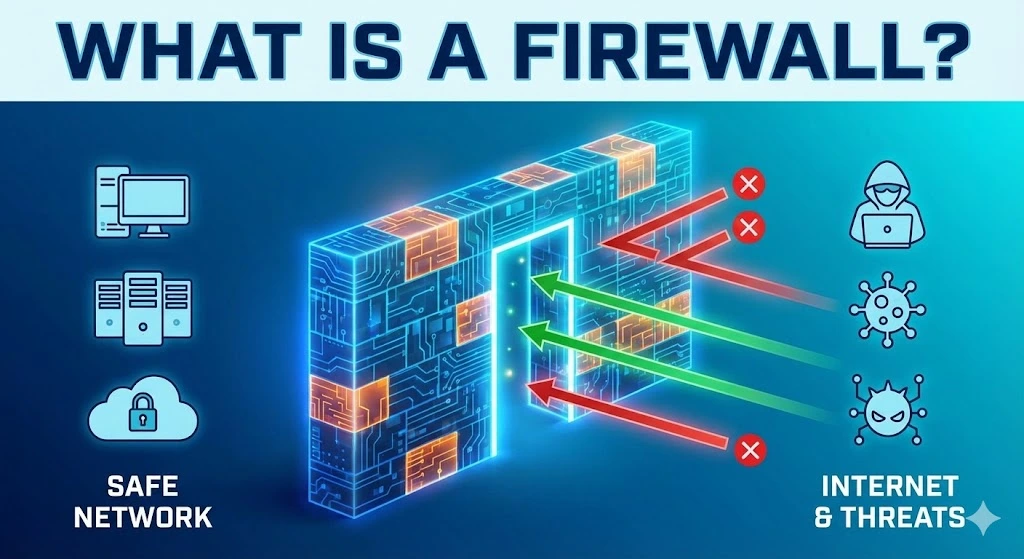
A firewall is a security device or piece of software that monitors and controls incoming and outgoing network traffic based on predetermined security rules. Acting as a barrier between a trusted internal network and untrusted external networks, such as the Internet, a firewall’s primary purpose is to prevent unauthorized access while allowing legitimate communication to pass through.
How does a firewall work?
Firewalls work by analyzing network traffic and determining whether it should be allowed or blocked based on a set of rules. These rules can be configured to filter traffic by IP addresses, domain names, protocols, ports, or specific applications. By examining data packets, firewalls can make real-time decisions to protect the network from potential threats.
Types of Firewalls
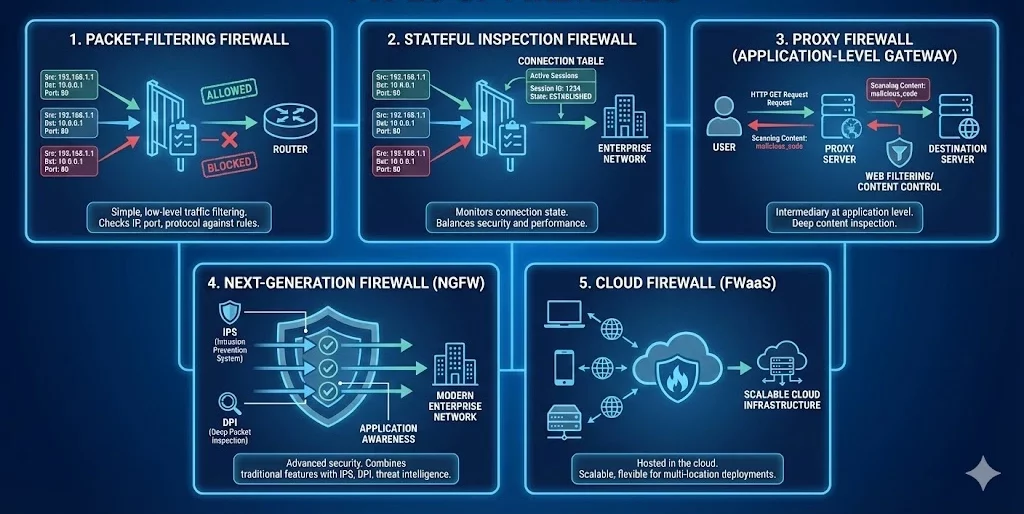
There are several types of firewalls, each offering different levels of protection and functionality. Here are the most common types:
1. Packet-Filtering Firewall
Definition: A packet-filtering firewall is one of the oldest and simplest types of firewalls. It inspects individual data packets and compares them against a set of rules before allowing or blocking them.
How It Works: The firewall examines the source and destination IP addresses, port numbers, and protocol types of each packet. If the packet matches the firewall’s rules, it is allowed to pass; otherwise, it is blocked.
Use Case: Packet-filtering firewalls are commonly used in routers and are ideal for simple, low-level traffic filtering.
2. Stateful Inspection Firewall
Definition: A stateful inspection firewall, also known as a dynamic packet-filtering firewall, offers more advanced security than a packet-filtering firewall by monitoring the state of active connections.
How It Works: This firewall not only checks the header information of each packet but also keeps track of the state of network connections. It can determine whether a packet is part of an established session or an unsolicited request, allowing it to make more informed decisions.
Use Case: Stateful inspection firewalls are widely used in enterprise networks to provide a balance between security and performance.
3. Proxy Firewall
Definition: A proxy firewall, also known as an application-level gateway, acts as an intermediary between users and the internet by filtering traffic at the application level.
How It Works: The proxy firewall intercepts all requests from users and forwards them to the destination server. It examines the content of the data packets and applies security rules based on the application layer protocols (e.g., HTTP, FTP).
Use Case: Proxy firewalls are used in environments where deep inspection of application-level traffic is required, such as in web filtering and content control systems.
4. Next-Generation Firewall (NGFW)
Definition: A Next-Generation Firewall (NGFW) is an advanced type of firewall that combines traditional firewall capabilities with additional security features, such as intrusion prevention systems (IPS), deep packet inspection (DPI), and application awareness.
How It Works: NGFWs offer more granular control over network traffic by analyzing data packets at multiple layers (network, transport, and application) and incorporating threat intelligence to detect and block sophisticated cyberattacks.
Use Case: NGFWs are ideal for modern enterprise networks that require comprehensive security measures to protect against advanced threats.
5. Cloud Firewall
Definition: A cloud firewall, also known as a firewall-as-a-service (FWaaS), is a firewall that is hosted in the cloud rather than on-premises hardware.
How It Works: Cloud firewalls provide similar functionality to traditional firewalls but are delivered as a service. They are scalable and can be easily deployed across multiple locations or cloud environments.
Use Case: Cloud firewalls are suitable for organizations that rely on cloud-based infrastructure and need flexible, scalable security solutions.
Where to purchase firewall service
To purchase a firewall service, consider reputable vendors like Cisco, Palo Alto Networks, Fortinet, or Check Point for enterprise-grade solutions. For small to medium businesses, SonicWall and WatchGuard offer reliable options. Cloud-based firewalls are available from providers like Amazon Web Services (AWS), Microsoft Azure, and Google Cloud. Always compare features, pricing, and support before making a decision.
Firewalls are a critical component of network security, serving as the first line of defense against cyber threats. By understanding the different types of firewalls—packet-filtering, stateful inspection, proxy, next-generation, and cloud firewalls—you can make informed decisions about which firewall best suits your needs. Whether you’re protecting a small home network or a large enterprise infrastructure, implementing the right firewall is essential for safeguarding your digital assets.
Trusted IPv4 Leasing for Business Growth
Get enterprise-grade IPv4 space quickly, with seamless deployment and end-to-end management.
Get Started with i.leaseFAQs
Do I need a firewall if I have an antivirus?
Yes, you need both. They serve different purposes. A firewall acts as a gatekeeper, monitoring network traffic to block unauthorized access before it reaches your computer. Antivirus software scans files already inside your computer to detect and remove malware.
Does Windows 10/11 come with a built-in firewall?
Yes, modern Windows operating systems come with Microsoft Defender Firewall pre-installed and enabled by default. It provides solid protection for most home users. However, enterprise environments often require more advanced third-party solutions (NGFWs) for granular control.
Can a firewall block a specific website?
Yes. Most firewalls allow you to create “Access Control Rules” or “Blocklists” to prevent users on your network from visiting specific IP addresses or domain names. This is commonly used in offices to block social media or dangerous sites.
Why is my firewall blocking a program I trust?
Firewalls sometimes generate “false positives,” blocking legitimate software because its behavior looks suspicious (e.g., trying to access the internet unexpectedly). You can fix this by adding the program to the firewall’s “Allow list” or “Exclusions list” in your settings.