How to Change Your IPv4 Address
 admin
admin
If you’re having networking problems, you might want to learn how to change your IPv4 address. Changing your IP address often helps resolve temporary issues with your network.
Table of Contents
When Do You Need to Change Your IP Address?
Your IP address is a unique number that your devices gets from your Internet Service Provider (ISP). It’s basically a number that sets your device from other devices on the Internet. It can also be used to track your online activity.
There are a few reasons why you might want to change your IP address. For example, Netflix might be banned in your location. You might want to change your IP address to get around this regional restriction. If you’re concerned about your online privacy, you will benefit from knowing how to change your IPv4 address.
There are different ways to change your IPv4, depending on whether it’s dynamic or static.
A. Dynamic IP address
A dynamic IP address is the most common type of IP address. Your ISP assigns you a dynamic IP address each time you connect to the internet. You can change your dynamic IP address by restarting your router. It’s just that.
The logic is pretty simple: your ISP has a pool of IP addresses that they assign to whoever needs it. Once you turn off your router, an IP address becomes free for others to use. When your router restarts, you get allocated the next available IP address.
Follow these steps to change your dynamic IP address:
1. Check your IP address on a website like WhatIsMyIp.com.
2. Restart your router. This will release your current IP address. When your router powers back up again, your ISP will assign you a new one.3. Verify your new IP address. Check your IP address again (same as in step one) to verify that you are assigned a new one.
B. Static IP address
A static IP address is a permanent IP that you get from your Internet service provider. You don’t get it by default. You will need to request it specifically.
There are reasons why some people, particularly those who run a business, choose to have a static IP address. First, it’s more secure because you won’t need to share it with anyone. Moreover, a dedicated IP address performs better when transferring huge chunks of files. To change your static IP address, you’ll need to contact your ISP and request a new one. They will provide you with the new IP address and the necessary instructions on how to configure your device.
How to Change Your IPv4 Through an RIR
In some cases, your ISPmay not have an available IPv4 address in their pool. If you’re in such a situation, you may need to request for a static IP address from a regional Internet registry (RIR). To do this, you need to be a member of your RIR and you need to follow a few steps to request for a static IP address.Once your request is granted, you will need to get in touch with your ISP again so that an IPv4 can be linked to your account
Related Article
Articles connexes

Que sont les entreprises de télécommunications ? Comment les fournisseurs de télécommunications assurent la connectivité au Royaume-Uni, aux États-Unis et au Canada
Les entreprises de télécommunications, également appelées opérateurs télécoms, fournissent des services de communication et de connectivité. Ces services peuvent inclure les réseaux mobiles, l’Internet haut débit, les connexions fibre, les services de téléphonie fixe, la connectivité pour les entreprises, l’accès au cloud, les services réseau gérés et la connectivité aux centres de données. Pour les consommateurs, les entreprises de télécommunications sont souvent connues comme des fournisseurs de services mobilesRead more Related Posts Desbloqueando la privacidad digital con una red privada virtual (VPN) ¿Qué es una VPN? Una red privada virtual (VPN) es una tecnología que permite a los usuarios crear una conexión Comprensión de la traducción de direcciones de red (NAT) En las redes informáticas, gestionar las direcciones IP de forma eficiente es fundamental para garantizar una comunicación fluida entre los Arrendamiento de direcciones IP: Cómo arrendar direcciones IP El mundo digital en el que nos movemos hoy depende en gran medida de las direcciones IP, identificadores únicos asignados .related-post {} .related-post .post-list { text-align: left; } .related-post .post-list .item { margin: 5px; padding: 10px; } .related-post .headline { font-size: 18px !important; color: #999999 !important; } .related-post .post-list .item .post_thumb { max-height: 220px; margin: 10px 0px; padding: 0px; display: block; } .related-post .post-list .item .post_title { font-size: 16px; color: #3f3f3f; margin: 10px 0px; padding: 0px; display: block; text-decoration: none; } .related-post .post-list .item .post_excerpt { font-size: 13px; color: #3f3f3f; margin: 10px 0px; padding: 0px; display: block; text-decoration: none; } @media only screen and (min-width: 1024px) { .related-post .post-list .item { width: 30%; } } @media only screen and (min-width: 768px) and (max-width: 1023px) { .related-post .post-list .item { width: 90%; } } @media only screen and (min-width: 0px) and (max-width: 767px) { .related-post .post-list .item { width: 90%; } }
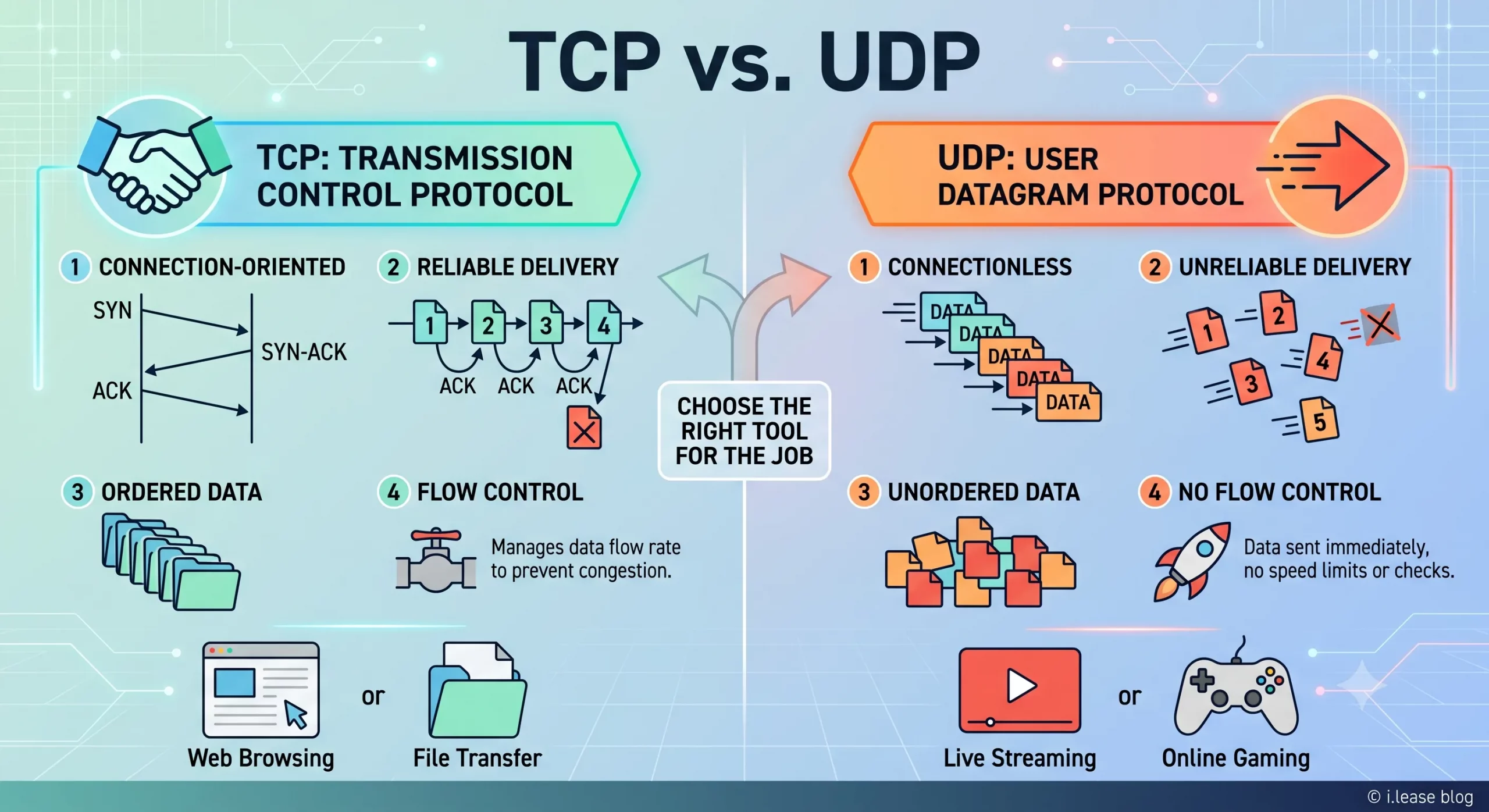
TCP vs UDP : guide de location IPv4 et de réseau d’entreprise
TCP et UDP sont deux des protocoles de transport les plus importants sur Internet. Ils déterminent la circulation des données entre les appareils, les serveurs, les plateformes cloud, les passerelles VPN, les résolveurs DNS, les systèmes de messagerie, les plateformes de streaming et les applications métier. Pour les entreprises, TCP et UDP ne sont pas de simples termes techniques. Ils ont un impact direct sur les performances de l’infrastructure. Related Posts Which RIRs Support Inter-RIR IPv4 Transfers in 2026? IPv4 addresses may be globally routable, but transferring their registration from one organization to another is governed by Regional Internet What Is Reverse DNS (rDNS)? Why PTR Records Matter for Email, Hosting, and Leased IPv4 Reverse DNS (rDNS) is the process of resolving an IP address back to a domain name. It is the mirror How DDoS Mitigation Works: Scrubbing, BGP Diversion, Anycast, and What Network Operators Should Prepare DDoS mitigation is the set of techniques used to keep services online during a distributed denial-of-service attack — by absorbing, .related-post {} .related-post .post-list { text-align: left; } .related-post .post-list .item { margin: 5px; padding: 10px; } .related-post .headline { font-size: 18px !important; color: #999999 !important; } .related-post .post-list .item .post_thumb { max-height: 220px; margin: 10px 0px; padding: 0px; display: block; } .related-post .post-list .item .post_title { font-size: 16px; color: #3f3f3f; margin: 10px 0px; padding: 0px; display: block; text-decoration: none; } .related-post .post-list .item .post_excerpt { font-size: 13px; color: #3f3f3f; margin: 10px 0px; padding: 0px; display: block; text-decoration: none; } @media only screen and (min-width: 1024px) { .related-post .post-list .item { width: 30%; } } @media only screen and (min-width: 768px) and (max-width: 1023px) { .related-post .post-list .item { width: 90%; } } @media only screen and (min-width: 0px) and (max-width: 767px) { .related-post .post-list .item { width: 90%; } }

Pourquoi la Malaisie devient-elle un pôle de centres de données pour les infrastructures cloud et d’intelligence artificielle ?
La Malaisie devient l’un des marchés de croissance les plus importants d’Asie du Sud-Est dans le secteur des centres de données. La demande en cloud computing, intelligence artificielle, applications d’entreprise, paiements numériques, commerce électronique, cybersécurité et services régionaux à faible latence pousse les entreprises à construire davantage d’infrastructures au plus près des utilisateurs. Cette croissance ne repose pas uniquement sur un effet de mode. La Malaisie a attiré desRead more Related Posts Desbloqueando la privacidad digital con una red privada virtual (VPN) ¿Qué es una VPN? Una red privada virtual (VPN) es una tecnología que permite a los usuarios crear una conexión Comprensión de la traducción de direcciones de red (NAT) En las redes informáticas, gestionar las direcciones IP de forma eficiente es fundamental para garantizar una comunicación fluida entre los ¿Por qué Malasia se está convirtiendo en un centro neurálgico para la infraestructura de nube e IA? Malasia se está convirtiendo en uno de los mercados de crecimiento de centros de datos más importantes del Sudeste Asiático. .related-post {} .related-post .post-list { text-align: left; } .related-post .post-list .item { margin: 5px; padding: 10px; } .related-post .headline { font-size: 18px !important; color: #999999 !important; } .related-post .post-list .item .post_thumb { max-height: 220px; margin: 10px 0px; padding: 0px; display: block; } .related-post .post-list .item .post_title { font-size: 16px; color: #3f3f3f; margin: 10px 0px; padding: 0px; display: block; text-decoration: none; } .related-post .post-list .item .post_excerpt { font-size: 13px; color: #3f3f3f; margin: 10px 0px; padding: 0px; display: block; text-decoration: none; } @media only screen and (min-width: 1024px) { .related-post .post-list .item { width: 30%; } } @media only screen and (min-width: 768px) and (max-width: 1023px) { .related-post .post-list .item { width: 90%; } } @media only screen and (min-width: 0px) and (max-width: 767px) { .related-post .post-list .item { width: 90%; } }
