Standard AWS Elastic IP pricing: USD 0.005 per hour
For standard Amazon-provided individual addresses, AWS's public IPv4 pricing page, reviewed on 24 September 2026, lists USD 0.005 per public IPv4 address-hour for both in-use and idle addresses. That is USD 3.60 for one address over a 30-day, 720-hour month before any account allowance or other service, data-transfer, NAT Gateway, load-balancer, support, tax, or regional program charges.
| Public IPv4 addresses | Hourly address charge | 30-day address charge (720 hours) |
|---|---|---|
| 1 | USD 0.005 | USD 3.60 |
| 5 | USD 0.025 | USD 18.00 |
| 10 | USD 0.050 | USD 36.00 |
Amazon-provided contiguous IPv4 blocks have a separate rate: AWS currently lists USD 0.008 per public IPv4 address-hour for every address in the block, billed from provisioning, with no separate in-use or idle address charge. BYOIP and COIP addresses are not charged this public IPv4 address fee, although related IPAM, service, data-transfer, support, tax, and regional program charges can still apply. Pricing and program terms can change, so use the current Amazon VPC pricing page for a purchase or architecture decision.
These examples are simple address-charge arithmetic, not an AWS workload quote. The old rule that an EIP was free while attached to a running instance is no longer current. Cost control therefore means finding every public IPv4 allocation, associating each one with a named workload and owner, and releasing addresses that no longer have a justified use. Amazon VPC IP Address Manager's Public IP Insights can help discover public addresses across accounts.
What is an AWS Elastic IP address?
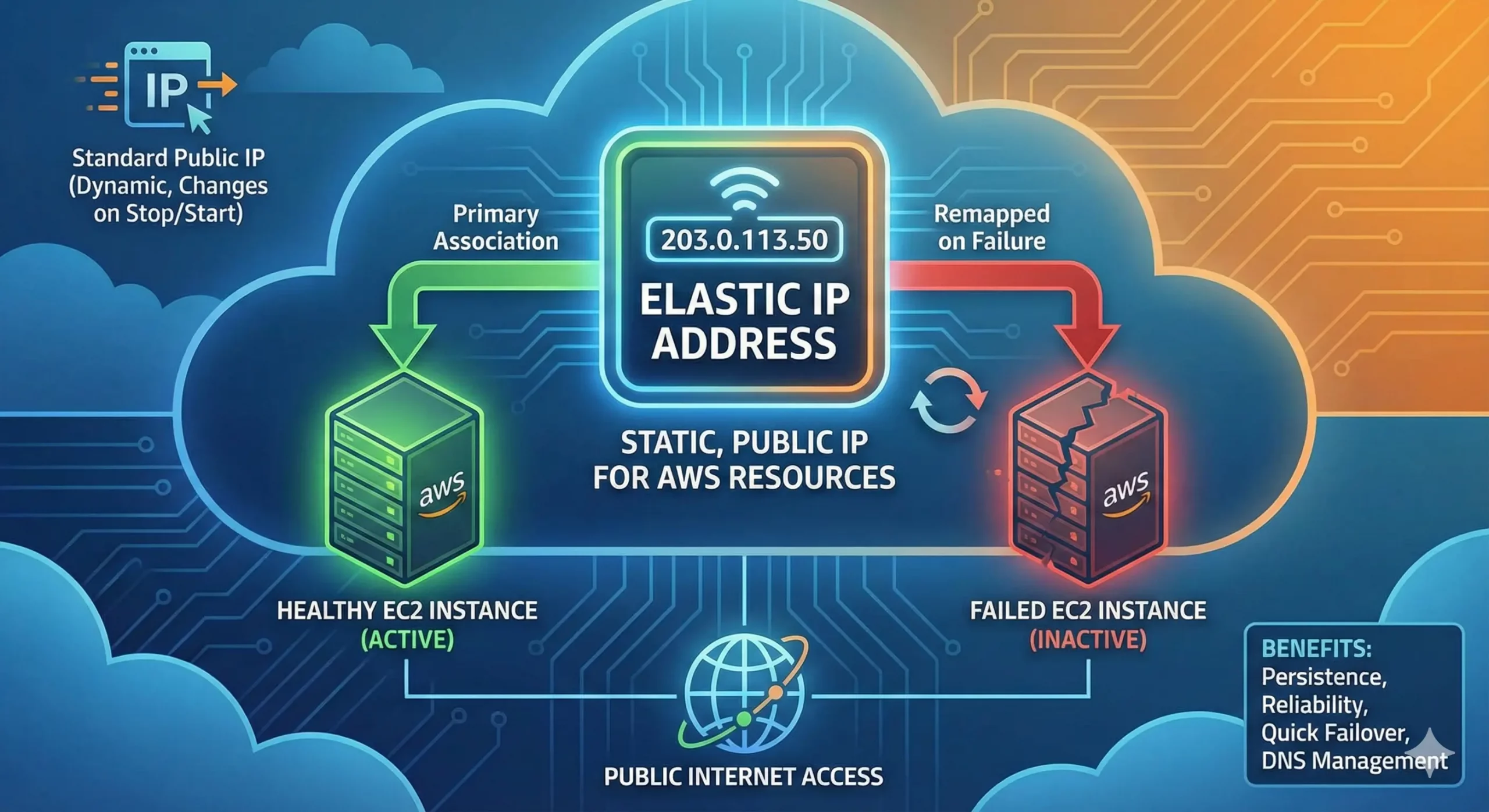
An Elastic IP address (EIP) is a static public IPv4 address allocated to your AWS account for use in one Region. You can associate it with a supported resource, such as an EC2 instance or network interface, and later reassociate it. The address remains allocated to the account until it is released.
An EIP is useful when an endpoint must keep the same public IPv4 address through an instance replacement or maintenance event. It is not an automatically highly available service, a globally portable prefix, or a substitute for routing, security groups, network ACLs, health checks, application recovery, and tested failover.
Elastic IP vs an automatically assigned EC2 public IPv4 address
| Question | Automatically assigned public IPv4 | Elastic IP |
|---|---|---|
| Who retains the address? | AWS assigns it to the instance from its public pool; it is not allocated to your account. | It remains allocated to your AWS account until you release it. |
| What happens after stop and start? | A stopped or hibernated instance normally loses the address and receives a new one when it starts. | The EIP stays allocated and can remain associated or be associated again according to your design. |
| Can it move to another resource? | No. After release to the AWS pool, you cannot rely on receiving it again. | Yes, within the EIP's supported Region and network border group constraints. |
| Is it visible inside the guest? | The public address is mapped to a private address through AWS network address translation. The guest normally sees its private interface address. | |
| Is there a public IPv4 charge? | Standard Amazon-provided individual addresses are charged whether in use or idle. Amazon-provided contiguous blocks have a separate rate; BYOIP and COIP addresses are exempt from this public IPv4 address fee. | |
Use an automatically assigned address for an endpoint that can change without breaking clients, allowlists, DNS, or operations. Use an EIP when one regional AWS endpoint genuinely needs a stable address and you have an explicit association, monitoring, and recovery plan.
How an Elastic IP address works
- Allocate the address. AWS selects an address from Amazon's pool, or you select an eligible public IPv4 pool already available to the account.
- Choose the right location boundary. The EIP is regional. If a Region uses distinct network border groups for Availability Zones, Local Zones, or Wavelength Zones, the EIP and target resource must use the same group.
- Associate it with a resource. For EC2, association maps the public address to a private IPv4 address on an instance or elastic network interface. Supported services such as NAT Gateway and Network Load Balancer have their own association workflows.
- Operate the full path. Internet access still depends on the subnet route, internet gateway or service architecture, security controls, operating-system configuration, and the application listening on the intended port.
- Reassociate or release deliberately. Reassociation is an API or console action, not proof of automatic failover. Release returns an Amazon-provided address to AWS, and recovery is not guaranteed.
The current hero illustration is conceptual. Its “remapped on failure” path represents an action your automation or operator must perform after checking the replacement target; an EIP does not monitor instance health or move itself.
Elastic IP quota and location limits
- Default quota: AWS currently documents five Elastic IP addresses per Region. This is a default, adjustable service quota—not a universal hard maximum.
- Region: an EIP cannot be moved to a different Region. A disaster-recovery design in another Region needs another endpoint and a traffic-switching plan.
- Network border group: an EIP must be allocated in the same network border group as the resource that will use it.
- Cross-account transfer: eligible EIPs allocated from Amazon's ordinary public pool can use AWS's same-Region account-transfer workflow. Transfer has a two-party acceptance process and does not make the address cross-Region.
- Pool exceptions: EIPs allocated from a Bring Your Own IP pool or from an Amazon-provided contiguous public IPv4 pool through IPAM cannot use the ordinary EIP account-transfer workflow. Customer-owned addresses on Outposts have a separate sharing model.
Check the current Amazon VPC quota table and request increases before deployment. A quota increase provides capacity; it does not decide whether one public address per workload is a sound design.
Does an Elastic IP provide automatic failover?
No. An EIP is a movable address, not a health-check or orchestration system. A failover controller or operator must detect the failure, confirm that the replacement instance or interface is ready, reassociate the address, and verify that traffic, application state, firewall policy, monitoring, and rollback all work.
Existing connections can be interrupted when the destination changes. The replacement also needs the correct private address mapping, routes, security groups, service configuration, certificates, data, and capacity. Test the exact recovery sequence instead of treating a successful EIP API call as service recovery.
| Requirement | Likely pattern | Reason to validate |
|---|---|---|
| One small regional endpoint with a fixed allowlisted address | EIP on a tested instance or network interface | Simple and direct, but your automation owns health detection and reassociation. |
| Static outbound IPv4 for private subnets | EIP on a NAT Gateway, designed per required Availability Zone | Count the EIP, NAT Gateway, traffic, resilience, and zonal-failure costs together. |
| Horizontally scaled inbound service | Load balancer, optionally with static-address capabilities appropriate to the service | A single instance EIP does not provide target health checks or distribute traffic. |
| Multi-Region ingress or rapid traffic steering | DNS, Global Accelerator, or another tested global design | An EIP is regional and cannot move between Regions. |
| Many stable addresses or an existing allowlisted range | Evaluate AWS IPAM contiguous blocks or BYOIP | Per-address EIPs may create quota, inventory, reputation, and lifecycle overhead. |
Good Elastic IP use cases
- A legacy peer or customer allowlist requires one stable regional IPv4 address.
- A controlled migration needs the same address moved from an old EC2 target to a prepared replacement.
- A NAT Gateway needs a known egress address for external allowlists.
- A supported load-balancing design needs static addresses for its zonal endpoints.
- A short list of operational endpoints needs stable addressing while the team retains clear ownership and monitoring.
A stable address is not automatically a stable service. Record the resource ID, allocation ID, private target, Region, network border group, DNS, reverse DNS where applicable, owner, cost center, allowlists, health signal, failover action, and release approval.
When not to put an Elastic IP on every instance
- Private workloads: systems that need only outbound access or private service connectivity may use private subnets, VPC endpoints, PrivateLink, controlled egress, or IPv6 instead of a public address per instance.
- Autoscaling fleets: tying an EIP to every ephemeral instance creates quota and lifecycle pressure. Put stable ingress or egress at the appropriate shared layer.
- High availability: an address attached to one unhealthy target is still an outage. Use health-aware traffic management and multiple ready targets.
- Multi-Region portability: EIPs do not move across Regions. Design separate regional endpoints and the way clients move between them.
- Address ownership or long-term portability: an Amazon-provided EIP is an AWS allocation. If the organization needs a controlled prefix across a broader network strategy, evaluate BYOIP, leasing, or an RIR-approved purchase separately.
Elastic IP vs BYOIP, leased IPv4, and purchased IPv4
| Option | Control and portability | Preparation | Best fit |
|---|---|---|---|
| Amazon-provided EIP | One static address allocated to an AWS account in one Region; AWS controls the source pool. | Quota, network border group, association, monitoring, security, cost ownership, and release process. | A small number of stable regional endpoints. |
| AWS BYOIP | Your organization or an authorized holder continues to control an eligible public prefix while AWS advertises it. | Current AWS and RIR eligibility, at least a /24 for public IPv4, RDAP evidence, certificate-based control validation, ROA authorization, onboarding time, and routing plan. | Address continuity, established allowlists, larger pools, or a strategy that should not depend on Amazon-provided individual addresses. |
| Leased IPv4 prepared for BYOIP | The holder keeps the resource while the contract grants bounded use; AWS onboarding is possible only when holder authority and AWS/RIR requirements can be satisfied. | Exact CIDR, right to use and advertise through AWS, RDAP and ROA cooperation, RPKI, reputation, abuse response, renewal, withdrawal, and return. | Temporary or variable demand where operational authority and exit are explicit. Not every IPv4 lease is BYOIP-compatible. |
| Purchased IPv4 prepared for BYOIP | After an accepted RIR transfer, the buyer controls the registered resource subject to registry policy. | Transfer eligibility and diligence, capital, RIR records, routing history, ROA, AWS onboarding, abuse operations, and long-term lifecycle. | Stable long-duration demand where registry control justifies the transfer and operating burden. |
AWS currently states that publicly advertisable IPv4 BYOIP ranges must be no more specific than /24 and must meet registration and control requirements. The holder must authorize AWS's origin as documented for the target environment. Read the current EC2 BYOIP requirements and BYOIP preparation steps before contracting for a prefix.
A practical AWS public IPv4 decision process
- Prove the public endpoint is necessary. Identify the client, protocol, inbound or outbound flow, allowlist, and why private connectivity, IPv6, a managed service, or a shared edge does not meet it.
- Count addresses by architecture. Include EC2, NAT Gateways, load balancers, databases, accelerators, VPN endpoints, idle allocations, Regions, Availability Zones, and recovery capacity.
- Choose the stability boundary. Decide whether the stable identity belongs to one instance, one zonal egress path, a load balancer, a global service, or an organization-controlled prefix.
- Compare total cost and lead time. Include AWS public IPv4 charges, supporting services, transfer or lease cost, routing work, RPKI, monitoring, reputation, abuse response, migration, and exit.
- Verify authority. For BYOIP, confirm the registered holder, eligible prefix, RDAP and certificate update, ROA, exact AWS account and Region, and who can reverse every change.
- Run an acceptance test. Check reachability, source address, allowlists, TLS, route origin, RPKI state, geolocation where relevant, monitoring, failover, rollback, and billing visibility.
- Assign lifecycle ownership. Review usage, quota, cost, renewal, reputation, abuse contacts, and release or return dates on a fixed schedule.
Elastic IP migration and failover checklist
- Prepare and health-check the replacement resource in the same Region and network border group.
- Confirm its private address, routes, internet gateway path, security groups, network ACLs, operating-system firewall, application ports, certificates, and data state.
- Record the EIP allocation ID and current association ID; define who may perform reassociation.
- Quiesce writes or coordinate state replication when the application requires it.
- Reassociate through a controlled console, CLI, API, or automation step and capture the result.
- Test from representative external networks, not only from inside the VPC.
- Verify monitoring, logs, source addresses, client allowlists, reverse DNS, and active sessions.
- Keep a bounded rollback and do not terminate the old target until acceptance criteria pass.
Where i.lease fits
i.lease does not replace AWS architecture or guarantee that a prefix will qualify for BYOIP. It can help turn a larger IPv4 requirement into an operating brief: exact prefix size, RIR and holder authority, intended AWS account and Region, origin authorization, RPKI, routing history, reputation evidence, abuse ownership, term, renewal, and exit.
Use managed IPv4 leasing when demand is time-bounded or variable and the holder can support the required authorization path. Review current marketplace supply only after defining the requirement, or compare a long-term IPv4 purchase when registry control and duration justify it. Apply the IPv4 risk-assessment checklist before onboarding any third-party prefix.
AWS Elastic IP FAQ
How much does an AWS Elastic IP cost?
A standard Amazon-provided individual EIP costs USD 0.005 per address-hour whether in use or idle. One address for a 30-day, 720-hour month is USD 3.60 before any account allowance or related charges. Amazon-provided contiguous blocks currently cost USD 0.008 per address-hour for every address in the block, while BYOIP and COIP addresses are exempt from this public IPv4 address fee. Check the current VPC pricing page before deciding.
Does an Elastic IP change when an EC2 instance restarts?
The EIP itself remains allocated to your account until you release it. Its association is separate from the lifecycle of an automatically assigned public address, but you should verify the target interface and recovery behavior in your architecture.
Can I move an Elastic IP to another AWS Region?
No. An EIP is regional. Build a separate endpoint in the recovery Region and use a tested traffic-steering or client-migration plan.
Does an Elastic IP automatically fail over?
No. AWS provides association and reassociation operations. Your monitoring, automation, or operator must detect failure, prepare the replacement, move the address, validate service, and roll back if acceptance fails.
How many Elastic IP addresses can I have?
AWS currently documents a default quota of five EIPs per Region, and the quota is adjustable. Other resource-specific quotas may also apply, so check Service Quotas for the account and planned architecture.
Can I use leased IPv4 space with AWS BYOIP?
Only when the exact prefix and relationship meet current AWS, RIR, and holder requirements. Public IPv4 BYOIP requires at least a /24, verifiable registration and control evidence, and the required ROA and RDAP cooperation. The contract must explicitly cover AWS advertisement, operations, renewal, withdrawal, and return; many ordinary leases do not.