What is IP Forwarding?

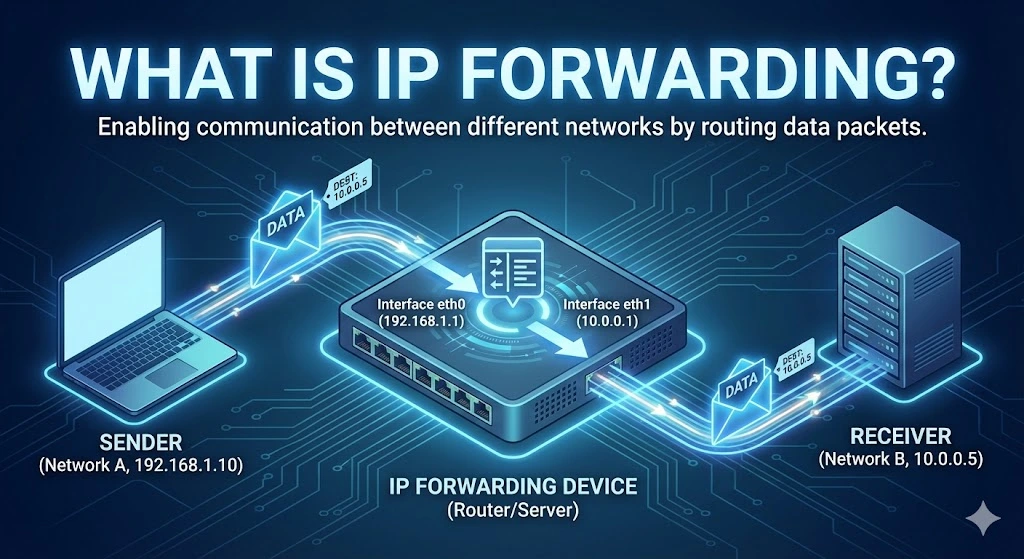
IP forwarding is the process by which a network device, such as a router, forwards or relays IP (Internet Protocol) packets from one network to another. It enables communication between different network segments by directing data packets to their appropriate destination IP addresses. When a device forwards packets that are not destined for its IP address, it acts as a gateway, passing data from one network to another, typically between different subnets or networks.
Table of Contents
IP forwarding is crucial in routers but can also be enabled on computers or other network devices to allow them to act as intermediaries between networks. Without IP forwarding, devices within a local network could not communicate with devices outside their immediate network.
Use Cases of IP Forwarding
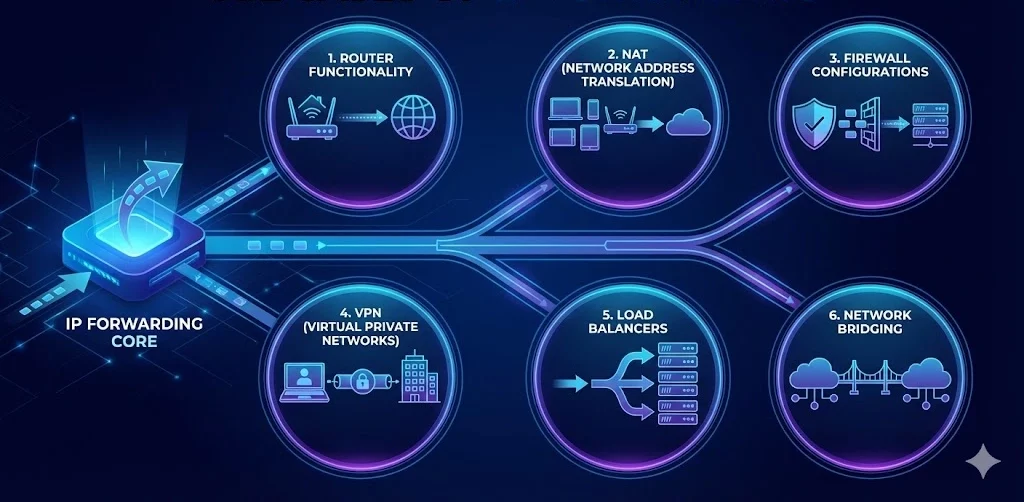
1. Router Functionality
The most common use case for IP forwarding is in routers, which form the backbone of any network communication infrastructure. Routers forward packets between local networks and larger networks, such as the Internet, ensuring data reaches its destination across multiple hops or networks. This is the core functionality of routers in homes, offices, and data centers.
2. Network Address Translation (NAT)
In NAT-enabled environments, IP forwarding is essential. NAT allows multiple devices on a local network to share a single public IP address for Internet access. A router with IP forwarding forwards packets from internal private IP addresses to external IP addresses, enabling communication between internal users and external resources like websites or servers.
3. Firewall Configurations
In enterprise environments, IP forwarding can be part of complex firewall setups, where packets are forwarded through a firewall to reach internal servers, subnets, or specific services. Firewalls can allow or block packets while forwarding them based on rules.
4. Virtual Private Networks (VPNs)
When users connect to a VPN, IP forwarding is used to forward traffic from the user’s local network to a company’s remote servers or internal networks. This ensures secure, encrypted communication across networks, often bypassing geographical or security restrictions.
5. Load Balancers
In large-scale web applications or services, load balancers use IP forwarding to distribute incoming traffic to multiple servers. By forwarding requests to different servers, the load balancer ensures that no single server is overwhelmed, improving reliability and performance.
6. Network Bridging
IP forwarding is also used when creating network bridges between two separate networks. This helps organizations manage traffic and resources more efficiently by forwarding packets between different network segments without creating a unified network.
Purpose of IP Forwarding
I) Network Segmentation
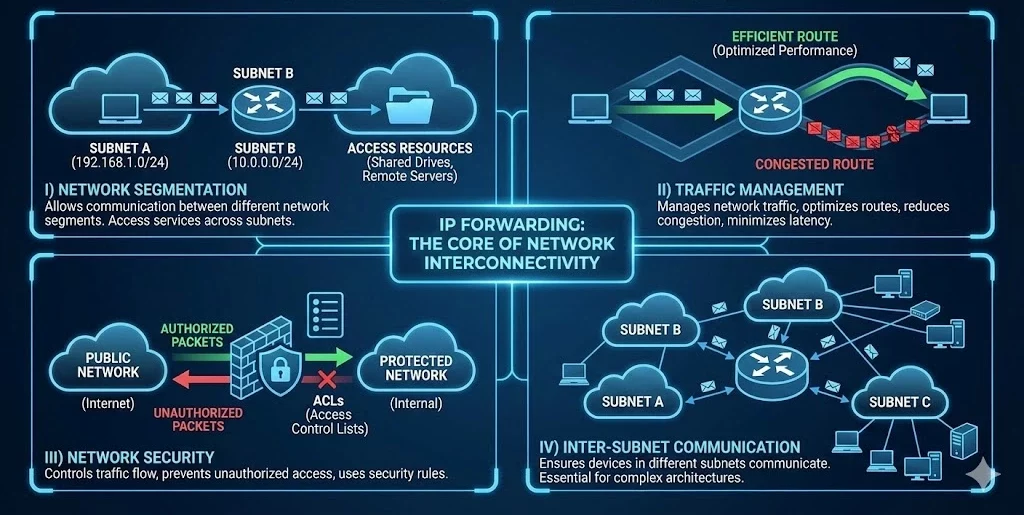
One of the primary purposes of IP forwarding is to allow communication between different network segments or subnets. By forwarding packets, one network can access services, devices, or resources in another network, such as accessing shared drives or using remote servers.
II) Traffic Management
Forwarding packets, routers, and network devices help manage network traffic, ensuring that data takes the most efficient route. This helps optimize network performance, reduces congestion, and minimizes latency in communication.
III) Network Security
IP forwarding also plays a critical role in securing network communication. Firewalls use IP forwarding to control traffic between different networks, ensuring that unauthorized data packets do not enter or leave protected networks. Additionally, IP forwarding is often used in conjunction with network security rules, such as access control lists (ACLs), to regulate traffic.
IV) Inter-Subnet Communication
In large networks, subnets are used to divide network traffic into smaller, more manageable segments. IP forwarding ensures that devices in different subnets can still communicate with each other, which is essential for larger organizations with complex network architectures.
How IP Forwarding Works
When a packet is received by a device (e.g., a router), it checks the destination IP address to determine whether the packet is meant for itself or another device. If the packet is not intended for the router itself, the device uses its routing table to determine the best path to forward the packet. The packet is then passed to the next device along the route until it reaches its destination.
In simple terms:
-
- A data packet is received by a router or device with IP forwarding enabled.
- The device checks the destination IP address of the packet.
- If the packet is not meant for the device, the routing table is consulted to find the next hop.
- The packet is forwarded to the next device or network.
- The process continues until the packet reaches its intended destination.
Trusted IPv4 Leasing for Business Growth
Get enterprise-grade IPv4 space quickly, with seamless deployment and end-to-end management.
Get Started with i.leaseFAQs
How do I enable IP forwarding on Linux?
To enable IP forwarding temporarily, run the command sysctl -w net.ipv4.ip_forward=1 in your terminal. To make it permanent, edit the /etc/sysctl.conf file and add or uncomment the line net.ipv4.ip_forward = 1, then run sysctl -p to apply the changes.
Is IP forwarding a security risk?
Yes, if not configured correctly. Enabling IP forwarding turns a device into a router. If you don’t have proper firewall rules (iptables/nftables) in place, malicious actors could use your device to route traffic between networks you intended to keep separate, potentially leading to Man-in-the-Middle (MITM) attacks or unauthorized access to private subnets.
What is the difference between IP forwarding and routing?
While often used interchangeably, they are distinct steps. Routing is the decision-making process where the device looks at its routing table to decide where to send a packet (like planning a route on a map). IP Forwarding is the actual physical action of moving the packet from one network interface to another based on that decision (like actually driving the car).
Related Posts

Common Myths About Selling IP Addresses
The IPv4 secondary market is often shrouded in mystery, leading many organizations to sit on valuable digital assets because they fear the perceived complexity or legal “gray areas.” As IPv4 exhaustion becomes a permanent reality, the value of these addresses has skyrocketed, yet misconceptions continue to stall potential transactions. At i.lease, powered by the real-world expertise of LARUS, we’ve seen how these myths prevent companies from unlocking significant capital.Read more Related Posts Common Myths About Selling IP Addresses The IPv4 secondary market is often shrouded in mystery, leading many organizations to sit on valuable digital assets because they Read more How to buy IPv4 addresses through a certified IP broker Buying IPv4 space requires policy compliance, verified need, and registry approval, making certified IP brokers essential guides through complex global Read more What happens when IP resources are mismanaged Poor IP resource management can lead to outages, security breaches, blacklisting, legal exposure and reputational damage across networks and business Read more .related-post {} .related-post .post-list { text-align: left; } .related-post .post-list .item { margin: 5px; padding: 10px; } .related-post .headline { font-size: 18px !important; color: #999999 !important; } .related-post .post-list .item .post_thumb { max-height: 220px; margin: 10px 0px; padding: 0px; display: block; } .related-post .post-list .item .post_title { font-size: 16px; color: #3f3f3f; margin: 10px 0px; padding: 0px; display: block; text-decoration: none; } .related-post .post-list .item .post_excerpt { font-size: 13px; color: #3f3f3f; margin: 10px 0px; padding: 0px; display: block; text-decoration: none; } @media only screen and (min-width: 1024px) { .related-post .post-list .item { width: 30%; } } @media only screen and (min-width: 768px) and (max-width: 1023px) { .related-post .post-list .item { width: 90%; } } @media only screen and (min-width: 0px) and (max-width: 767px) { .related-post .post-list .item { width: 90%; } }

How to buy IPv4 addresses through a certified IP broker
Buying IPv4 space requires policy compliance, verified need, and registry approval, making certified IP brokers essential guides through complex global transfers. IPv4 transactions are regulated transfers, not simple purchases — registries must approve documentation, justification and registration changes. Certified brokers reduce risk and delay by aligning buyers with registry policy, routing legitimacy and cross-region requirements. Why companies still need to buy IPv4 addresses The global supply of IPv4 addressesRead more Related Posts Common Myths About Selling IP Addresses The IPv4 secondary market is often shrouded in mystery, leading many organizations to sit on valuable digital assets because they Read more How to buy IPv4 addresses through a certified IP broker Buying IPv4 space requires policy compliance, verified need, and registry approval, making certified IP brokers essential guides through complex global Read more What happens when IP resources are mismanaged Poor IP resource management can lead to outages, security breaches, blacklisting, legal exposure and reputational damage across networks and business Read more .related-post {} .related-post .post-list { text-align: left; } .related-post .post-list .item { margin: 5px; padding: 10px; } .related-post .headline { font-size: 18px !important; color: #999999 !important; } .related-post .post-list .item .post_thumb { max-height: 220px; margin: 10px 0px; padding: 0px; display: block; } .related-post .post-list .item .post_title { font-size: 16px; color: #3f3f3f; margin: 10px 0px; padding: 0px; display: block; text-decoration: none; } .related-post .post-list .item .post_excerpt { font-size: 13px; color: #3f3f3f; margin: 10px 0px; padding: 0px; display: block; text-decoration: none; } @media only screen and (min-width: 1024px) { .related-post .post-list .item { width: 30%; } } @media only screen and (min-width: 768px) and (max-width: 1023px) { .related-post .post-list .item { width: 90%; } } @media only screen and (min-width: 0px) and (max-width: 767px) { .related-post .post-list .item { width: 90%; } }

How to turn idle IPv4 addresses into a recurring revenue stream with iLease
Unlock the hidden value of unused IPv4 addresses with iLease, turning dormant digital infrastructure into a recurring revenue stream while navigating market demand, compliance and risk. Leasing idle IPv4 blocks can generate steady, long-term income without relinquishing ownership. Platforms like i.lease global IPv4 marketplace make it easier to monetise addresses and manage reputation and compliance. why IPv4 addresses still matter Despite the long-anticipated exhaustion of the IPv4 address space — aRead more Related Posts Common Myths About Selling IP Addresses The IPv4 secondary market is often shrouded in mystery, leading many organizations to sit on valuable digital assets because they Read more How to buy IPv4 addresses through a certified IP broker Buying IPv4 space requires policy compliance, verified need, and registry approval, making certified IP brokers essential guides through complex global Read more What happens when IP resources are mismanaged Poor IP resource management can lead to outages, security breaches, blacklisting, legal exposure and reputational damage across networks and business Read more .related-post {} .related-post .post-list { text-align: left; } .related-post .post-list .item { margin: 5px; padding: 10px; } .related-post .headline { font-size: 18px !important; color: #999999 !important; } .related-post .post-list .item .post_thumb { max-height: 220px; margin: 10px 0px; padding: 0px; display: block; } .related-post .post-list .item .post_title { font-size: 16px; color: #3f3f3f; margin: 10px 0px; padding: 0px; display: block; text-decoration: none; } .related-post .post-list .item .post_excerpt { font-size: 13px; color: #3f3f3f; margin: 10px 0px; padding: 0px; display: block; text-decoration: none; } @media only screen and (min-width: 1024px) { .related-post .post-list .item { width: 30%; } } @media only screen and (min-width: 768px) and (max-width: 1023px) { .related-post .post-list .item { width: 90%; } } @media only screen and (min-width: 0px) and (max-width: 767px) { .related-post .post-list .item { width: 90%; } }