VPN with a public IP: the short answer
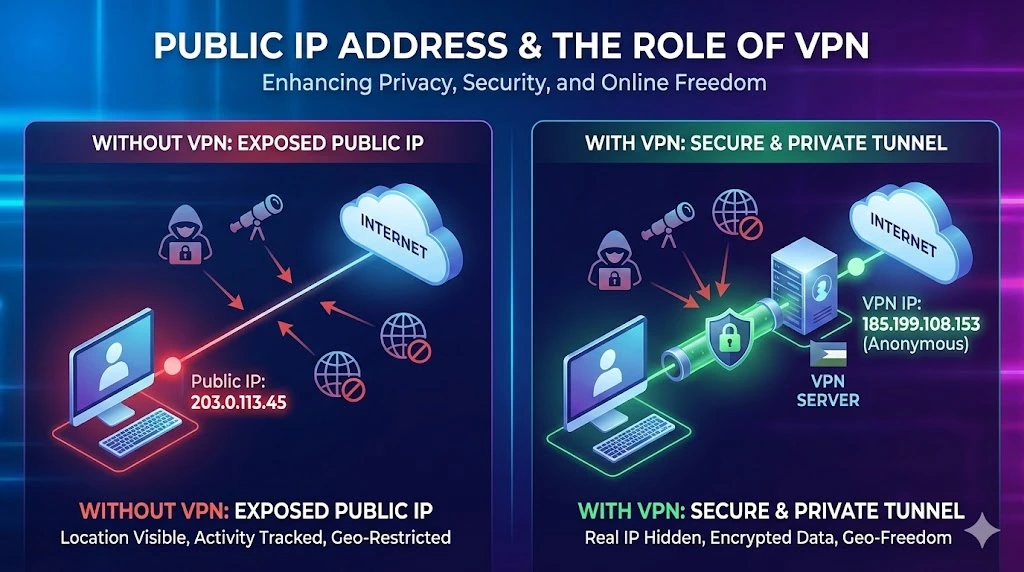
A VPN can change the public IP address that an Internet destination sees, but only for traffic that actually uses the tunnel and exits through the VPN gateway. The destination normally records the gateway's public egress address. Your device still has local addresses, and a VPN does not normally replace the private address used on your Wi-Fi, Ethernet, mobile, or tunnel interface.
“VPN with a public IP” can describe several different services: a shared exit used by many customers, a dedicated or static exit, selected inbound port forwarding, or a routed address or prefix. Those properties must be checked separately. An outbound VPN connection does not automatically make a local service reachable from the Internet.
A VPN protects traffic across the configured tunnel path. It does not by itself provide anonymity, reliable destination access, a trustworthy IP reputation, or a permanent location. Accounts, cookies, device signals, DNS paths, the VPN operator, and the destination can still reveal or correlate information.
What public IP does each observer see?
| Observer or interface | Address it normally sees | What to verify |
|---|---|---|
| Your device on the local network | A private or link-local address assigned by the local network, plus any address assigned inside the tunnel. | The active interface, route table, and whether the application selected IPv4 or IPv6. |
| Your access provider | The access connection and a flow to the VPN endpoint. It may also see traffic that does not enter the tunnel. | Full tunnel or split tunnel policy, DNS path, address family, and any fallback when the VPN fails. |
| The VPN gateway | The authenticated tunnel peer and traffic it is configured to process. | Provider logging, retention, routing, NAT, access controls, and organizational ownership. |
| A website or Internet API | The source address on the path that reaches it, commonly the VPN gateway's public egress address. | The exact destination, protocol, account state, IPv4 or IPv6 route, and observation time. |
| A private destination reached through the VPN | The tunnel address, translated address, or routed organizational address defined by that network. | The private route, identity policy, firewall decision, and return path. |
An IP-check page reports the address seen by that page at that moment. It does not prove that every application, DNS request, address family, or destination follows the same path. A split tunnel intentionally sends some routes through the VPN and leaves others on the local connection.
Shared, dedicated, static, port-forwarded, and routed IPs
| Property | What it means | What it does not establish |
|---|---|---|
| Shared egress | Multiple customers can leave through the same public address. A shared VPN egress address can represent many customers. | Exclusive attribution, stable reputation, inbound reachability, or a fixed address across reconnects. |
| Dedicated egress | An address is reserved for one account, tenant, or customer under the service terms. | That the address stays unchanged, accepts inbound traffic, or can move to another provider. |
| Static or fixed egress | The same address is expected to be presented across normal sessions. | Exclusive use, permanent continuity, or ownership of the address resource. |
| Port-forwarded address | The provider maps documented public ports and protocols to a destination through the VPN. | All ports, every protocol, a listening application, safe firewall policy, or stable mapping during failover. |
| Routed address or prefix | The provider routes authorized public space toward a customer gateway or network. | Registry authority, global route acceptance, RPKI or IRR completion, application security, or operational support unless those are agreed. |
The labels used in a product page are not enough. Ask for the precise egress, inbound, routing, failover, logging, and ownership behavior. The related fixed-IP VPN guide explains how to test a stable exit before depending on it.
Can a VPN give you a public IP address?
For outbound traffic, a VPN can present a provider-controlled public source address to the destination. The device usually receives a tunnel address and the gateway performs routing or translation; the public exit is therefore a service property rather than proof that the address is assigned directly to the device.
For inbound traffic, the answer depends on the delivery model. Inbound access needs an explicit reachable endpoint, such as a provider public address, supported port mapping, relay or reverse tunnel, native IPv6 with firewall permission, or a routed public address or prefix. A conventional outbound VPN does not automatically bypass the access provider's CGNAT. Review how CGNAT changes inbound reachability before treating a VPN as the solution.
A public address is also different from a private address and from the address assigned inside a tunnel. The public and private IP guide explains address scope, NAT, and what an Internet service can observe.
How to check a VPN public IP correctly
- Record a baseline. Before connecting, record the local interface addresses, default routes, public IPv4 and IPv6 seen by controlled destinations, DNS resolvers, network, and time.
- Connect to the intended profile. Record the VPN endpoint, selected region, tunnel address, assigned routes, and whether the profile is full tunnel or split tunnel.
- Test IPv4 and IPv6 separately. Confirm which public address each family presents. A fixed IPv4 exit does not prove that IPv6 uses the same service.
- Test DNS and the real application. Confirm resolver behavior, then test the actual website, API, database, or allowlist that matters. A generic lookup cannot prove destination acceptance.
- Reconnect and change access networks. Repeat after reconnecting and, where authorized, after moving between office, home, or mobile access. Record whether the egress stays shared, dedicated, or fixed as promised.
- Test inbound separately. From an external network, test only the approved port and protocol. Confirm mapping, firewall logs, service binding, authentication, TLS, and return routing.
- Exercise failure behavior. Determine what happens when the tunnel drops, one gateway fails, or a region is evacuated. A safe profile should have an intentional direct, blocked, or alternate path.
What a VPN protects and what remains visible
NIST SP 800-77 Rev. 1 describes IPsec as a way to protect IP communications between configured endpoints, while RFC 4301 defines how security associations and policy apply to traffic. The protection boundary ends at those peers. Traffic leaving a VPN gateway continues toward its destination under the protocols and controls used on that path.
A VPN does not replace end-to-end TLS, application authentication, authorization, endpoint security, patches, or destination-side controls. The local network and access provider may observe that a device communicates with a VPN endpoint and may see any traffic outside the tunnel. The VPN operator processes the covered traffic according to its architecture and policy. The destination sees the exit address and can still use logged-in identity, cookies, browser or device signals, request content, timing, and its own policy.
Encryption does not promise anonymity, faster service, unrestricted regional content, or immunity from throttling and blocking. A destination may reject a shared or datacenter address, require additional identity checks, or apply its own regional and abuse policies. Measure the exact service and preserve dated evidence rather than inferring the result from the word “VPN.”
IPv4, IPv6, DNS, and CGNAT are separate paths
Check IPv4 and IPv6 separately because their routes, tunnel support, DNS answers, egress addresses, and firewall policies can differ. A client may tunnel IPv4 while sending IPv6 directly, or the reverse. DNS may use the VPN's resolver, an encrypted application resolver, or the local network, so resolver behavior must be tested independently from web traffic.
RFC 1918 defines private IPv4 ranges, RFC 6598 defines shared address space used by service providers, and RFC 4291 defines IPv6 addressing architecture. RFC 6269 explains why address sharing affects attribution, limits, and application behavior. None of these address classes alone proves which VPN path an application used.
If the access connection is behind CGNAT, an outbound tunnel can still work, but unsolicited inbound IPv4 requires a reachable endpoint and an agreed return path. Configuring a port on the home router does not configure the provider's translator or the VPN gateway.
Choose the public-IP path for the job
| Requirement | Likely path | Acceptance evidence |
|---|---|---|
| General outbound privacy on an untrusted access network | An authenticated VPN with documented tunnel, DNS, logging, and failure behavior. | Covered routes, endpoint identity, address-family tests, TLS use, and disconnect behavior. |
| Allowlisting one business egress | A stable shared or dedicated exit, chosen according to the destination's policy. | Observed address across reconnect and failover, destination acceptance, owner, and change procedure. |
| Reach a private company network | A managed remote-access or site-to-site gateway with least-privilege private routes. | Strong authentication, authorized routes, firewall logs, return path, monitoring, and recovery. |
| Publish one service through a VPN | Explicit provider port forwarding, a relay, reverse tunnel, or routed endpoint. | External port test, protocol support, service binding, TLS, firewall, DDoS handling, and failover. |
| Operate controlled public IPv4 capacity | A routed organization-controlled or leased prefix with an accepted network handoff. | Holder authority, origin ASN, LOA, IRR and RPKI duties, routing tests, abuse owner, continuity, and return plan. |
Business VPN and public IPv4 checklist
- Define the users, applications, destinations, regions, address families, protocols, ports, throughput, latency, and availability target.
- Separate stable, dedicated, inbound-reachable, routed, and transferable requirements; do not use one label as evidence for another.
- Document full or split tunnel routes, DNS behavior, IPv4 and IPv6 handling, reconnects, failover, and the intended response to a tunnel failure.
- Verify authentication, least-privilege access, key rotation, endpoint controls, logging, retention, incident response, and the application-layer TLS boundary.
- Record the current public addresses, observation time, service or tenant identifier, reputation checks relevant to the real destinations, and who owns remediation.
- For inbound access, confirm the reachable endpoint, mapping or route, firewall boundary, source controls, service binding, certificates, monitoring, and recovery.
- For a routed prefix, confirm registry authority, permitted origin, LOA, BGP handoff, RPKI, IRR, reverse DNS, geofeed, abuse contacts, renewal, withdrawal, and return.
- Run acceptance tests from representative networks with synthetic traffic and preserve the expected result and rollback procedure.
When a deployment needs controlled IPv4 space rather than a consumer VPN exit, prepare the prefix size, RIR, term, origin ASN, regions, handoff, reputation evidence, abuse ownership, and return plan before reviewing managed IPv4 leasing. Proceed only after the delivery and routing model is confirmed.
VPN public IP FAQs
Does a VPN change my public IP address?
It commonly changes the source address seen by a destination when that traffic enters the tunnel and exits through the VPN gateway. Traffic outside the tunnel, another address family, or another application path may continue to show a different address.
Is a VPN public IP shared or dedicated?
It can be either. Shared, dedicated, and static describe different properties. Ask whether the address is exclusive, whether it remains stable, and what changes during reconnect, failover, migration, suspension, or termination.
Does a dedicated VPN IP allow inbound connections?
Not automatically. The service must explicitly support inbound routing or port forwarding for the required address, protocols, and ports. Firewall policy, service binding, authentication, TLS, monitoring, and the return path still apply.
Can a VPN expose a server behind CGNAT?
Only when the VPN or another intermediary supplies an inbound endpoint, supported mapping, relay, or routed path. An ordinary outbound tunnel does not create an unsolicited inbound mapping in the access provider's CGNAT.
Does a VPN hide all Internet activity from my ISP?
The access provider can usually observe the connection to the VPN endpoint and any traffic that bypasses the tunnel. It may not see the final destination inside a correctly protected tunnel, but DNS, IPv6, split routes, failure paths, and application behavior must be checked.
Does a VPN make me anonymous?
No single network control guarantees anonymity. A VPN changes one observation point, while accounts, cookies, device signals, payment records, timing, the VPN operator, and destinations can still identify or correlate activity.
Should a business use a VPN exit or a routed IPv4 prefix?
Use a managed exit when the requirement is a controlled outbound source or private-network access. Consider a routed prefix when the organization needs address capacity and routing control across infrastructure, and can operate the authority, security, reputation, continuity, and return obligations.