What Is Reverse DNS (rDNS)? Why PTR Records Matter for Email, Hosting, and Leased IPv4
 Stephanie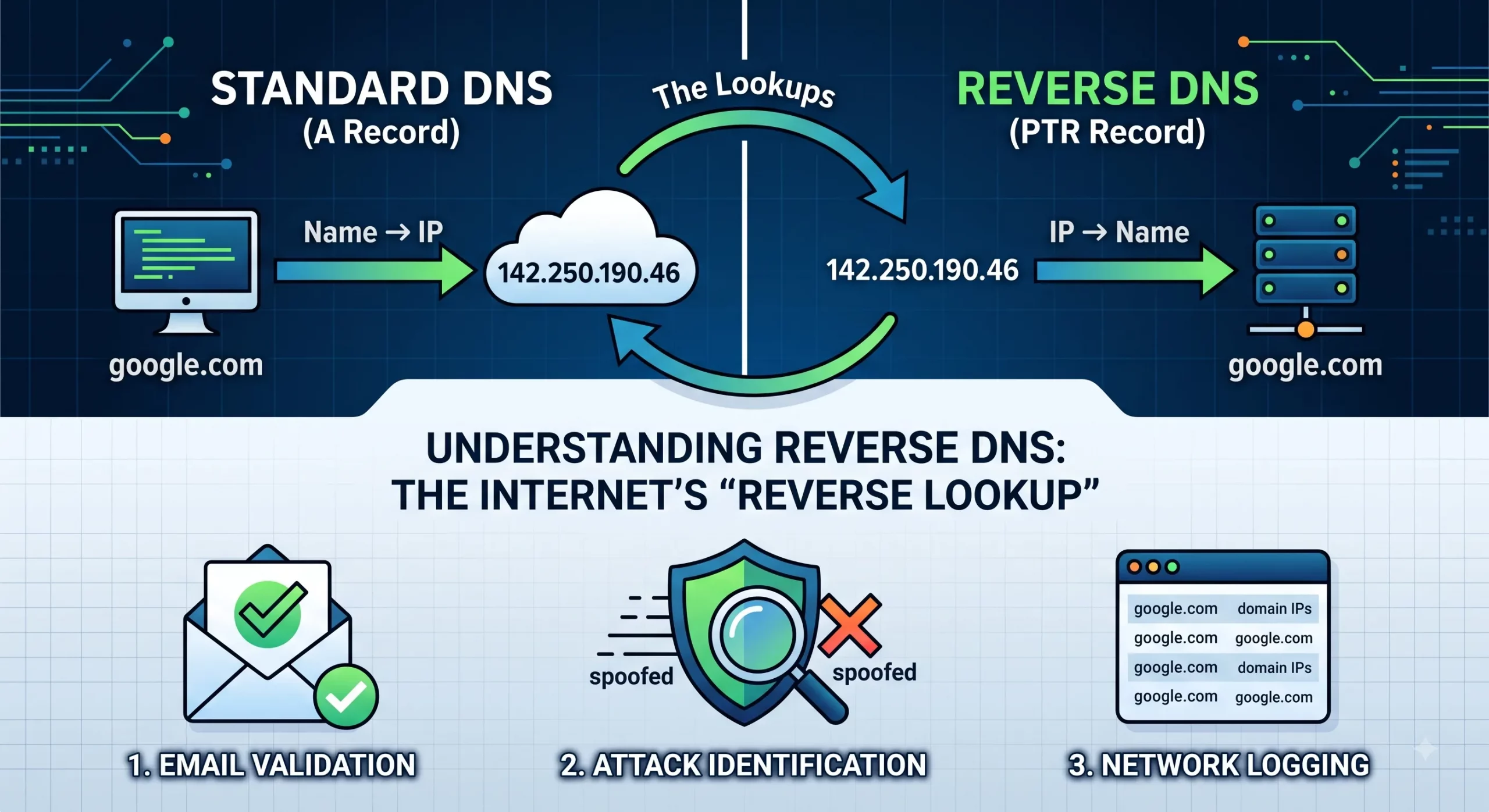
Reverse DNS (rDNS) is the process of resolving an IP address back to a domain name. It is the mirror image of the DNS lookups most people know: forward DNS translates a name like mail.example.com into an IP address, while reverse DNS translates an IP address back into a name. The record type that stores this answer is called a PTR record.
Table of Contents
For most of the Internet’s history, reverse DNS was a background detail. Today it is an operational requirement for anyone running mail infrastructure. Major mailbox providers, including Gmail and Outlook, now expect sending IP addresses to have valid reverse DNS, and mail from addresses without it is routinely rejected or filtered. A missing PTR record is one of the most common reasons a newly deployed mail server cannot deliver email — and one of the most confusing, because the server itself is configured perfectly.
There is also a control question that many explanations skip: reverse DNS is not managed in your domain’s DNS zone. It is managed by whoever controls the IP address block. That makes rDNS capability something to verify when acquiring or leasing IPv4 space, not something to discover after deployment fails. This article explains how reverse DNS works, what mail servers actually check, who controls the records in different holding models, and how to set it up correctly.
What Is Reverse DNS?
Reverse DNS is a DNS lookup that starts with an IP address and returns the hostname associated with it. The answer is stored in a PTR (pointer) record. When a mail server, logging system, or security tool asks “what name does 203.0.113.10 claim?”, the PTR record for that address provides the answer — for example, mail.example.com.
Three terms are worth fixing precisely, because they are often used interchangeably:
- Reverse DNS (rDNS): the overall process of resolving an IP address to a name.
- PTR record: the specific DNS record type that stores the answer. One PTR record typically maps one IP address to one hostname.
- Reverse zone: the DNS zone in which PTR records for a given IP block live, managed by whoever controls that block.
A useful way to think about it: forward DNS is how the world finds your services. Reverse DNS is how your IP addresses identify themselves when they initiate connections. That self-identification is exactly what receiving mail servers examine before deciding whether to trust an incoming connection.
How Does Reverse DNS Work?
Reverse DNS works through a special DNS namespace called in-addr.arpa (for IPv4), in which IP addresses are written in reverse order and delegated down the same hierarchy that allocates the addresses themselves.
Here is the mechanism, using a worked example:
- The address is reversed and mapped into the rDNS namespace. To look up reverse DNS for 203.0.113.10, a resolver queries the name 10.113.0.203.in-addr.arpa. The octets are reversed because DNS delegation works from the most general label to the most specific, and in IP addresses the most general part comes first.
- Delegation follows the address hierarchy. The relevant Regional Internet Registry delegates the reverse zone for an address block to the nameservers specified by the block’s registered holder (or the party authorized to manage its records). For a /24 such as 203.0.113.0/24, the reverse zone is 113.0.203.in-addr.arpa.
- The zone answers with a PTR record. Inside that zone, the record
10.113.0.203.in-addr.arpa. IN PTR mail.example.com.provides the answer: 203.0.113.10 identifies itself as mail.example.com.
The practical consequence of this design is the point that matters for businesses: PTR records live in the reverse zone of the IP block, not in your domain’s DNS. You can have full control of example.com and still be unable to set reverse DNS for your server — because the reverse zone belongs to whoever holds or manages the IP block. Control over rDNS follows control over the addresses.
IPv6 works the same way conceptually, using the ip6.arpa namespace instead of in-addr.arpa.
Forward DNS vs Reverse DNS
Forward DNS maps names to addresses so clients can find services; reverse DNS maps addresses to names so connections can be identified. They are stored in different zones, managed by different parties, and serve different trust functions.
| Aspect | Forward DNS | Reverse DNS |
|---|---|---|
| Direction | Name → IP address | IP address → name |
| Main record type | A (IPv4) / AAAA (IPv6) | PTR |
| Where it is managed | Your domain’s DNS zone (e.g., example.com) | The IP block’s reverse zone (in-addr.arpa / ip6.arpa) |
| Who controls it | The domain owner | The IP block holder or its authorized manager |
| Primary purpose | Letting clients reach services | Identifying and validating connecting addresses |
The two directions come together in a check called forward-confirmed reverse DNS (FCrDNS). A verifier looks up the PTR record for an IP address, takes the hostname it returns, then performs a forward lookup on that hostname and checks whether it resolves back to the original IP address. When both directions agree — 203.0.113.10 → mail.example.com → 203.0.113.10 — the identity is considered confirmed. When they disagree, or when the PTR record is missing entirely, many receiving systems treat the connection as unverified. FCrDNS matters because it is the version of the check that mail servers actually perform, not a simple PTR existence test.
Why Does Reverse DNS Matter?
Reverse DNS matters because it functions as an identity check for outbound connections — and email delivery is where that check has hard consequences. Four areas are affected in practice:
- Email deliverability. This is the headline case. Major mailbox providers require sending IP addresses to have valid reverse DNS, and Gmail’s sender guidelines explicitly require sending IPs to have PTR records that pass forward-confirmation. Mail from IP addresses without valid rDNS is commonly rejected at connection time or filtered to spam, regardless of how well SPF, DKIM, and DMARC are configured.
- Logging and troubleshooting. Firewalls, load balancers, and analytics systems resolve connecting IPs to names. Meaningful PTR records (mail1.example.com rather than a bare address) make logs across your own and your partners’ systems readable, which shortens incident investigations.
- Access and trust checks by some services. Certain systems — some FTP and SSH configurations, monitoring tools, and legacy enterprise services — perform rDNS checks on connecting clients and may delay or refuse connections that fail them.
- Reputation signaling. A clean, consistent PTR record that matches your infrastructure is one of several signals that reputation systems weigh when assessing an IP address. It does not create good reputation by itself, but its absence — or a generic, auto-generated hostname — contributes to a lower-trust profile. We cover the broader topic in our guide to IP address reputation.
Note what reverse DNS does not do: it is not a security mechanism on its own, since a PTR record proves configuration, not intent. Its role is identification and consistency — and modern mail systems have made that identification mandatory.
Reverse DNS and Email: What Mail Servers Actually Check
Receiving mail servers check three things about a connecting IP’s reverse DNS: that a PTR record exists, that it passes forward-confirmation, and that the hostname looks like deliberate mail infrastructure rather than a generic assignment. Each failure mode has a different consequence:
1. Missing PTR record
The connecting IP has no reverse DNS at all. This is the most severe failure: several large providers reject such connections outright at the SMTP stage, before message content is even evaluated. A brand-new mail server on an IP block whose reverse zone was never delegated or populated will hit this immediately.
2. Failed forward-confirmation (FCrDNS mismatch)
A PTR record exists, but the hostname it returns does not resolve back to the same IP address. This commonly happens after infrastructure changes: a server moves to a new address, the forward A record is updated, and the old PTR record is forgotten. Mismatched rDNS is treated as unverified identity and weighs against the message in filtering decisions.
3. Generic or auto-generated PTR
The PTR record exists and forward-confirms, but reads like 203-0-113-10.pool.provider.example — the pattern of dynamically assigned consumer addresses. Many mail systems treat generic-looking rDNS as a signal that the IP is not intended to run a mail server, and filter accordingly. Deliberate mail infrastructure should carry a deliberate name, such as mail.yourdomain.com, matching the HELO/EHLO name the server presents.
The operational takeaway: before any mail deployment on new IP space — owned or leased — confirm that you can get custom PTR records set for the sending addresses, that they forward-confirm, and that changes can be made quickly when infrastructure moves. If any of those three is uncertain, the mail project has a blocking dependency.
Who Controls Reverse DNS for Your IP Addresses?
Control over reverse DNS follows control over the IP block, which means your ability to set PTR records depends on how you hold your addresses. There are three common models:
Provider-assigned IP addresses
When your addresses come bundled with a hosting, cloud, or connectivity service, the provider controls the reverse zone. Setting or changing a PTR record means using the provider’s control panel where offered, or filing a support ticket where not. Turnaround varies from minutes to days depending on the provider, and some do not offer custom PTR records at all on lower service tiers. If your addresses change — a new VM, a new plan — the rDNS work starts over, and the old records may linger.
Your own registered IPv4 space
When your organization is the registered holder of the block, the RIR delegates the reverse zone to nameservers you specify. You run (or host) the reverse zone and manage PTR records directly, with changes taking effect as fast as your DNS infrastructure allows. This is the maximum-control model, and it comes with the corresponding responsibility: the zone must be maintained, kept consistent with forward DNS, and updated as infrastructure changes.
Leased IPv4 space
With leased addresses, rDNS capability derives from the lease arrangement, not from registration — the reverse zone belongs to the block’s registered holder, and what the lessee can do depends on what the lessor supports and has agreed to. In practice, leases handle reverse DNS in one of three ways:
- Delegation to the lessee: the lessor points the reverse zone (or the relevant portion) at nameservers the lessee operates, giving the lessee direct day-to-day control of PTR records for the leased range.
- Managed PTR changes: the lessor retains the zone and applies PTR records on request. Workable if — and only if — the turnaround is fast and documented.
- No rDNS support: some informal arrangements simply do not address reverse DNS. For web-only workloads this may go unnoticed; for mail infrastructure it is disqualifying.
This is why reverse DNS belongs on the pre-lease verification list alongside reputation, routing authorization, and renewal terms — points we cover in our broader guide to leasing IP addresses. A structured arrangement, such as those set up through managed IPv4 leasing, should state explicitly how reverse DNS is handled: whether the zone is delegated, how PTR changes are requested, and how quickly they are applied. The same applies when you buy IPv4 addresses: reverse-zone delegation should be part of the transfer completion checklist, not an afterthought discovered when the first mail campaign bounces.
How to Set Up Reverse DNS
Setting up reverse DNS involves getting a PTR record created in the block’s reverse zone and confirming it forward-matches your hostname. The exact steps depend on which control model applies:
Scenario 1: Provider-assigned addresses
- Decide the hostname the IP should identify as (e.g., mail.example.com) and make sure a forward A record already points that hostname at the IP.
- Set the PTR record through the provider’s control panel, or request it via support ticket, quoting the exact IP and hostname.
- Verify after the change propagates (see verification below).
Scenario 2: Your own or delegated leased space
- Confirm the reverse zone for your block is delegated to your nameservers — by the RIR for registered holders, or by the lessor for delegated leases.
- Create the reverse zone (e.g., 113.0.203.in-addr.arpa for 203.0.113.0/24) on your DNS servers if it does not already exist.
- Add PTR records for each address that initiates outbound connections, matching each to a hostname that has a corresponding forward A record.
- Keep forward and reverse records synchronized as part of your change process — every rDNS mismatch starts as a forward-DNS change someone made without updating the PTR.
Verification
Check the result from an external network, not just inside your own:
dig -x 203.0.113.10(ornslookup 203.0.113.10) should return your intended hostname.dig mail.example.com Ashould return the original IP address, confirming FCrDNS.
If the reverse lookup returns nothing, the usual causes are, in order: the PTR record was not created, the reverse zone is not delegated to the nameservers answering for it, or the change has not yet propagated.
Common Reverse DNS Problems
Most reverse DNS problems fall into five patterns, and all five are preventable with a delegation check and a change-management habit.
- No PTR record on a new deployment. The most frequent case: services go live on new IP space before anyone requests PTR records. Harmless for a web server; immediately blocking for a mail server.
- Stale PTR after infrastructure changes. A server moves, forward DNS is updated, the PTR still points at the old name (or the old address still carries the mail hostname). The result is FCrDNS mismatch and gradually degrading deliverability that is hard to trace because “nothing changed” on the mail server itself.
- Generic auto-generated hostnames. The block came with placeholder PTR records in the pattern of dynamic pools. Fine until mail or trust-sensitive services are deployed, at which point the generic names work against you.
- Delegation never completed after a lease or transfer. The commercial side finished — payment, LOA, routing — but the reverse zone still points at the previous holder’s nameservers, which no longer answer for your range. PTR changes silently go nowhere. This belongs on the same completion checklist as routing records, alongside the steps in our guide to avoiding downtime when deploying leased IPv4 blocks.
- Slow change turnaround. The records are correct today, but every change takes a multi-day ticket cycle. Acceptable for static infrastructure; a real constraint for anyone who rotates, scales, or migrates addresses regularly. Turnaround time is a service-quality question to ask before committing, not after.
Practical Checklist Before Deploying Services That Depend on rDNS
- Confirm who controls the reverse zone for your block — provider, your organization, or lessor — and how changes are made.
- Verify delegation is actually in place: query a PTR in your range from an external resolver and confirm the answering nameservers are the intended ones.
- Set deliberate hostnames for every address that initiates outbound connections, especially mail: mail1.example.com, not a generic pool name.
- Confirm FCrDNS for each sending address: PTR → hostname → same IP, checked in both directions.
- Match the mail server’s HELO/EHLO name to the PTR hostname for consistency across the checks receivers run.
- Document the change process and turnaround — for leased space, get the rDNS handling terms in writing before signing.
- Add rDNS to your change management: any forward-DNS or IP change ticket should include a PTR review step.
- Re-verify after any transfer, lease start, or provider migration — delegation is the step most often left dangling.
Practical Note from i.lease
Reverse DNS problems almost never announce themselves as reverse DNS problems. They surface as “our email suddenly goes to spam,” “the new block won’t deliver mail at all,” or “deliverability degraded after the migration and nobody knows why.” By the time the PTR record is identified as the cause, the deployment has usually lost days — and sometimes sender reputation that takes far longer to rebuild.
The pattern we see repeatedly is that rDNS capability was assumed rather than verified. A business acquires or leases a block, confirms routing works, sees websites load, and concludes the space is production-ready — then discovers that the reverse zone was never delegated, or that PTR changes go through a ticket queue measured in days, or that the arrangement does not support custom PTR records at all. For mail infrastructure, each of those is a blocking condition that was knowable before any commitment was made. The questions cost nothing to ask up front: Who controls the reverse zone? Will it be delegated to us? If not, what is the documented turnaround for PTR changes? A block that arrives with clear answers supports mail on day one. A block that arrives without them supports mail eventually, after the least pleasant kind of troubleshooting.
Final Thoughts
Reverse DNS is the mechanism by which IP addresses identify themselves: a PTR record in the block’s reverse zone answers the question “what name does this address claim?”, and forward-confirmation checks whether that claim holds in both directions. What was once a cosmetic detail has hardened into a requirement — mail from addresses without valid, forward-confirmed reverse DNS is now rejected or filtered by the largest mailbox providers, making PTR records as much a part of email infrastructure as SPF, DKIM, and DMARC.
The structural point for businesses is that reverse DNS control follows IP block control. With provider-assigned addresses, you work within the provider’s process. With your own registered space, you run the reverse zone yourself. With leased space, your capability is exactly what the lease arrangement provides — which is why rDNS delegation and PTR turnaround belong on the verification list before acquiring or leasing IPv4, alongside reputation, routing authorization, and renewal terms. Address space that supports your services on paper but cannot identify itself correctly on the wire is not yet production infrastructure; the gap between the two is usually one delegation and a handful of PTR records, set up before they are needed rather than after they are missed.
Frequently Asked Questions
What is a PTR record?
A PTR (pointer) record is the DNS record type that stores a reverse DNS answer. It maps an IP address to a hostname — the opposite direction of an A record — and lives in the IP block’s reverse zone, not in your domain’s DNS zone.
Is reverse DNS required for sending email?
Effectively yes. Major mailbox providers, including Gmail and Outlook, expect sending IP addresses to have valid PTR records that pass forward-confirmation, and mail from addresses without them is commonly rejected or filtered to spam regardless of SPF, DKIM, and DMARC configuration.
How do I check the reverse DNS of an IP address?
Run dig -x followed by the IP address, or nslookup with the IP address, from an external network. The result should return the intended hostname; a forward lookup on that hostname should return the original IP.
Can I set reverse DNS myself?
Only if you control the block’s reverse zone. Registered holders manage it directly through RIR delegation; lessees can manage it if the lessor delegates the zone to them; users of provider-assigned addresses must set PTR records through the provider’s panel or support process.
What is FCrDNS (forward-confirmed reverse DNS)?
FCrDNS is a two-way check: the PTR record for an IP returns a hostname, and a forward lookup on that hostname must return the same IP. Mail servers use this check, not mere PTR existence, to validate a connecting address’s identity.
Does reverse DNS affect IP reputation?
It is one signal among several. A consistent, deliberate PTR record supports a trustworthy profile, while a missing or generic one contributes to a lower-trust assessment. Reverse DNS alone does not create good reputation, but its absence works against you.
Who sets reverse DNS for leased IP addresses?
The block’s registered holder controls the reverse zone, so a lessee’s capability depends on the lease arrangement: the lessor may delegate the zone to the lessee’s nameservers, apply PTR records on request, or in weak arrangements not support reverse DNS at all. This should be confirmed in writing before leasing.
What is a generic PTR record?
A generic PTR is an auto-generated hostname in a pattern like 203-0-113-10.pool.provider.example, typical of dynamically assigned addresses. Mail systems treat generic rDNS as a signal that the address is not deliberate mail infrastructure, so sending addresses should carry custom hostnames instead.
Does reverse DNS work for IPv6?
Yes. IPv6 reverse DNS works on the same principle using the ip6.arpa namespace instead of in-addr.arpa, with PTR records mapping IPv6 addresses to hostnames.
How long do PTR record changes take to apply?
The DNS change itself propagates like any record, typically within minutes to a few hours depending on TTLs. The practical variable is process time: self-managed zones apply changes immediately, while provider or lessor ticket queues can take hours to days — worth confirming before you depend on it.
Also Read
相关文章

什么是电信公司?电信运营商如何为英国、美国和加拿大提供网络连接支持?
电信公司(Telco Companies),也称为电信运营商(Telecommunications Companies),提供通信与网络连接服务。这些服务包括移动通信网络、宽带互联网、光纤连接、固定电话服务、企业网络连接、云连接、托管网络服务以及数据中心连接等。 对于普通消费者而言,电信公司通常被视为移动通信或宽带互联网服务提供商。对于企业来说,电信公司远不只是一个服务品牌,更是关键的基础设施合作伙伴,帮助企业连接办公室、数据中心、云平台、远程员工、客户应用程序以及各类数字化服务。 随着企业越来越依赖云平台、SaaS 应用、AI 工具、VPN、网络安全系统以及在线服务,电信公司已成为数字基础设施规划中不可或缺的重要组成部分。 电信公司是什么? 电信公司(Telco Companies)是提供电信服务的企业。这些服务让个人、设备、企业和各种系统能够跨越距离进行通信与连接。 一家电信公司可能提供以下服务: 移动通信服务 宽带互联网 光纤连接 固定电话服务 企业互联网接入 企业广域网(WAN)服务 云连接服务 数据中心连接 VPN 服务 托管网络解决方案 互联网传输(Internet Transit) 电信批发服务 部分电信公司拥有并运营大规模的实体网络基础设施;另一些则通过批发接入、租用基础设施或与网络运营商合作来提供电信服务。 电信公司提供哪些服务? 电信公司同时为个人消费者和企业客户提供服务。 面向消费者的服务通常包括移动通信套餐、家庭宽带、光纤互联网、固定电话以及通信组合套餐。 面向企业的服务则可能包括专线互联网接入、企业光纤、专用网络、云连接、托管安全服务、数据中心连接、物联网(IoT)连接以及企业移动通信方案。 对于大型企业客户,电信公司还可提供: 多地点办公室网络连接 远程员工接入 私有云连接 SD-WAN(软件定义广域网) 灾难恢复连接 低延迟网络路由 互联网传输(Internet Transit) 网络监控 托管防火墙服务 正因如此,电信公司不仅对日常通信至关重要,也是现代企业建设先进数字基础设施的重要支柱。 电信公司 vs 互联网服务提供商 vs 网络运营商 电信公司(Telco)、互联网服务提供商(ISP)和网络运营商(Network Operator)之间可能存在重叠,但它们并不完全相同。 电信公司提供电信服务。 互联网服务提供商(ISP)提供互联网接入服务。 网络运营商负责建设、运营和管理网络基础设施。 一些大型电信公司同时承担这三种角色。它们拥有基础设施、运营网络,并向市场提供互联网、移动通信以及企业网络服务。 规模较小的服务提供商则可能专注于其中某一层。例如,互联网服务提供商(ISP)可以销售宽带服务,而无需拥有所有实体网络基础设施;网络运营商可能负责建设和运营光纤网络,并向电信公司或 ISP 提供批发网络接入;电信公司则可能结合自有网络与合作伙伴网络,为客户提供移动通信和企业服务。 对于企业而言,理解这些区别非常重要,因为服务质量不仅取决于销售该方案的品牌,还受到其底层网络、路由设计、网络覆盖范围以及技术支持体系等因素的影响。 为什么电信公司对企业至关重要 电信公司之所以重要,是因为几乎所有现代企业都依赖稳定的网络连接。 企业可能需要电信服务来支持: 办公室互联网接入 移动网络连接 远程办公 客户支持系统 云应用程序 SaaS 平台 支付系统 VPNRead more Related Posts 什么是电信公司?电信运营商如何为英国、美国和加拿大提供网络连接支持? 电信公司(Telco Companies),也称为电信运营商(Telecommunications Companies),提供通信与网络连接服务。这些服务包括移动通信网络、宽带互联网、光纤连接、固定电话服务、企业网络连接、云连接、托管网络服务以及数据中心连接等。 对于普通消费者而言,电信公司通常被视为移动通信或宽带互联网服务提供商。对于企业来说,电信公司远不只是一个服务品牌,更是关键的基础设施合作伙伴,帮助企业连接办公室、数据中心、云平台、远程员工、客户应用程序以及各类数字化服务。 随着企业越来越依赖云平台、SaaS 应用、AI 工具、VPN、网络安全系统以及在线服务,电信公司已成为数字基础设施规划中不可或缺的重要组成部分。 电信公司是什么? 电信公司(Telco Companies)是提供电信服务的企业。这些服务让个人、设备、企业和各种系统能够跨越距离进行通信与连接。 一家电信公司可能提供以下服务: 移动通信服务 宽带互联网 光纤连接 固定电话服务 企业互联网接入 企业广域网(WAN)服务 云连接服务 数据中心连接 VPN TCP 与 UDP:IPv4 租赁和企业网络指南 TCP 和 UDP 是互联网中最重要的两种传输层协议。它们决定数据如何在设备、服务器、云平台、VPN 网关、DNS 解析器、电子邮件系统、流媒体平台以及企业应用程序之间传输。 对于企业而言,TCP 和 UDP 不仅仅是技术术语,它们会直接影响实际的基础设施性能。公网 IPv4 地址提供可从互联网访问的网络端点,而 TCP 和 UDP 则决定流量如何通过该端点进行传输。 这对于租用或购买 IPv4 地址的企业尤为重要。企业租用 IPv4 什么是区域互联网注册管理机构(RIR) 区域互联网注册管理机构(Regional Internet Registry, RIR)是负责在特定地理区域内分配和管理互联网编号资源的组织。这些资源主要包括 IP 地址(IPv4 和 IPv6)以及自治系统号(ASN),它们是支撑设备和网络在互联网上相互通信的关键要素。 如果没有一套组织完善的系统来分配唯一的 IP 地址和路由标识符,互联网便无法正常运转。RIR 确保这一过程在各自管辖的区域内保持公平、高效与一致,从而避免冲突,并提升互联网治理的透明度。 全球五大 RIR 目前全球共有五家获官方认可的 RIR,各自负责世界上特定的区域:AFRINIC – 非洲网络信息中心(非洲)APNIC – 亚太网络信息中心(亚太地区)ARIN .related-post {} .related-post .post-list { text-align: left; } .related-post .post-list .item { margin: 5px; padding: 10px; } .related-post .headline { font-size: 18px !important; color: #999999 !important; } .related-post .post-list .item .post_thumb { max-height: 220px; margin: 10px 0px; padding: 0px; display: block; } .related-post .post-list .item .post_title { font-size: 16px; color: #3f3f3f; margin: 10px 0px; padding: 0px; display: block; text-decoration: none; } .related-post .post-list .item .post_excerpt { font-size: 13px; color: #3f3f3f; margin: 10px 0px; padding: 0px; display: block; text-decoration: none; } @media only screen and (min-width: 1024px) { .related-post .post-list .item { width: 30%; } } @media only screen and (min-width: 768px) and (max-width: 1023px) { .related-post .post-list .item { width: 90%; } } @media only screen and (min-width: 0px) and (max-width: 767px) { .related-post .post-list .item { width: 90%; } }
TCP 与 UDP:IPv4 租赁和企业网络指南
TCP 和 UDP 是互联网中最重要的两种传输层协议。它们决定数据如何在设备、服务器、云平台、VPN 网关、DNS 解析器、电子邮件系统、流媒体平台以及企业应用程序之间传输。 对于企业而言,TCP 和 UDP 不仅仅是技术术语,它们会直接影响实际的基础设施性能。公网 IPv4 地址提供可从互联网访问的网络端点,而 TCP 和 UDP 则决定流量如何通过该端点进行传输。 这对于租用或购买 IPv4 地址的企业尤为重要。企业租用 IPv4 地址并不是单纯为了持有这些地址,而是为了运行网站、API、VPN 隧道、DNS 服务、电子邮件平台、SaaS 应用程序、游戏服务器、流媒体系统、安全工具以及云端工作负载。不同类型的服务决定了需要使用 TCP、UDP,还是同时使用两者。 通过 i.lease,企业可以使用 IPv4 租赁服务获取用于实际网络部署的公网 IPv4 资源。需要长期控制 IP 地址资源的企业也可以购买 IP 地址,而拥有闲置 IPv4 资源的组织则可以出售 IP 地址。 TCP和UDP是什么? TCP 和 UDP 都是传输层协议。它们位于 IP 协议之上,帮助应用程序通过网络发送和接收数据。 IP 地址用于确定流量应该发送到哪里,而 TCP 和 UDP 则决定这些流量如何进行传输。 简单来说: TCP 适用于重视可靠性和按顺序传输数据的场景。 UDP 适用于重视速度、低延迟和轻量化数据传输的场景。 企业可能会使用同一个公网 IPv4 地址来运行不同的服务,但每项服务可能依赖不同的传输协议。例如,网站可能使用 TCP,VPN 网关可能使用 UDP,DNS 解析器可能同时使用 UDP 和 TCP,而游戏服务器则可能更倾向于使用 UDP,因为对于实时游戏而言,延迟造成的影响通常比少量数据包丢失更加明显。 因此,TCPRead more Related Posts 什么是电信公司?电信运营商如何为英国、美国和加拿大提供网络连接支持? 电信公司(Telco Companies),也称为电信运营商(Telecommunications Companies),提供通信与网络连接服务。这些服务包括移动通信网络、宽带互联网、光纤连接、固定电话服务、企业网络连接、云连接、托管网络服务以及数据中心连接等。 对于普通消费者而言,电信公司通常被视为移动通信或宽带互联网服务提供商。对于企业来说,电信公司远不只是一个服务品牌,更是关键的基础设施合作伙伴,帮助企业连接办公室、数据中心、云平台、远程员工、客户应用程序以及各类数字化服务。 随着企业越来越依赖云平台、SaaS 应用、AI 工具、VPN、网络安全系统以及在线服务,电信公司已成为数字基础设施规划中不可或缺的重要组成部分。 电信公司是什么? 电信公司(Telco Companies)是提供电信服务的企业。这些服务让个人、设备、企业和各种系统能够跨越距离进行通信与连接。 一家电信公司可能提供以下服务: 移动通信服务 宽带互联网 光纤连接 固定电话服务 企业互联网接入 企业广域网(WAN)服务 云连接服务 数据中心连接 VPN TCP 与 UDP:IPv4 租赁和企业网络指南 TCP 和 UDP 是互联网中最重要的两种传输层协议。它们决定数据如何在设备、服务器、云平台、VPN 网关、DNS 解析器、电子邮件系统、流媒体平台以及企业应用程序之间传输。 对于企业而言,TCP 和 UDP 不仅仅是技术术语,它们会直接影响实际的基础设施性能。公网 IPv4 地址提供可从互联网访问的网络端点,而 TCP 和 UDP 则决定流量如何通过该端点进行传输。 这对于租用或购买 IPv4 地址的企业尤为重要。企业租用 IPv4 什么是区域互联网注册管理机构(RIR) 区域互联网注册管理机构(Regional Internet Registry, RIR)是负责在特定地理区域内分配和管理互联网编号资源的组织。这些资源主要包括 IP 地址(IPv4 和 IPv6)以及自治系统号(ASN),它们是支撑设备和网络在互联网上相互通信的关键要素。 如果没有一套组织完善的系统来分配唯一的 IP 地址和路由标识符,互联网便无法正常运转。RIR 确保这一过程在各自管辖的区域内保持公平、高效与一致,从而避免冲突,并提升互联网治理的透明度。 全球五大 RIR 目前全球共有五家获官方认可的 RIR,各自负责世界上特定的区域:AFRINIC – 非洲网络信息中心(非洲)APNIC – 亚太网络信息中心(亚太地区)ARIN .related-post {} .related-post .post-list { text-align: left; } .related-post .post-list .item { margin: 5px; padding: 10px; } .related-post .headline { font-size: 18px !important; color: #999999 !important; } .related-post .post-list .item .post_thumb { max-height: 220px; margin: 10px 0px; padding: 0px; display: block; } .related-post .post-list .item .post_title { font-size: 16px; color: #3f3f3f; margin: 10px 0px; padding: 0px; display: block; text-decoration: none; } .related-post .post-list .item .post_excerpt { font-size: 13px; color: #3f3f3f; margin: 10px 0px; padding: 0px; display: block; text-decoration: none; } @media only screen and (min-width: 1024px) { .related-post .post-list .item { width: 30%; } } @media only screen and (min-width: 768px) and (max-width: 1023px) { .related-post .post-list .item { width: 90%; } } @media only screen and (min-width: 0px) and (max-width: 767px) { .related-post .post-list .item { width: 90%; } }

什么是BYOIP(自备IP地址)?
自带 IP(Bring Your Own IP,简称 BYOIP)是一种网络部署方式,允许企业将自己现有的公网 IP 地址段应用于云服务提供商、数据中心、内容分发网络(CDN)或其他基础设施平台。 企业无需使用服务提供商分配的新公网 IP 地址,而是可以使用自己已拥有或已获授权使用的 IPv4 或 IPv6 地址前缀。服务提供商会验证该组织对该地址段的使用权限,并在支持的情况下,通过其自身网络对该地址段进行路由公告(Advertise)。 BYOIP 有助于企业在迁移至云平台时保留现有的防火墙规则、白名单(Allowlists)、客户系统集成、IP 信誉(IP Reputation)、DNS 配置以及既有的网络身份。这不仅能够减少因更换 IP 地址而带来的业务中断,还能降低对服务提供商分配 IP 的依赖,使未来的基础设施迁移与扩展更加灵活且易于管理。 对于需要 BYOIP 地址资源的企业,可选择 购买 IPv4 地址(Buy IP),以获得长期控制权;如果更重视灵活性,也可采用 IPv4 租赁(IPv4 Leasing),按业务需求获取公网 IP 资源。 什么是BYOIP? BYOIP 是 Bring Your Own IP(自带 IP)的缩写。这是一种网络部署模式,允许组织将现有的公网 IP 地址段带入云服务提供商或其他基础设施平台使用。 在 BYOIP 模式下,组织仍然拥有或保留该 IP 地址段的使用权,而平台则获得授权,可在其基础设施中对该地址段进行路由公告(Advertise)和使用。随后,这些 IP 地址可分配给虚拟机(Virtual Machines)、负载均衡器(Load Balancers)、VPN 网关、内容分发服务(CDN)、安全平台以及公网应用程序端点等受支持的服务。 例如,一家企业将应用程序从本地数据中心迁移到云环境时,可能并不希望更换现有的公网 IP 地址。这些 IP 地址可能已经存在于客户白名单(Allowlists)、防火墙策略、DNS 记录、合作伙伴配置以及电子邮件信誉(Email Reputation)数据库中。 BYOIP 使企业能够在迁移工作负载的同时,继续使用原有的公网 IP 地址,从而保持更一致的网络身份,并减少因更换 IP 地址而带来的配置调整和业务影响。 Related Posts 什么是电信公司?电信运营商如何为英国、美国和加拿大提供网络连接支持? 电信公司(Telco Companies),也称为电信运营商(Telecommunications Companies),提供通信与网络连接服务。这些服务包括移动通信网络、宽带互联网、光纤连接、固定电话服务、企业网络连接、云连接、托管网络服务以及数据中心连接等。 对于普通消费者而言,电信公司通常被视为移动通信或宽带互联网服务提供商。对于企业来说,电信公司远不只是一个服务品牌,更是关键的基础设施合作伙伴,帮助企业连接办公室、数据中心、云平台、远程员工、客户应用程序以及各类数字化服务。 随着企业越来越依赖云平台、SaaS 应用、AI 工具、VPN、网络安全系统以及在线服务,电信公司已成为数字基础设施规划中不可或缺的重要组成部分。 电信公司是什么? 电信公司(Telco Companies)是提供电信服务的企业。这些服务让个人、设备、企业和各种系统能够跨越距离进行通信与连接。 一家电信公司可能提供以下服务: 移动通信服务 宽带互联网 光纤连接 固定电话服务 企业互联网接入 企业广域网(WAN)服务 云连接服务 数据中心连接 VPN TCP 与 UDP:IPv4 租赁和企业网络指南 TCP 和 UDP 是互联网中最重要的两种传输层协议。它们决定数据如何在设备、服务器、云平台、VPN 网关、DNS 解析器、电子邮件系统、流媒体平台以及企业应用程序之间传输。 对于企业而言,TCP 和 UDP 不仅仅是技术术语,它们会直接影响实际的基础设施性能。公网 IPv4 地址提供可从互联网访问的网络端点,而 TCP 和 UDP 则决定流量如何通过该端点进行传输。 这对于租用或购买 IPv4 地址的企业尤为重要。企业租用 IPv4 什么是区域互联网注册管理机构(RIR) 区域互联网注册管理机构(Regional Internet Registry, RIR)是负责在特定地理区域内分配和管理互联网编号资源的组织。这些资源主要包括 IP 地址(IPv4 和 IPv6)以及自治系统号(ASN),它们是支撑设备和网络在互联网上相互通信的关键要素。 如果没有一套组织完善的系统来分配唯一的 IP 地址和路由标识符,互联网便无法正常运转。RIR 确保这一过程在各自管辖的区域内保持公平、高效与一致,从而避免冲突,并提升互联网治理的透明度。 全球五大 RIR 目前全球共有五家获官方认可的 RIR,各自负责世界上特定的区域:AFRINIC – 非洲网络信息中心(非洲)APNIC – 亚太网络信息中心(亚太地区)ARIN .related-post {} .related-post .post-list { text-align: left; } .related-post .post-list .item { margin: 5px; padding: 10px; } .related-post .headline { font-size: 18px !important; color: #999999 !important; } .related-post .post-list .item .post_thumb { max-height: 220px; margin: 10px 0px; padding: 0px; display: block; } .related-post .post-list .item .post_title { font-size: 16px; color: #3f3f3f; margin: 10px 0px; padding: 0px; display: block; text-decoration: none; } .related-post .post-list .item .post_excerpt { font-size: 13px; color: #3f3f3f; margin: 10px 0px; padding: 0px; display: block; text-decoration: none; } @media only screen and (min-width: 1024px) { .related-post .post-list .item { width: 30%; } } @media only screen and (min-width: 768px) and (max-width: 1023px) { .related-post .post-list .item { width: 90%; } } @media only screen and (min-width: 0px) and (max-width: 767px) { .related-post .post-list .item { width: 90%; } }
