How to speed up APNIC transfer approvals
 admin
admin
Standfirst
APNIC IPv4 transfers can stall on documentation, timing, and registry hygiene. Preparation, pre-approval, and clean records materially accelerate outcomes.
Table of Contents
- Faster APNIC approvals start with pre-approval, accurate “needs” justification, and prompt acceptance in MyAPNIC within required timeframes.
- i.Lease-aligned operational discipline—clean provenance, strong IPAM, and governance—reduces delays and protects address reputation during transfers.

Why APNIC transfer speed has become a board-level issue
For organisations operating in the Asia-Pacific region, IPv4 transfer approvals are no longer a back-office administrative chore. They are increasingly a gating factor for product launches, data-centre expansion, customer onboarding, security services, and even merger integration. The reason is structural: APNIC’s remaining allocatable IPv4 is constrained, and policy pushes most meaningful growth into transfers. APNIC’s own guidance notes that recipients under the relevant transfer policy “must demonstrate their need for the resources being transferred”, making documentation and process compliance central to approval timelines.
In practice, transfer speed is influenced less by “how fast APNIC works” than by how complete, consistent, and policy-aligned an applicant’s inputs are. APNIC explicitly frames transfer pre-approval as a way to avoid delays: recipient accounts can “better manage the transfer and avoid unexpected delays” by seeking evaluation of their needs before they even find a source block.
This is where many companies stumble. They treat the transfer as a commercial transaction, but APNIC treats it as a registry integrity process. Aligning to that reality is the quickest way to reduce friction.
Understand what APNIC is actually evaluating
Companies often assume the “approval” step is mainly about the seller and the commercial deal. APNIC policy and process make clear that the recipient’s readiness is frequently decisive. APNIC states that, after the recipient acknowledges the transfer in MyAPNIC, it “will evaluate the transfer based on the IPv4 transfer criteria”.
The two most common evaluation dimensions that slow approvals are:
First, the “demonstrated need” test. APNIC’s transfer policy pages emphasise that recipients must show a justified requirement for the address space. If your submission reads like a vague aspiration (“growth”, “new customers”, “future capacity”), you are inviting back-and-forth questions.
Second, registry integrity and account status. APNIC’s transfer guide notes that the transfer fee must be paid before APNIC updates the registration in the Whois database. If internal finance approval is slow, your technical team can be “done” while the transfer still sits idle.
A useful mental model is that APNIC is trying to protect the accuracy of the registry and the policy intent (fair access, conservation, and correctness), not optimise your procurement schedule.
Start with pre-approval: the single biggest lever for speed
If you want a concrete accelerator, it is APNIC transfer pre-approval. APNIC describes pre-approval as a mechanism where recipient accounts ask APNIC to evaluate their IPv4 needs “before they find any sources of IPv4”.
The operational benefit is explicitly stated: once the source is found and the transfer size fits within the approved request, “the process can progress quickly and does not require the recipient to provide justification again.”
From a project-management perspective, pre-approval de-risks the two slowest phases of most transfers: (a) crafting and iterating on a needs justification under time pressure, and (b) dealing with surprises after a commercial agreement is already signed.
Pre-approvals also have a predictable lifecycle. APNIC documentation states that pre-approvals are valid for 24 months. That window is long enough to cover typical procurement cycles, especially if your organisation regularly acquires IPv4 over time.
If your organisation expects recurring IPv4 requirements, pre-approval turns “approval time” from a per-deal crisis into a controllable, recurring governance process.
Get the MyAPNIC timing right: the 30-day trap
A surprisingly large number of transfers fail or reset due to simple timing issues. APNIC’s transfer guide is explicit: the recipient must acknowledge the transfer “within 30 days after it is initiated by the source account, or the transfer request will be cancelled.”
The same 30-day expiry warning is reinforced in APNIC’s policy materials, which state that a transfer “expires after 30 days if the recipient does not acknowledge”.
To speed approvals, companies should operationalise this as a governance control rather than an email notification. In practice that means: ensuring the recipient account is actively monitored; defining who is authorised to acknowledge; and removing bottlenecks created by staff leave, access issues, or internal sign-off chains that block a timely acceptance.
If you are working with intermediaries—brokers, consultants, or leasing platforms such as i.Lease—ensure the responsibility for the acknowledgement step is unambiguous. A perfectly prepared case can still fail if the acknowledgement window is missed.
Fix registry hygiene before you submit anything
APNIC transfers are registry operations, and registry accuracy is treated as a first-order requirement. Third-party summaries of APNIC’s recent posture highlight “enhanced registry object checks”, including validation of organisation records and fee status, and warn that incomplete or outdated objects can trigger denial until corrected.
Even without relying on third-party interpretation, APNIC’s official guidance repeatedly emphasises correct registration and policy compliance as the purpose of transfer rules, stating that these policies ensure resources are “correctly registered to organizations who are using them.”
In practical terms, “registry hygiene” that speeds approvals typically includes:
Ensuring the legal name of the recipient entity is consistent across the APNIC account, supporting documents, and any relevant registration records. Mismatches create the kind of manual validation work that slows approval queues.
Ensuring your contact and organisational objects are current and maintained. If APNIC needs to request clarifications because the registry does not match your claimed entity, you have added days or weeks.
Ensuring the source and recipient parties are properly set up as APNIC account holders where required, since APNIC notes that transfers within the region require both parties to be account holders.
In short: treat registry records like compliance artefacts, not administrative afterthoughts.
Write a “needs” justification APNIC can approve quickly
APNIC is clear that demonstrated need is central to transfer approvals. The fastest approvals tend to come from submissions that read like operational plans rather than aspirational narratives.
While APNIC’s exact evidence requirements vary by circumstance and policy criteria, the common denominator is specificity: what services require the space, what scale, and on what timeline. When recipients fail to provide detail, APNIC’s evaluation naturally becomes iterative—requests for clarification, revised plans, and resubmission.
If you already hold pre-approval, this risk diminishes substantially because APNIC has already assessed the needs case. That is precisely why pre-approval is repeatedly recommended in APNIC materials.
An IP with a poor reputation can disrupt email delivery, block website access, and undermine customer trust. For businesses, this translates into lost revenue, failed customer acquisition, and operational bottlenecks—especially in sensitive industries like banking and healthcare. Repairing a damaged IP reputation is a time-consuming process involving malware removal, strengthened security, and improved sending practices. Even then, it can take weeks or months to fully restore trust, during which careful monitoring is essential to prevent further losses.
-Dr. Evelyn Shaw, Cybersecurity and Network Infrastructure Specialist
Remove the finance bottleneck: pay fees and clear account status early
Transfers are often slowed by non-technical steps. APNIC’s transfer guide states that the transfer fee is “payable before the IPv4 registration in the APNIC Whois Database is updated by APNIC.”
That line matters operationally: your internal procurement and finance processes can become the critical path even after APNIC has concluded its evaluation. If you want speed, treat fee readiness as a prerequisite, not a follow-on activity.
Companies that consistently move quickly typically do two things: they pre-authorise the transfer fee within procurement policy, and they ensure the APNIC account is in good standing before any transfer is initiated. That avoids the “everything is ready except payment” delay that can push timelines well beyond what engineers expect.

Where i.Lease fits: bridging short-term needs while approvals run their course
Even with strong preparation, APNIC transfers can take time—particularly when policy constraints, documentation reviews, or internal approvals stack up. In those cases, some organisations use leasing to cover short-term operational requirements while longer-term transfers are processed.
This is one reason the keyword matters in practice: platforms such as i.Lease are increasingly discussed in industry circles as a way to source IPv4 capacity without depending solely on the timing of registry transfer approvals. This does not eliminate the need for APNIC transfers when you require long-term control of address space, but it can reduce business risk while approvals proceed.
The strategic point is not “lease instead of transfer”, but “avoid making your product roadmap hostage to a single administrative pathway”.
In today’s cloud landscape, providers like AWS, Azure, and Google Cloud shape the reputation of IP addresses. While new IPs can start 'clean,' shared subnets mean the missteps of one user can impact many. To protect business operations, cloud users should prioritize dedicated IPs, maintain clean virtual machines, and actively monitor reputation shifts. Effective IP reputation management in the cloud demands vigilance, proactive measures, and continuous attention
– Alex Mercer, Cloud Security Specialist
Conclusion: faster approvals are built, not begged for
Speeding up APNIC transfer approvals is primarily about preparing inputs that are policy-aligned, time-safe, and registry-clean. APNIC itself provides the blueprint: seek pre-approval to “avoid unexpected delays”; acknowledge transfers within 30 days to prevent cancellation; and ensure fees are ready so registry updates are not held up.
For companies, the competitive advantage lies in operational maturity: disciplined IPAM, documented needs, tight internal controls, and a clear understanding that APNIC is safeguarding registry accuracy, not simply facilitating a commercial trade. Organisations that treat IP resources as governed assets—rather than emergency purchases—will consistently move faster, and with less risk.
Trusted IPv4 Leasing for Business Growth
Get enterprise-grade IPv4 space quickly, with seamless deployment and end-to-end management.
Get Started with i.leaseFrequently Asked Questions
1. What is the fastest way to accelerate an APNIC IPv4 transfer?
Start with APNIC transfer pre-approval. APNIC says pre-approval helps recipients “avoid unexpected delays” and can allow the process to “progress quickly” without re-submitting justification when the transfer size matches the approved need.
2. What happens if the recipient does not acknowledge the transfer in time?
APNIC notes that the recipient must acknowledge within 30 days of initiation, or the transfer request will be cancelled.
3. Can payment really delay a transfer after approval?
Yes. APNIC states the transfer fee is payable before APNIC updates the IPv4 registration in the Whois database. If payment is slow, the registry update is delayed.
4. Why does APNIC ask recipients to demonstrate need?
APNIC’s transfer policy emphasises that recipients “must demonstrate their need for the resources being transferred”, reflecting the registry’s conservation and fairness objectives.
5.How does i.Lease relate to APNIC transfers?
APNIC transfers are a registry process for re-registering address space to a new entity, while leasing platforms such as i.Lease can support short-term IPv4 capacity needs when transfer timelines or policy constraints create delays.
相关文章

什么是电信公司?电信运营商如何为英国、美国和加拿大提供网络连接支持?
电信公司(Telco Companies),也称为电信运营商(Telecommunications Companies),提供通信与网络连接服务。这些服务包括移动通信网络、宽带互联网、光纤连接、固定电话服务、企业网络连接、云连接、托管网络服务以及数据中心连接等。 对于普通消费者而言,电信公司通常被视为移动通信或宽带互联网服务提供商。对于企业来说,电信公司远不只是一个服务品牌,更是关键的基础设施合作伙伴,帮助企业连接办公室、数据中心、云平台、远程员工、客户应用程序以及各类数字化服务。 随着企业越来越依赖云平台、SaaS 应用、AI 工具、VPN、网络安全系统以及在线服务,电信公司已成为数字基础设施规划中不可或缺的重要组成部分。 电信公司是什么? 电信公司(Telco Companies)是提供电信服务的企业。这些服务让个人、设备、企业和各种系统能够跨越距离进行通信与连接。 一家电信公司可能提供以下服务: 移动通信服务 宽带互联网 光纤连接 固定电话服务 企业互联网接入 企业广域网(WAN)服务 云连接服务 数据中心连接 VPN 服务 托管网络解决方案 互联网传输(Internet Transit) 电信批发服务 部分电信公司拥有并运营大规模的实体网络基础设施;另一些则通过批发接入、租用基础设施或与网络运营商合作来提供电信服务。 电信公司提供哪些服务? 电信公司同时为个人消费者和企业客户提供服务。 面向消费者的服务通常包括移动通信套餐、家庭宽带、光纤互联网、固定电话以及通信组合套餐。 面向企业的服务则可能包括专线互联网接入、企业光纤、专用网络、云连接、托管安全服务、数据中心连接、物联网(IoT)连接以及企业移动通信方案。 对于大型企业客户,电信公司还可提供: 多地点办公室网络连接 远程员工接入 私有云连接 SD-WAN(软件定义广域网) 灾难恢复连接 低延迟网络路由 互联网传输(Internet Transit) 网络监控 托管防火墙服务 正因如此,电信公司不仅对日常通信至关重要,也是现代企业建设先进数字基础设施的重要支柱。 电信公司 vs 互联网服务提供商 vs 网络运营商 电信公司(Telco)、互联网服务提供商(ISP)和网络运营商(Network Operator)之间可能存在重叠,但它们并不完全相同。 电信公司提供电信服务。 互联网服务提供商(ISP)提供互联网接入服务。 网络运营商负责建设、运营和管理网络基础设施。 一些大型电信公司同时承担这三种角色。它们拥有基础设施、运营网络,并向市场提供互联网、移动通信以及企业网络服务。 规模较小的服务提供商则可能专注于其中某一层。例如,互联网服务提供商(ISP)可以销售宽带服务,而无需拥有所有实体网络基础设施;网络运营商可能负责建设和运营光纤网络,并向电信公司或 ISP 提供批发网络接入;电信公司则可能结合自有网络与合作伙伴网络,为客户提供移动通信和企业服务。 对于企业而言,理解这些区别非常重要,因为服务质量不仅取决于销售该方案的品牌,还受到其底层网络、路由设计、网络覆盖范围以及技术支持体系等因素的影响。 为什么电信公司对企业至关重要 电信公司之所以重要,是因为几乎所有现代企业都依赖稳定的网络连接。 企业可能需要电信服务来支持: 办公室互联网接入 移动网络连接 远程办公 客户支持系统 云应用程序 SaaS 平台 支付系统 VPNRead more Related Posts 什么是电信公司?电信运营商如何为英国、美国和加拿大提供网络连接支持? 电信公司(Telco Companies),也称为电信运营商(Telecommunications Companies),提供通信与网络连接服务。这些服务包括移动通信网络、宽带互联网、光纤连接、固定电话服务、企业网络连接、云连接、托管网络服务以及数据中心连接等。 对于普通消费者而言,电信公司通常被视为移动通信或宽带互联网服务提供商。对于企业来说,电信公司远不只是一个服务品牌,更是关键的基础设施合作伙伴,帮助企业连接办公室、数据中心、云平台、远程员工、客户应用程序以及各类数字化服务。 随着企业越来越依赖云平台、SaaS 应用、AI 工具、VPN、网络安全系统以及在线服务,电信公司已成为数字基础设施规划中不可或缺的重要组成部分。 电信公司是什么? 电信公司(Telco Companies)是提供电信服务的企业。这些服务让个人、设备、企业和各种系统能够跨越距离进行通信与连接。 一家电信公司可能提供以下服务: 移动通信服务 宽带互联网 光纤连接 固定电话服务 企业互联网接入 企业广域网(WAN)服务 云连接服务 数据中心连接 VPN TCP 与 UDP:IPv4 租赁和企业网络指南 TCP 和 UDP 是互联网中最重要的两种传输层协议。它们决定数据如何在设备、服务器、云平台、VPN 网关、DNS 解析器、电子邮件系统、流媒体平台以及企业应用程序之间传输。 对于企业而言,TCP 和 UDP 不仅仅是技术术语,它们会直接影响实际的基础设施性能。公网 IPv4 地址提供可从互联网访问的网络端点,而 TCP 和 UDP 则决定流量如何通过该端点进行传输。 这对于租用或购买 IPv4 地址的企业尤为重要。企业租用 IPv4 什么是区域互联网注册管理机构(RIR) 区域互联网注册管理机构(Regional Internet Registry, RIR)是负责在特定地理区域内分配和管理互联网编号资源的组织。这些资源主要包括 IP 地址(IPv4 和 IPv6)以及自治系统号(ASN),它们是支撑设备和网络在互联网上相互通信的关键要素。 如果没有一套组织完善的系统来分配唯一的 IP 地址和路由标识符,互联网便无法正常运转。RIR 确保这一过程在各自管辖的区域内保持公平、高效与一致,从而避免冲突,并提升互联网治理的透明度。 全球五大 RIR 目前全球共有五家获官方认可的 RIR,各自负责世界上特定的区域:AFRINIC – 非洲网络信息中心(非洲)APNIC – 亚太网络信息中心(亚太地区)ARIN .related-post {} .related-post .post-list { text-align: left; } .related-post .post-list .item { margin: 5px; padding: 10px; } .related-post .headline { font-size: 18px !important; color: #999999 !important; } .related-post .post-list .item .post_thumb { max-height: 220px; margin: 10px 0px; padding: 0px; display: block; } .related-post .post-list .item .post_title { font-size: 16px; color: #3f3f3f; margin: 10px 0px; padding: 0px; display: block; text-decoration: none; } .related-post .post-list .item .post_excerpt { font-size: 13px; color: #3f3f3f; margin: 10px 0px; padding: 0px; display: block; text-decoration: none; } @media only screen and (min-width: 1024px) { .related-post .post-list .item { width: 30%; } } @media only screen and (min-width: 768px) and (max-width: 1023px) { .related-post .post-list .item { width: 90%; } } @media only screen and (min-width: 0px) and (max-width: 767px) { .related-post .post-list .item { width: 90%; } }
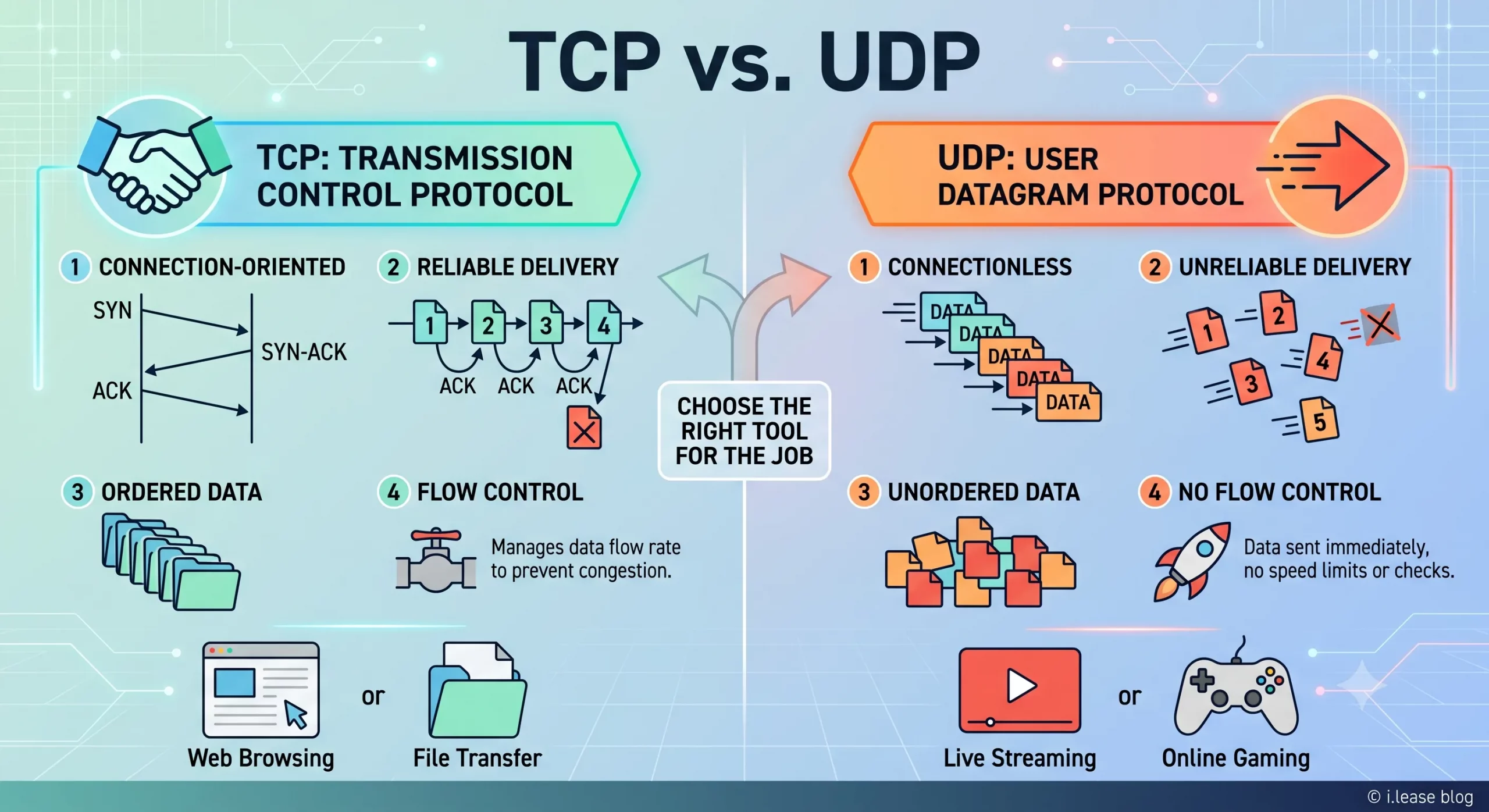
TCP 与 UDP:IPv4 租赁和企业网络指南
TCP 和 UDP 是互联网中最重要的两种传输层协议。它们决定数据如何在设备、服务器、云平台、VPN 网关、DNS 解析器、电子邮件系统、流媒体平台以及企业应用程序之间传输。 对于企业而言,TCP 和 UDP 不仅仅是技术术语,它们会直接影响实际的基础设施性能。公网 IPv4 地址提供可从互联网访问的网络端点,而 TCP 和 UDP 则决定流量如何通过该端点进行传输。 这对于租用或购买 IPv4 地址的企业尤为重要。企业租用 IPv4 地址并不是单纯为了持有这些地址,而是为了运行网站、API、VPN 隧道、DNS 服务、电子邮件平台、SaaS 应用程序、游戏服务器、流媒体系统、安全工具以及云端工作负载。不同类型的服务决定了需要使用 TCP、UDP,还是同时使用两者。 通过 i.lease,企业可以使用 IPv4 租赁服务获取用于实际网络部署的公网 IPv4 资源。需要长期控制 IP 地址资源的企业也可以购买 IP 地址,而拥有闲置 IPv4 资源的组织则可以出售 IP 地址。 TCP和UDP是什么? TCP 和 UDP 都是传输层协议。它们位于 IP 协议之上,帮助应用程序通过网络发送和接收数据。 IP 地址用于确定流量应该发送到哪里,而 TCP 和 UDP 则决定这些流量如何进行传输。 简单来说: TCP 适用于重视可靠性和按顺序传输数据的场景。 UDP 适用于重视速度、低延迟和轻量化数据传输的场景。 企业可能会使用同一个公网 IPv4 地址来运行不同的服务,但每项服务可能依赖不同的传输协议。例如,网站可能使用 TCP,VPN 网关可能使用 UDP,DNS 解析器可能同时使用 UDP 和 TCP,而游戏服务器则可能更倾向于使用 UDP,因为对于实时游戏而言,延迟造成的影响通常比少量数据包丢失更加明显。 因此,TCPRead more Related Posts 什么是电信公司?电信运营商如何为英国、美国和加拿大提供网络连接支持? 电信公司(Telco Companies),也称为电信运营商(Telecommunications Companies),提供通信与网络连接服务。这些服务包括移动通信网络、宽带互联网、光纤连接、固定电话服务、企业网络连接、云连接、托管网络服务以及数据中心连接等。 对于普通消费者而言,电信公司通常被视为移动通信或宽带互联网服务提供商。对于企业来说,电信公司远不只是一个服务品牌,更是关键的基础设施合作伙伴,帮助企业连接办公室、数据中心、云平台、远程员工、客户应用程序以及各类数字化服务。 随着企业越来越依赖云平台、SaaS 应用、AI 工具、VPN、网络安全系统以及在线服务,电信公司已成为数字基础设施规划中不可或缺的重要组成部分。 电信公司是什么? 电信公司(Telco Companies)是提供电信服务的企业。这些服务让个人、设备、企业和各种系统能够跨越距离进行通信与连接。 一家电信公司可能提供以下服务: 移动通信服务 宽带互联网 光纤连接 固定电话服务 企业互联网接入 企业广域网(WAN)服务 云连接服务 数据中心连接 VPN TCP 与 UDP:IPv4 租赁和企业网络指南 TCP 和 UDP 是互联网中最重要的两种传输层协议。它们决定数据如何在设备、服务器、云平台、VPN 网关、DNS 解析器、电子邮件系统、流媒体平台以及企业应用程序之间传输。 对于企业而言,TCP 和 UDP 不仅仅是技术术语,它们会直接影响实际的基础设施性能。公网 IPv4 地址提供可从互联网访问的网络端点,而 TCP 和 UDP 则决定流量如何通过该端点进行传输。 这对于租用或购买 IPv4 地址的企业尤为重要。企业租用 IPv4 什么是区域互联网注册管理机构(RIR) 区域互联网注册管理机构(Regional Internet Registry, RIR)是负责在特定地理区域内分配和管理互联网编号资源的组织。这些资源主要包括 IP 地址(IPv4 和 IPv6)以及自治系统号(ASN),它们是支撑设备和网络在互联网上相互通信的关键要素。 如果没有一套组织完善的系统来分配唯一的 IP 地址和路由标识符,互联网便无法正常运转。RIR 确保这一过程在各自管辖的区域内保持公平、高效与一致,从而避免冲突,并提升互联网治理的透明度。 全球五大 RIR 目前全球共有五家获官方认可的 RIR,各自负责世界上特定的区域:AFRINIC – 非洲网络信息中心(非洲)APNIC – 亚太网络信息中心(亚太地区)ARIN .related-post {} .related-post .post-list { text-align: left; } .related-post .post-list .item { margin: 5px; padding: 10px; } .related-post .headline { font-size: 18px !important; color: #999999 !important; } .related-post .post-list .item .post_thumb { max-height: 220px; margin: 10px 0px; padding: 0px; display: block; } .related-post .post-list .item .post_title { font-size: 16px; color: #3f3f3f; margin: 10px 0px; padding: 0px; display: block; text-decoration: none; } .related-post .post-list .item .post_excerpt { font-size: 13px; color: #3f3f3f; margin: 10px 0px; padding: 0px; display: block; text-decoration: none; } @media only screen and (min-width: 1024px) { .related-post .post-list .item { width: 30%; } } @media only screen and (min-width: 768px) and (max-width: 1023px) { .related-post .post-list .item { width: 90%; } } @media only screen and (min-width: 0px) and (max-width: 767px) { .related-post .post-list .item { width: 90%; } }
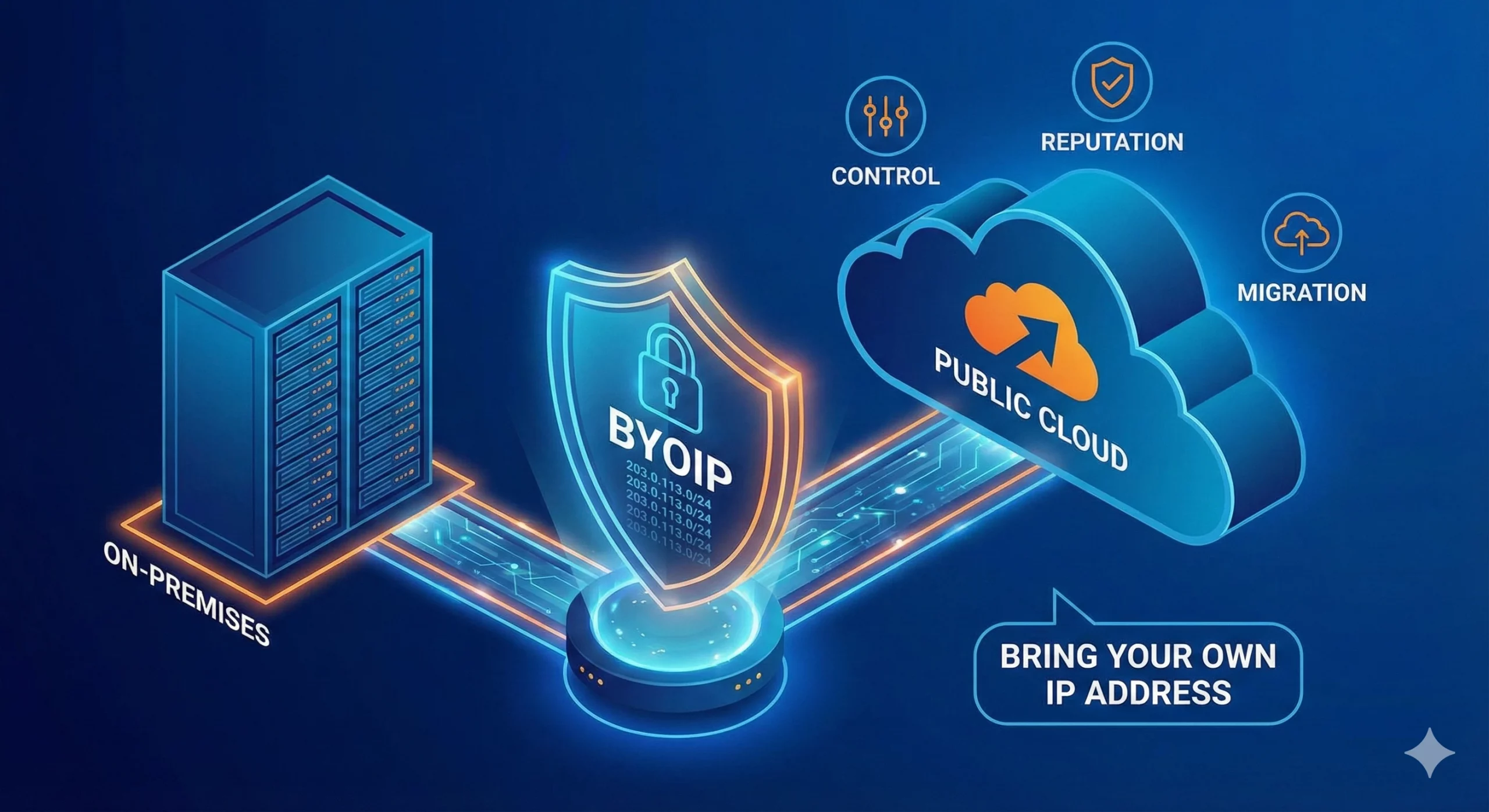
什么是BYOIP(自备IP地址)?
自带 IP(Bring Your Own IP,简称 BYOIP)是一种网络部署方式,允许企业将自己现有的公网 IP 地址段应用于云服务提供商、数据中心、内容分发网络(CDN)或其他基础设施平台。 企业无需使用服务提供商分配的新公网 IP 地址,而是可以使用自己已拥有或已获授权使用的 IPv4 或 IPv6 地址前缀。服务提供商会验证该组织对该地址段的使用权限,并在支持的情况下,通过其自身网络对该地址段进行路由公告(Advertise)。 BYOIP 有助于企业在迁移至云平台时保留现有的防火墙规则、白名单(Allowlists)、客户系统集成、IP 信誉(IP Reputation)、DNS 配置以及既有的网络身份。这不仅能够减少因更换 IP 地址而带来的业务中断,还能降低对服务提供商分配 IP 的依赖,使未来的基础设施迁移与扩展更加灵活且易于管理。 对于需要 BYOIP 地址资源的企业,可选择 购买 IPv4 地址(Buy IP),以获得长期控制权;如果更重视灵活性,也可采用 IPv4 租赁(IPv4 Leasing),按业务需求获取公网 IP 资源。 什么是BYOIP? BYOIP 是 Bring Your Own IP(自带 IP)的缩写。这是一种网络部署模式,允许组织将现有的公网 IP 地址段带入云服务提供商或其他基础设施平台使用。 在 BYOIP 模式下,组织仍然拥有或保留该 IP 地址段的使用权,而平台则获得授权,可在其基础设施中对该地址段进行路由公告(Advertise)和使用。随后,这些 IP 地址可分配给虚拟机(Virtual Machines)、负载均衡器(Load Balancers)、VPN 网关、内容分发服务(CDN)、安全平台以及公网应用程序端点等受支持的服务。 例如,一家企业将应用程序从本地数据中心迁移到云环境时,可能并不希望更换现有的公网 IP 地址。这些 IP 地址可能已经存在于客户白名单(Allowlists)、防火墙策略、DNS 记录、合作伙伴配置以及电子邮件信誉(Email Reputation)数据库中。 BYOIP 使企业能够在迁移工作负载的同时,继续使用原有的公网 IP 地址,从而保持更一致的网络身份,并减少因更换 IP 地址而带来的配置调整和业务影响。 Related Posts 什么是电信公司?电信运营商如何为英国、美国和加拿大提供网络连接支持? 电信公司(Telco Companies),也称为电信运营商(Telecommunications Companies),提供通信与网络连接服务。这些服务包括移动通信网络、宽带互联网、光纤连接、固定电话服务、企业网络连接、云连接、托管网络服务以及数据中心连接等。 对于普通消费者而言,电信公司通常被视为移动通信或宽带互联网服务提供商。对于企业来说,电信公司远不只是一个服务品牌,更是关键的基础设施合作伙伴,帮助企业连接办公室、数据中心、云平台、远程员工、客户应用程序以及各类数字化服务。 随着企业越来越依赖云平台、SaaS 应用、AI 工具、VPN、网络安全系统以及在线服务,电信公司已成为数字基础设施规划中不可或缺的重要组成部分。 电信公司是什么? 电信公司(Telco Companies)是提供电信服务的企业。这些服务让个人、设备、企业和各种系统能够跨越距离进行通信与连接。 一家电信公司可能提供以下服务: 移动通信服务 宽带互联网 光纤连接 固定电话服务 企业互联网接入 企业广域网(WAN)服务 云连接服务 数据中心连接 VPN TCP 与 UDP:IPv4 租赁和企业网络指南 TCP 和 UDP 是互联网中最重要的两种传输层协议。它们决定数据如何在设备、服务器、云平台、VPN 网关、DNS 解析器、电子邮件系统、流媒体平台以及企业应用程序之间传输。 对于企业而言,TCP 和 UDP 不仅仅是技术术语,它们会直接影响实际的基础设施性能。公网 IPv4 地址提供可从互联网访问的网络端点,而 TCP 和 UDP 则决定流量如何通过该端点进行传输。 这对于租用或购买 IPv4 地址的企业尤为重要。企业租用 IPv4 什么是区域互联网注册管理机构(RIR) 区域互联网注册管理机构(Regional Internet Registry, RIR)是负责在特定地理区域内分配和管理互联网编号资源的组织。这些资源主要包括 IP 地址(IPv4 和 IPv6)以及自治系统号(ASN),它们是支撑设备和网络在互联网上相互通信的关键要素。 如果没有一套组织完善的系统来分配唯一的 IP 地址和路由标识符,互联网便无法正常运转。RIR 确保这一过程在各自管辖的区域内保持公平、高效与一致,从而避免冲突,并提升互联网治理的透明度。 全球五大 RIR 目前全球共有五家获官方认可的 RIR,各自负责世界上特定的区域:AFRINIC – 非洲网络信息中心(非洲)APNIC – 亚太网络信息中心(亚太地区)ARIN .related-post {} .related-post .post-list { text-align: left; } .related-post .post-list .item { margin: 5px; padding: 10px; } .related-post .headline { font-size: 18px !important; color: #999999 !important; } .related-post .post-list .item .post_thumb { max-height: 220px; margin: 10px 0px; padding: 0px; display: block; } .related-post .post-list .item .post_title { font-size: 16px; color: #3f3f3f; margin: 10px 0px; padding: 0px; display: block; text-decoration: none; } .related-post .post-list .item .post_excerpt { font-size: 13px; color: #3f3f3f; margin: 10px 0px; padding: 0px; display: block; text-decoration: none; } @media only screen and (min-width: 1024px) { .related-post .post-list .item { width: 30%; } } @media only screen and (min-width: 768px) and (max-width: 1023px) { .related-post .post-list .item { width: 90%; } } @media only screen and (min-width: 0px) and (max-width: 767px) { .related-post .post-list .item { width: 90%; } }
