Identifier un préfixe IPv6 : Guide simple
 Stephanie
En IPv4, on utilise un masque de sous-réseau pour identifier le réseau auquel appartient un périphérique. En IPv6, on utilise un préfixe à la place.
Table of Contents
How to Identify IPv6 Address on Windows, Mac, Android, and iOS:
1.0 Windows
1. Open a command prompt.
2. Type “ipconfig” and press Enter.
3. Locate the “IPv6 Address” field. An entry in this field indicates the presence of an IPv6 address.
2.0 Mac
1. Open a Terminal window.
2. Type “ipconfig getifaddr en0” and press Enter.
3. Observe the IPv6 address. If one is listed, it confirms the existence of an IPv6 address.
3.0 Android
1. Open the Settings app.
2. Navigate to “Network & Internet.”
3. Select “Wi-Fi.”
4. Choose the network you are connected to.
5. Verify the presence of an IPv6 address. Its presence indicates the existence of an IPv6 address.
4.0 iOS
1. Open the Settings app.
2. Access “Wi-Fi.”
3. Select the network to which you are connected.
4. Verify the presence of an IPv6 address in the settings. If one is displayed, it confirms the presence of an IPv6 address.
À propos des préfixes IPv6 : les bases
An IPv6 prefix serves as the segment of an IPv6 address that designates the network. In other words, it determines whether a device belongs to a given network or if it should be routed elsewhere. The remaining portion of an IP address specifies the host within that network.
For instance, consider the IPv6 address 2001:1111:2222:3333::/64. In this example, the prefix consists of 64 bits. The initial 64 bits of the address refer to the network, while the subsequent 64 bits signify the host.
As you may notice, the prefix is denoted by a slash followed by the number of bits constituting the prefix. This notation is called classless inter-domain routing (CIDR) and is commonly used for setting up networks.
Pour déterminer le préfixe IPv6 d’une adresse, suivez ces étapes :
1. Convert the IPv6 address to binary.
2. Calculate the count of leading zeros within the binary address.
3. The number of leading zeros equates to the prefix length.
For example, the binary rendition of the IPv6 address 2001:1111:2222:3333::/64 appears as follows:
11000000 00000001 00000011 00000011 00000011 00000000 00000000 00000000
This binary address contains 64 leading zeros, indicating a prefix length of 64.
Alternatively, you can skip doing the math by using different web-based tools to identify the IPv6 prefix of an address.
When operating with IPv6, understanding how IPv6 prefixes work is important. This will help you manage your network better and improve its performance.
Additional points to consider about IPv6:
1. The minimum prefix length is 64 bits.
2. The maximum prefix length is 128 bits.
3. Common prefix lengths encompass 64 bits and 128 bits.
4. Prefixes can be subdivided to form smaller subnets.
5. Aggregating prefixes facilitates the creation of larger networks.
If you are still unsure about how to verify your IPv6 address, consider reaching out to your Internet service provider (ISP). They can provide information about the availability of IPv6 in their services and guide you in configuration.
However, if you have concerns regarding IPv4, i.lease can help you. We are a reputable broker of IPv4 assets, with experts who can provide professional help for both IPv4 and IPv6.
相关文章

什么是电信公司?电信运营商如何为英国、美国和加拿大提供网络连接支持?
电信公司(Telco Companies),也称为电信运营商(Telecommunications Companies),提供通信与网络连接服务。这些服务包括移动通信网络、宽带互联网、光纤连接、固定电话服务、企业网络连接、云连接、托管网络服务以及数据中心连接等。 对于普通消费者而言,电信公司通常被视为移动通信或宽带互联网服务提供商。对于企业来说,电信公司远不只是一个服务品牌,更是关键的基础设施合作伙伴,帮助企业连接办公室、数据中心、云平台、远程员工、客户应用程序以及各类数字化服务。 随着企业越来越依赖云平台、SaaS 应用、AI 工具、VPN、网络安全系统以及在线服务,电信公司已成为数字基础设施规划中不可或缺的重要组成部分。 电信公司是什么? 电信公司(Telco Companies)是提供电信服务的企业。这些服务让个人、设备、企业和各种系统能够跨越距离进行通信与连接。 一家电信公司可能提供以下服务: 移动通信服务 宽带互联网 光纤连接 固定电话服务 企业互联网接入 企业广域网(WAN)服务 云连接服务 数据中心连接 VPN 服务 托管网络解决方案 互联网传输(Internet Transit) 电信批发服务 部分电信公司拥有并运营大规模的实体网络基础设施;另一些则通过批发接入、租用基础设施或与网络运营商合作来提供电信服务。 电信公司提供哪些服务? 电信公司同时为个人消费者和企业客户提供服务。 面向消费者的服务通常包括移动通信套餐、家庭宽带、光纤互联网、固定电话以及通信组合套餐。 面向企业的服务则可能包括专线互联网接入、企业光纤、专用网络、云连接、托管安全服务、数据中心连接、物联网(IoT)连接以及企业移动通信方案。 对于大型企业客户,电信公司还可提供: 多地点办公室网络连接 远程员工接入 私有云连接 SD-WAN(软件定义广域网) 灾难恢复连接 低延迟网络路由 互联网传输(Internet Transit) 网络监控 托管防火墙服务 正因如此,电信公司不仅对日常通信至关重要,也是现代企业建设先进数字基础设施的重要支柱。 电信公司 vs 互联网服务提供商 vs 网络运营商 电信公司(Telco)、互联网服务提供商(ISP)和网络运营商(Network Operator)之间可能存在重叠,但它们并不完全相同。 电信公司提供电信服务。 互联网服务提供商(ISP)提供互联网接入服务。 网络运营商负责建设、运营和管理网络基础设施。 一些大型电信公司同时承担这三种角色。它们拥有基础设施、运营网络,并向市场提供互联网、移动通信以及企业网络服务。 规模较小的服务提供商则可能专注于其中某一层。例如,互联网服务提供商(ISP)可以销售宽带服务,而无需拥有所有实体网络基础设施;网络运营商可能负责建设和运营光纤网络,并向电信公司或 ISP 提供批发网络接入;电信公司则可能结合自有网络与合作伙伴网络,为客户提供移动通信和企业服务。 对于企业而言,理解这些区别非常重要,因为服务质量不仅取决于销售该方案的品牌,还受到其底层网络、路由设计、网络覆盖范围以及技术支持体系等因素的影响。 为什么电信公司对企业至关重要 电信公司之所以重要,是因为几乎所有现代企业都依赖稳定的网络连接。 企业可能需要电信服务来支持: 办公室互联网接入 移动网络连接 远程办公 客户支持系统 云应用程序 SaaS 平台 支付系统 VPNRead more Related Posts 什么是电信公司?电信运营商如何为英国、美国和加拿大提供网络连接支持? 电信公司(Telco Companies),也称为电信运营商(Telecommunications Companies),提供通信与网络连接服务。这些服务包括移动通信网络、宽带互联网、光纤连接、固定电话服务、企业网络连接、云连接、托管网络服务以及数据中心连接等。 对于普通消费者而言,电信公司通常被视为移动通信或宽带互联网服务提供商。对于企业来说,电信公司远不只是一个服务品牌,更是关键的基础设施合作伙伴,帮助企业连接办公室、数据中心、云平台、远程员工、客户应用程序以及各类数字化服务。 随着企业越来越依赖云平台、SaaS 应用、AI 工具、VPN、网络安全系统以及在线服务,电信公司已成为数字基础设施规划中不可或缺的重要组成部分。 电信公司是什么? 电信公司(Telco Companies)是提供电信服务的企业。这些服务让个人、设备、企业和各种系统能够跨越距离进行通信与连接。 一家电信公司可能提供以下服务: 移动通信服务 宽带互联网 光纤连接 固定电话服务 企业互联网接入 企业广域网(WAN)服务 云连接服务 数据中心连接 VPN TCP 与 UDP:IPv4 租赁和企业网络指南 TCP 和 UDP 是互联网中最重要的两种传输层协议。它们决定数据如何在设备、服务器、云平台、VPN 网关、DNS 解析器、电子邮件系统、流媒体平台以及企业应用程序之间传输。 对于企业而言,TCP 和 UDP 不仅仅是技术术语,它们会直接影响实际的基础设施性能。公网 IPv4 地址提供可从互联网访问的网络端点,而 TCP 和 UDP 则决定流量如何通过该端点进行传输。 这对于租用或购买 IPv4 地址的企业尤为重要。企业租用 IPv4 什么是区域互联网注册管理机构(RIR) 区域互联网注册管理机构(Regional Internet Registry, RIR)是负责在特定地理区域内分配和管理互联网编号资源的组织。这些资源主要包括 IP 地址(IPv4 和 IPv6)以及自治系统号(ASN),它们是支撑设备和网络在互联网上相互通信的关键要素。 如果没有一套组织完善的系统来分配唯一的 IP 地址和路由标识符,互联网便无法正常运转。RIR 确保这一过程在各自管辖的区域内保持公平、高效与一致,从而避免冲突,并提升互联网治理的透明度。 全球五大 RIR 目前全球共有五家获官方认可的 RIR,各自负责世界上特定的区域:AFRINIC – 非洲网络信息中心(非洲)APNIC – 亚太网络信息中心(亚太地区)ARIN .related-post {} .related-post .post-list { text-align: left; } .related-post .post-list .item { margin: 5px; padding: 10px; } .related-post .headline { font-size: 18px !important; color: #999999 !important; } .related-post .post-list .item .post_thumb { max-height: 220px; margin: 10px 0px; padding: 0px; display: block; } .related-post .post-list .item .post_title { font-size: 16px; color: #3f3f3f; margin: 10px 0px; padding: 0px; display: block; text-decoration: none; } .related-post .post-list .item .post_excerpt { font-size: 13px; color: #3f3f3f; margin: 10px 0px; padding: 0px; display: block; text-decoration: none; } @media only screen and (min-width: 1024px) { .related-post .post-list .item { width: 30%; } } @media only screen and (min-width: 768px) and (max-width: 1023px) { .related-post .post-list .item { width: 90%; } } @media only screen and (min-width: 0px) and (max-width: 767px) { .related-post .post-list .item { width: 90%; } }
TCP 与 UDP:IPv4 租赁和企业网络指南
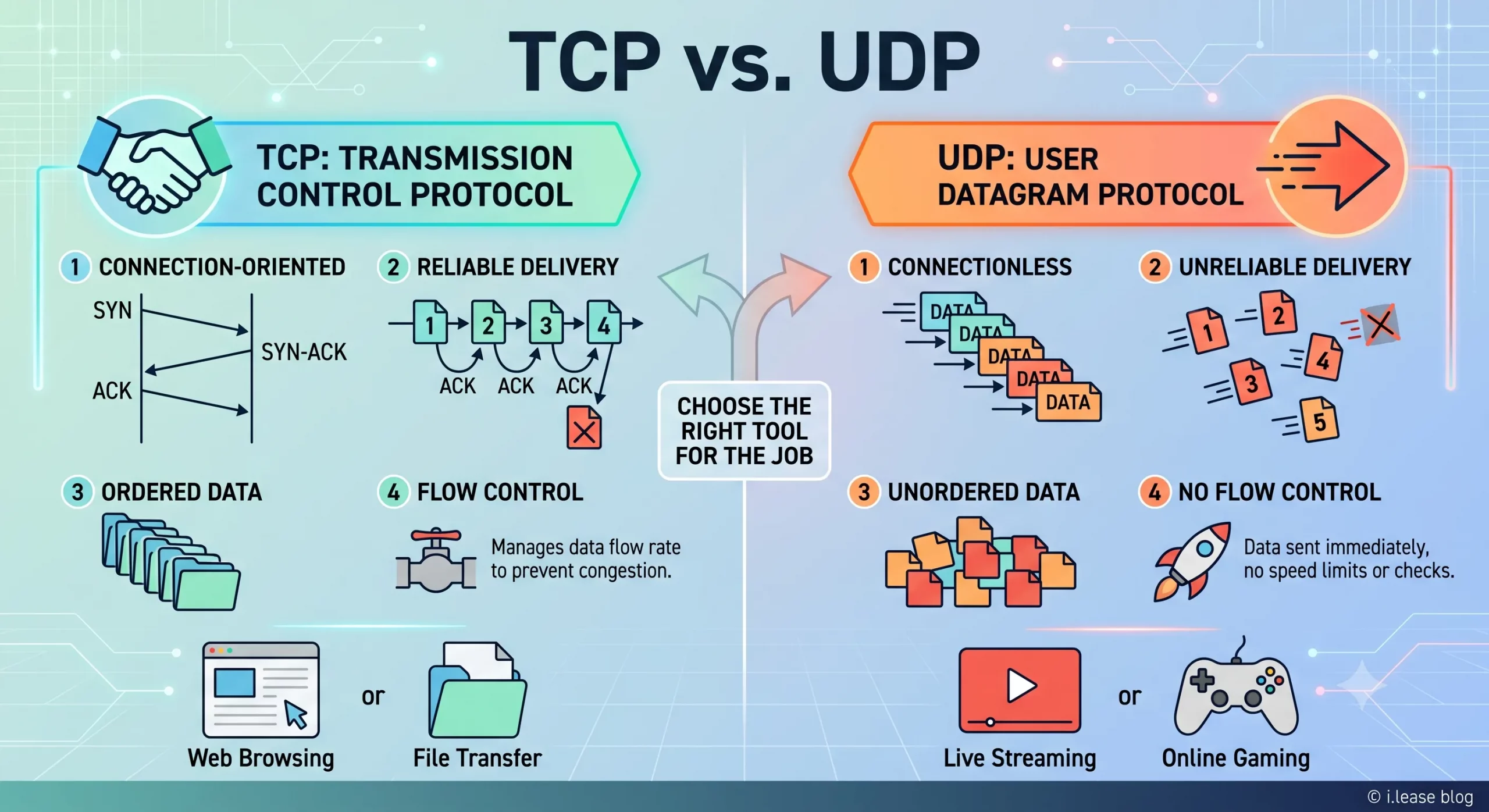
TCP 和 UDP 是互联网中最重要的两种传输层协议。它们决定数据如何在设备、服务器、云平台、VPN 网关、DNS 解析器、电子邮件系统、流媒体平台以及企业应用程序之间传输。 对于企业而言,TCP 和 UDP 不仅仅是技术术语,它们会直接影响实际的基础设施性能。公网 IPv4 地址提供可从互联网访问的网络端点,而 TCP 和 UDP 则决定流量如何通过该端点进行传输。 这对于租用或购买 IPv4 地址的企业尤为重要。企业租用 IPv4 地址并不是单纯为了持有这些地址,而是为了运行网站、API、VPN 隧道、DNS 服务、电子邮件平台、SaaS 应用程序、游戏服务器、流媒体系统、安全工具以及云端工作负载。不同类型的服务决定了需要使用 TCP、UDP,还是同时使用两者。 通过 i.lease,企业可以使用 IPv4 租赁服务获取用于实际网络部署的公网 IPv4 资源。需要长期控制 IP 地址资源的企业也可以购买 IP 地址,而拥有闲置 IPv4 资源的组织则可以出售 IP 地址。 TCP和UDP是什么? TCP 和 UDP 都是传输层协议。它们位于 IP 协议之上,帮助应用程序通过网络发送和接收数据。 IP 地址用于确定流量应该发送到哪里,而 TCP 和 UDP 则决定这些流量如何进行传输。 简单来说: TCP 适用于重视可靠性和按顺序传输数据的场景。 UDP 适用于重视速度、低延迟和轻量化数据传输的场景。 企业可能会使用同一个公网 IPv4 地址来运行不同的服务,但每项服务可能依赖不同的传输协议。例如,网站可能使用 TCP,VPN 网关可能使用 UDP,DNS 解析器可能同时使用 UDP 和 TCP,而游戏服务器则可能更倾向于使用 UDP,因为对于实时游戏而言,延迟造成的影响通常比少量数据包丢失更加明显。 因此,TCPRead more Related Posts 什么是电信公司?电信运营商如何为英国、美国和加拿大提供网络连接支持? 电信公司(Telco Companies),也称为电信运营商(Telecommunications Companies),提供通信与网络连接服务。这些服务包括移动通信网络、宽带互联网、光纤连接、固定电话服务、企业网络连接、云连接、托管网络服务以及数据中心连接等。 对于普通消费者而言,电信公司通常被视为移动通信或宽带互联网服务提供商。对于企业来说,电信公司远不只是一个服务品牌,更是关键的基础设施合作伙伴,帮助企业连接办公室、数据中心、云平台、远程员工、客户应用程序以及各类数字化服务。 随着企业越来越依赖云平台、SaaS 应用、AI 工具、VPN、网络安全系统以及在线服务,电信公司已成为数字基础设施规划中不可或缺的重要组成部分。 电信公司是什么? 电信公司(Telco Companies)是提供电信服务的企业。这些服务让个人、设备、企业和各种系统能够跨越距离进行通信与连接。 一家电信公司可能提供以下服务: 移动通信服务 宽带互联网 光纤连接 固定电话服务 企业互联网接入 企业广域网(WAN)服务 云连接服务 数据中心连接 VPN TCP 与 UDP:IPv4 租赁和企业网络指南 TCP 和 UDP 是互联网中最重要的两种传输层协议。它们决定数据如何在设备、服务器、云平台、VPN 网关、DNS 解析器、电子邮件系统、流媒体平台以及企业应用程序之间传输。 对于企业而言,TCP 和 UDP 不仅仅是技术术语,它们会直接影响实际的基础设施性能。公网 IPv4 地址提供可从互联网访问的网络端点,而 TCP 和 UDP 则决定流量如何通过该端点进行传输。 这对于租用或购买 IPv4 地址的企业尤为重要。企业租用 IPv4 什么是区域互联网注册管理机构(RIR) 区域互联网注册管理机构(Regional Internet Registry, RIR)是负责在特定地理区域内分配和管理互联网编号资源的组织。这些资源主要包括 IP 地址(IPv4 和 IPv6)以及自治系统号(ASN),它们是支撑设备和网络在互联网上相互通信的关键要素。 如果没有一套组织完善的系统来分配唯一的 IP 地址和路由标识符,互联网便无法正常运转。RIR 确保这一过程在各自管辖的区域内保持公平、高效与一致,从而避免冲突,并提升互联网治理的透明度。 全球五大 RIR 目前全球共有五家获官方认可的 RIR,各自负责世界上特定的区域:AFRINIC – 非洲网络信息中心(非洲)APNIC – 亚太网络信息中心(亚太地区)ARIN .related-post {} .related-post .post-list { text-align: left; } .related-post .post-list .item { margin: 5px; padding: 10px; } .related-post .headline { font-size: 18px !important; color: #999999 !important; } .related-post .post-list .item .post_thumb { max-height: 220px; margin: 10px 0px; padding: 0px; display: block; } .related-post .post-list .item .post_title { font-size: 16px; color: #3f3f3f; margin: 10px 0px; padding: 0px; display: block; text-decoration: none; } .related-post .post-list .item .post_excerpt { font-size: 13px; color: #3f3f3f; margin: 10px 0px; padding: 0px; display: block; text-decoration: none; } @media only screen and (min-width: 1024px) { .related-post .post-list .item { width: 30%; } } @media only screen and (min-width: 768px) and (max-width: 1023px) { .related-post .post-list .item { width: 90%; } } @media only screen and (min-width: 0px) and (max-width: 767px) { .related-post .post-list .item { width: 90%; } }
什么是BYOIP(自备IP地址)?
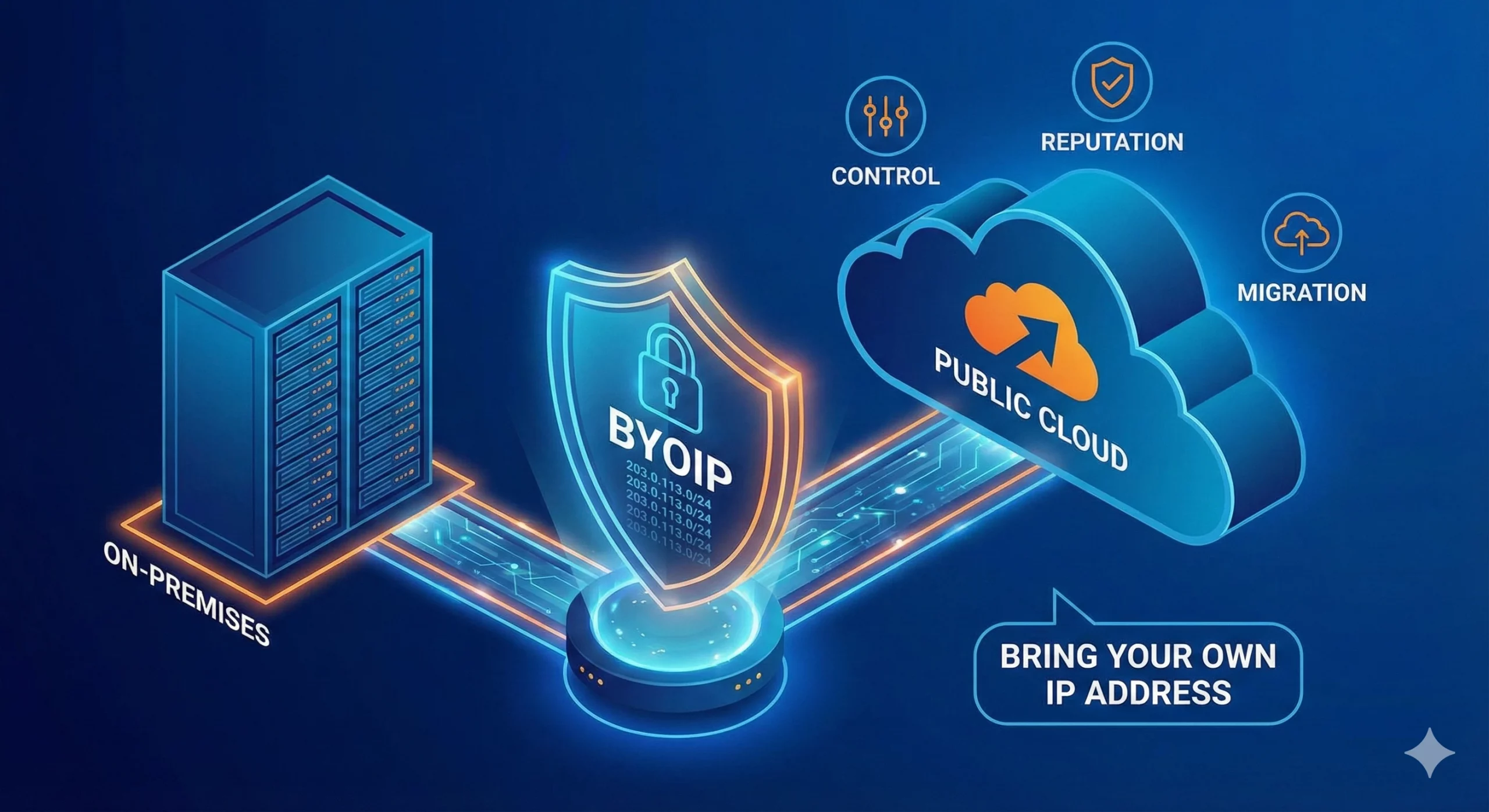
自带 IP(Bring Your Own IP,简称 BYOIP)是一种网络部署方式,允许企业将自己现有的公网 IP 地址段应用于云服务提供商、数据中心、内容分发网络(CDN)或其他基础设施平台。 企业无需使用服务提供商分配的新公网 IP 地址,而是可以使用自己已拥有或已获授权使用的 IPv4 或 IPv6 地址前缀。服务提供商会验证该组织对该地址段的使用权限,并在支持的情况下,通过其自身网络对该地址段进行路由公告(Advertise)。 BYOIP 有助于企业在迁移至云平台时保留现有的防火墙规则、白名单(Allowlists)、客户系统集成、IP 信誉(IP Reputation)、DNS 配置以及既有的网络身份。这不仅能够减少因更换 IP 地址而带来的业务中断,还能降低对服务提供商分配 IP 的依赖,使未来的基础设施迁移与扩展更加灵活且易于管理。 对于需要 BYOIP 地址资源的企业,可选择 购买 IPv4 地址(Buy IP),以获得长期控制权;如果更重视灵活性,也可采用 IPv4 租赁(IPv4 Leasing),按业务需求获取公网 IP 资源。 什么是BYOIP? BYOIP 是 Bring Your Own IP(自带 IP)的缩写。这是一种网络部署模式,允许组织将现有的公网 IP 地址段带入云服务提供商或其他基础设施平台使用。 在 BYOIP 模式下,组织仍然拥有或保留该 IP 地址段的使用权,而平台则获得授权,可在其基础设施中对该地址段进行路由公告(Advertise)和使用。随后,这些 IP 地址可分配给虚拟机(Virtual Machines)、负载均衡器(Load Balancers)、VPN 网关、内容分发服务(CDN)、安全平台以及公网应用程序端点等受支持的服务。 例如,一家企业将应用程序从本地数据中心迁移到云环境时,可能并不希望更换现有的公网 IP 地址。这些 IP 地址可能已经存在于客户白名单(Allowlists)、防火墙策略、DNS 记录、合作伙伴配置以及电子邮件信誉(Email Reputation)数据库中。 BYOIP 使企业能够在迁移工作负载的同时,继续使用原有的公网 IP 地址,从而保持更一致的网络身份,并减少因更换 IP 地址而带来的配置调整和业务影响。 Related Posts 什么是电信公司?电信运营商如何为英国、美国和加拿大提供网络连接支持? 电信公司(Telco Companies),也称为电信运营商(Telecommunications Companies),提供通信与网络连接服务。这些服务包括移动通信网络、宽带互联网、光纤连接、固定电话服务、企业网络连接、云连接、托管网络服务以及数据中心连接等。 对于普通消费者而言,电信公司通常被视为移动通信或宽带互联网服务提供商。对于企业来说,电信公司远不只是一个服务品牌,更是关键的基础设施合作伙伴,帮助企业连接办公室、数据中心、云平台、远程员工、客户应用程序以及各类数字化服务。 随着企业越来越依赖云平台、SaaS 应用、AI 工具、VPN、网络安全系统以及在线服务,电信公司已成为数字基础设施规划中不可或缺的重要组成部分。 电信公司是什么? 电信公司(Telco Companies)是提供电信服务的企业。这些服务让个人、设备、企业和各种系统能够跨越距离进行通信与连接。 一家电信公司可能提供以下服务: 移动通信服务 宽带互联网 光纤连接 固定电话服务 企业互联网接入 企业广域网(WAN)服务 云连接服务 数据中心连接 VPN TCP 与 UDP:IPv4 租赁和企业网络指南 TCP 和 UDP 是互联网中最重要的两种传输层协议。它们决定数据如何在设备、服务器、云平台、VPN 网关、DNS 解析器、电子邮件系统、流媒体平台以及企业应用程序之间传输。 对于企业而言,TCP 和 UDP 不仅仅是技术术语,它们会直接影响实际的基础设施性能。公网 IPv4 地址提供可从互联网访问的网络端点,而 TCP 和 UDP 则决定流量如何通过该端点进行传输。 这对于租用或购买 IPv4 地址的企业尤为重要。企业租用 IPv4 什么是区域互联网注册管理机构(RIR) 区域互联网注册管理机构(Regional Internet Registry, RIR)是负责在特定地理区域内分配和管理互联网编号资源的组织。这些资源主要包括 IP 地址(IPv4 和 IPv6)以及自治系统号(ASN),它们是支撑设备和网络在互联网上相互通信的关键要素。 如果没有一套组织完善的系统来分配唯一的 IP 地址和路由标识符,互联网便无法正常运转。RIR 确保这一过程在各自管辖的区域内保持公平、高效与一致,从而避免冲突,并提升互联网治理的透明度。 全球五大 RIR 目前全球共有五家获官方认可的 RIR,各自负责世界上特定的区域:AFRINIC – 非洲网络信息中心(非洲)APNIC – 亚太网络信息中心(亚太地区)ARIN .related-post {} .related-post .post-list { text-align: left; } .related-post .post-list .item { margin: 5px; padding: 10px; } .related-post .headline { font-size: 18px !important; color: #999999 !important; } .related-post .post-list .item .post_thumb { max-height: 220px; margin: 10px 0px; padding: 0px; display: block; } .related-post .post-list .item .post_title { font-size: 16px; color: #3f3f3f; margin: 10px 0px; padding: 0px; display: block; text-decoration: none; } .related-post .post-list .item .post_excerpt { font-size: 13px; color: #3f3f3f; margin: 10px 0px; padding: 0px; display: block; text-decoration: none; } @media only screen and (min-width: 1024px) { .related-post .post-list .item { width: 30%; } } @media only screen and (min-width: 768px) and (max-width: 1023px) { .related-post .post-list .item { width: 90%; } } @media only screen and (min-width: 0px) and (max-width: 767px) { .related-post .post-list .item { width: 90%; } }
