How to Avoid Downtime When Deploying Leased IPv4 Blocks
 Stephanie
Leased IPv4 blocks are often used by hosting providers, cloud platforms, ISPs, SaaS companies, data centers, and enterprise networks that need public IPv4 resources without purchasing address space outright. Leasing can be a practical way to support infrastructure growth, customer services, migration projects, and temporary deployment needs.
Table of Contents
However, getting access to IPv4 space is only the first step. The real challenge is deploying the leased IPv4 block without causing downtime, routing issues, failed connections, email delivery problems, or customer-facing disruptions.
A leased IPv4 block must be treated as a production network asset. It needs routing preparation, reputation checks, DNS configuration, firewall updates, monitoring, and a rollback plan. Without these steps, even a technically valid IPv4 block can create operational risk.
This guide explains how to avoid downtime when deploying leased IPv4 blocks and what your team should prepare before moving production traffic.
Why Downtime Happens During IPv4 Deployment
Downtime during leased IPv4 deployment usually happens because of poor coordination between commercial approval, network routing, security configuration, and application migration.
Common causes include:
- The IPv4 block is not announced correctly.
- Upstream providers reject the route.
- RPKI or route authorization is missing or incorrect.
- Reverse DNS has not been configured.
- Firewalls or access control lists still block the new range.
- Partner allowlists are not updated.
- The block has poor reputation or blacklist history.
- Geolocation databases show the wrong country or region.
- Monitoring starts too late.
- There is no rollback plan.
In many cases, the IPv4 lease itself is not the problem. The problem is that the deployment process is rushed or incomplete.
1. Confirm the Use Case Before Deployment
Before deploying a leased IPv4 block, your team should clearly define how the addresses will be used. Different use cases require different levels of preparation.
For example, a block used for web hosting may require DNS, SSL, load balancer, and firewall updates. A block used for email infrastructure will require deeper attention to reverse DNS, SPF, DKIM, DMARC, and blacklist checks. A block used for VPN or enterprise access may require customer allowlists and partner coordination.
Ask these questions before deployment:
- Will the block be used for hosting, cloud services, VPN, email, APIs, or customer access?
- Will it support production traffic immediately?
- Which ASN will announce the block?
- Which upstream provider will carry the route?
- Will the block be used in one region or multiple regions?
- Which internal teams need to approve the deployment?
- Who is responsible for troubleshooting?
A clear deployment scope helps prevent confusion when the block goes live.
2. Work With a Reliable IPv4 Leasing Provider
One of the safest ways to reduce deployment risk is to work with a provider that understands both the commercial and operational side of IPv4 leasing.
Some companies try to find unused IPv4 blocks directly from individual holders. This may work, but it can involve negotiation, verification, contract preparation, blacklist checks, routing coordination, and operational uncertainty. For businesses that need speed and reliability, it is often more practical to lease IPv4 blocks through an experienced IPv4 leasing provider, especially when managed IPv4 leasing support is needed for routing readiness, documentation, and operational handoff.
A reliable provider should help clarify:
- Block availability
- Lease duration
- Routing requirements
- Reputation status
- Required documentation
- Operational responsibilities
- Support process
- Renewal terms
This is especially important when the leased IPv4 block will support production systems. The provider should not only deliver the IP range, but also help reduce risk during deployment.
3. Validate Routing Before Moving Traffic
Routing is one of the most important parts of leased IPv4 deployment. If routing is not correct, users may not be able to reach your services even if the servers and applications are working properly.
Before production migration, confirm:
- The prefix is accepted by your upstream provider.
- Route objects are created where required.
- RPKI/ROA records are correct where applicable.
- The ASN is authorized to announce the block.
- BGP announcements are visible globally.
- No upstream filters are blocking the prefix.
- Route propagation is stable.
Do not wait until production traffic is moved to discover routing problems. Announce and test the prefix first, then verify reachability from multiple networks and regions.
4. Check IP Reputation Before Launch
IP reputation can affect whether your traffic is accepted, filtered, delayed, or blocked. This is especially important for email, hosting, SaaS platforms, login systems, API gateways, and customer-facing applications.
Before using a leased IPv4 block, check:
- Spam blacklist status
- Abuse history
- Malware or botnet listings
- Proxy or VPN reputation
- Email deliverability risk
- Threat intelligence databases
- Previous usage patterns
If a block has reputation issues, your team should address them before production launch. Otherwise, users may experience blocked emails, failed signups, security warnings, or restricted access.
For email-related deployments, reputation preparation is not optional. Reverse DNS, domain alignment, authentication records, and gradual sending volume are all important for protecting deliverability.
5. Configure Reverse DNS Early
Reverse DNS, also known as rDNS or PTR records, is often required for email servers, security validation, logging, and trust checks.
Before deployment, make sure:
- rDNS delegation is completed.
- PTR records match the intended service names.
- Forward and reverse DNS are consistent where needed.
- DNS records are tested before launch.
- Internal documentation records who controls DNS changes.
Missing or incorrect rDNS may not always create a full outage, but it can cause partial service failure. For example, email may be rejected, partner systems may flag the traffic, or security tools may treat the connection as suspicious.
6. Update Firewalls, ACLs, and Security Policies
Many downtime incidents happen because the network route works, but security controls still block the new IPv4 block.
Before migration, update:
- Firewalls
- Cloud security groups
- Router ACLs
- VPN policies
- DDoS protection rules
- Web application firewall rules
- SIEM rules
- Internal monitoring rules
- Partner allowlists
- Customer access controls
This step is critical when the new leased IPv4 block replaces an existing range. Customers, vendors, banks, payment providers, enterprise partners, and API integrations may already trust your old IP addresses. If they are not told to allowlist the new block, traffic may fail even though your own network is configured correctly.
7. Plan for Geolocation Updates
Geolocation issues are common when deploying leased IPv4 blocks. A block may be routed from one country but still appear in geolocation databases as another country or region.
This can affect:
- Content localization
- Fraud detection
- Payment systems
- Streaming access
- Compliance controls
- Regional pricing
- Login risk scoring
- Customer experience
Before launch, check the leased IPv4 block against major geolocation databases. If the location is incorrect, submit update requests early. These updates may take time, so do not leave them until the day of migration.
For businesses serving specific markets, geolocation accuracy should be part of the deployment checklist.
8. Stage the Migration
Avoid moving all production traffic to a leased IPv4 block at once. A staged rollout makes it easier to detect and fix problems before they affect every user.
A safer migration process may look like this:
Prepare routing and authorization.
Announce the leased IPv4 block.
Confirm global route visibility.
Configure DNS and rDNS.
Update firewalls and allowlists.
Test from multiple external networks.
Move a low-risk service first.
Monitor traffic and errors.
Gradually migrate production workloads.
Keep rollback options available.
This approach reduces the risk of a full outage. It also gives your team time to identify unexpected issues such as routing instability, blocked traffic, incorrect DNS, or reputation problems.
9. Use Monitoring From the First Announcement
Monitoring should begin as soon as the block is announced, not after production traffic has already moved.
Track:
- BGP visibility
- Route propagation
- Packet loss
- Latency
- DNS resolution
- rDNS correctness
- Application errors
- Blacklist changes
- Abuse reports
- Geolocation accuracy
- Customer support tickets
Monitoring should include both network-level and application-level checks. A route may be visible, but the application may still fail because of firewall rules, SSL configuration, DNS caching, or partner restrictions.
Set alerts for unusual traffic drops, route withdrawals, increased error rates, and reputation changes.
10. Prepare a Rollback Plan
Every IPv4 deployment should include a rollback plan. Even with careful preparation, unexpected issues can happen.
Your rollback plan should define:
- Which systems can return to the previous IP range
- How DNS rollback will be handled
- Expected DNS TTL behavior
- Who approves rollback
- Which teams must be notified
- How customer communication will be handled
- What logs and metrics must be preserved
A rollback plan does not mean the deployment is expected to fail. It means the business is prepared to protect uptime if something unexpected occurs.
11. Review Lease Terms and Continuity Requirements
Downtime risk is not limited to the first deployment. It can also appear later if the lease expires, renewal terms are unclear, or the provider cannot support long-term continuity.
Before using leased IPv4 blocks for production workloads, confirm:
- Lease duration
- Renewal process
- Notice period
- Termination terms
- Support availability
- Abuse handling process
- Routing responsibilities
- Documentation requirements
- Pricing structure
For smaller deployments, many teams start by evaluating a /24 because it is commonly used for production routing and service segmentation. To understand cost expectations, read this guide on how much a /24 IPv4 block costs in 2026.
Cost is important, but it should not be the only factor. For production use, stability, reputation, provider support, and renewal clarity are just as important.
12. Document the Entire Deployment
Good documentation helps prevent mistakes during troubleshooting, renewals, audits, and future migrations.
Your documentation should include:
- IPv4 block details
- Lease start and end date
- Provider contact
- ASN and routing information
- Route authorization details
- rDNS configuration
- DNS records
- Firewall changes
- Partner allowlists
- Monitoring dashboards
- Geolocation update records
- Abuse contact process
- Renewal reminders
- Rollback steps
Documentation should be accessible to network, security, infrastructure, and support teams. If only one engineer understands the deployment, the business has unnecessary operational risk.
Deployment Checklist for Leased IPv4 Blocks
Before moving production traffic, confirm the following:
- The leased IPv4 block is approved for your intended use.
- The ASN and routing plan are confirmed.
- Required route objects or authorization records are prepared.
- RPKI/ROA status is checked.
- BGP announcement is tested.
- IP reputation is reviewed.
- Blacklist checks are completed.
- rDNS is configured.
- DNS records are ready.
- Firewalls and ACLs are updated.
- Partner allowlists are updated.
- Geolocation is checked.
- Monitoring is active.
- A staged migration plan is prepared.
- A rollback plan is ready.
- Lease and renewal terms are documented.
This checklist can help reduce the most common causes of IPv4 deployment downtime.
Final Thoughts
Deploying leased IPv4 blocks safely requires more than assigning addresses to servers. It requires planning, validation, monitoring, and coordination across network, security, infrastructure, and business teams.
The most successful deployments start before traffic moves. Teams verify routing, check reputation, configure DNS, update security controls, monitor propagation, and prepare rollback steps in advance. These actions help prevent downtime and protect customer experience.
Leased IPv4 blocks can give businesses the flexibility to scale infrastructure without purchasing address space outright. But to get the full benefit, organizations must treat IPv4 leasing as an operational process, not just a commercial transaction.
Read: How to lease ipv4 block
With the right preparation and provider support, businesses can deploy leased IPv4 blocks smoothly, reduce downtime risk, and maintain reliable service continuity.
Frequent Asked Questions
1. What causes downtime when deploying leased IPv4 blocks?
Downtime often happens because of routing errors, missing route authorization, incorrect RPKI/ROA records, firewall misconfiguration, poor IP reputation, missing rDNS, outdated partner allowlists, or geolocation issues. Most problems can be avoided with proper testing before production traffic is moved.
2. How can I check if a leased IPv4 block is ready for deployment?
Before deployment, confirm that the IPv4 block can be announced by your ASN, route objects or authorization records are prepared, RPKI/ROA status is valid, BGP visibility is stable, rDNS is configured, IP reputation is clean, and monitoring is active.
3. Why is IP reputation important for leased IPv4 blocks?
IP reputation affects whether traffic from the block is trusted, filtered, delayed, or blocked. If the block has a history of spam, abuse, proxy use, or malware activity, it may affect email delivery, hosting reliability, API access, and customer-facing services.
4. Should leased IPv4 blocks be deployed all at once?
No. A staged migration is safer. Start by announcing the block, testing global reachability, configuring DNS and security rules, then moving low-risk services first. Production workloads should only be moved after monitoring confirms stable routing and service performance.
5. What should be included in a rollback plan for leased IPv4 deployment?
A rollback plan should include the previous IP range, DNS rollback steps, expected TTL behavior, approval contacts, customer communication steps, monitoring checks, and responsibilities for network, infrastructure, and support teams.
相关文章

什么是电信公司?电信运营商如何为英国、美国和加拿大提供网络连接支持?
电信公司(Telco Companies),也称为电信运营商(Telecommunications Companies),提供通信与网络连接服务。这些服务包括移动通信网络、宽带互联网、光纤连接、固定电话服务、企业网络连接、云连接、托管网络服务以及数据中心连接等。 对于普通消费者而言,电信公司通常被视为移动通信或宽带互联网服务提供商。对于企业来说,电信公司远不只是一个服务品牌,更是关键的基础设施合作伙伴,帮助企业连接办公室、数据中心、云平台、远程员工、客户应用程序以及各类数字化服务。 随着企业越来越依赖云平台、SaaS 应用、AI 工具、VPN、网络安全系统以及在线服务,电信公司已成为数字基础设施规划中不可或缺的重要组成部分。 电信公司是什么? 电信公司(Telco Companies)是提供电信服务的企业。这些服务让个人、设备、企业和各种系统能够跨越距离进行通信与连接。 一家电信公司可能提供以下服务: 移动通信服务 宽带互联网 光纤连接 固定电话服务 企业互联网接入 企业广域网(WAN)服务 云连接服务 数据中心连接 VPN 服务 托管网络解决方案 互联网传输(Internet Transit) 电信批发服务 部分电信公司拥有并运营大规模的实体网络基础设施;另一些则通过批发接入、租用基础设施或与网络运营商合作来提供电信服务。 电信公司提供哪些服务? 电信公司同时为个人消费者和企业客户提供服务。 面向消费者的服务通常包括移动通信套餐、家庭宽带、光纤互联网、固定电话以及通信组合套餐。 面向企业的服务则可能包括专线互联网接入、企业光纤、专用网络、云连接、托管安全服务、数据中心连接、物联网(IoT)连接以及企业移动通信方案。 对于大型企业客户,电信公司还可提供: 多地点办公室网络连接 远程员工接入 私有云连接 SD-WAN(软件定义广域网) 灾难恢复连接 低延迟网络路由 互联网传输(Internet Transit) 网络监控 托管防火墙服务 正因如此,电信公司不仅对日常通信至关重要,也是现代企业建设先进数字基础设施的重要支柱。 电信公司 vs 互联网服务提供商 vs 网络运营商 电信公司(Telco)、互联网服务提供商(ISP)和网络运营商(Network Operator)之间可能存在重叠,但它们并不完全相同。 电信公司提供电信服务。 互联网服务提供商(ISP)提供互联网接入服务。 网络运营商负责建设、运营和管理网络基础设施。 一些大型电信公司同时承担这三种角色。它们拥有基础设施、运营网络,并向市场提供互联网、移动通信以及企业网络服务。 规模较小的服务提供商则可能专注于其中某一层。例如,互联网服务提供商(ISP)可以销售宽带服务,而无需拥有所有实体网络基础设施;网络运营商可能负责建设和运营光纤网络,并向电信公司或 ISP 提供批发网络接入;电信公司则可能结合自有网络与合作伙伴网络,为客户提供移动通信和企业服务。 对于企业而言,理解这些区别非常重要,因为服务质量不仅取决于销售该方案的品牌,还受到其底层网络、路由设计、网络覆盖范围以及技术支持体系等因素的影响。 为什么电信公司对企业至关重要 电信公司之所以重要,是因为几乎所有现代企业都依赖稳定的网络连接。 企业可能需要电信服务来支持: 办公室互联网接入 移动网络连接 远程办公 客户支持系统 云应用程序 SaaS 平台 支付系统 VPNRead more Related Posts 什么是电信公司?电信运营商如何为英国、美国和加拿大提供网络连接支持? 电信公司(Telco Companies),也称为电信运营商(Telecommunications Companies),提供通信与网络连接服务。这些服务包括移动通信网络、宽带互联网、光纤连接、固定电话服务、企业网络连接、云连接、托管网络服务以及数据中心连接等。 对于普通消费者而言,电信公司通常被视为移动通信或宽带互联网服务提供商。对于企业来说,电信公司远不只是一个服务品牌,更是关键的基础设施合作伙伴,帮助企业连接办公室、数据中心、云平台、远程员工、客户应用程序以及各类数字化服务。 随着企业越来越依赖云平台、SaaS 应用、AI 工具、VPN、网络安全系统以及在线服务,电信公司已成为数字基础设施规划中不可或缺的重要组成部分。 电信公司是什么? 电信公司(Telco Companies)是提供电信服务的企业。这些服务让个人、设备、企业和各种系统能够跨越距离进行通信与连接。 一家电信公司可能提供以下服务: 移动通信服务 宽带互联网 光纤连接 固定电话服务 企业互联网接入 企业广域网(WAN)服务 云连接服务 数据中心连接 VPN TCP 与 UDP:IPv4 租赁和企业网络指南 TCP 和 UDP 是互联网中最重要的两种传输层协议。它们决定数据如何在设备、服务器、云平台、VPN 网关、DNS 解析器、电子邮件系统、流媒体平台以及企业应用程序之间传输。 对于企业而言,TCP 和 UDP 不仅仅是技术术语,它们会直接影响实际的基础设施性能。公网 IPv4 地址提供可从互联网访问的网络端点,而 TCP 和 UDP 则决定流量如何通过该端点进行传输。 这对于租用或购买 IPv4 地址的企业尤为重要。企业租用 IPv4 什么是区域互联网注册管理机构(RIR) 区域互联网注册管理机构(Regional Internet Registry, RIR)是负责在特定地理区域内分配和管理互联网编号资源的组织。这些资源主要包括 IP 地址(IPv4 和 IPv6)以及自治系统号(ASN),它们是支撑设备和网络在互联网上相互通信的关键要素。 如果没有一套组织完善的系统来分配唯一的 IP 地址和路由标识符,互联网便无法正常运转。RIR 确保这一过程在各自管辖的区域内保持公平、高效与一致,从而避免冲突,并提升互联网治理的透明度。 全球五大 RIR 目前全球共有五家获官方认可的 RIR,各自负责世界上特定的区域:AFRINIC – 非洲网络信息中心(非洲)APNIC – 亚太网络信息中心(亚太地区)ARIN .related-post {} .related-post .post-list { text-align: left; } .related-post .post-list .item { margin: 5px; padding: 10px; } .related-post .headline { font-size: 18px !important; color: #999999 !important; } .related-post .post-list .item .post_thumb { max-height: 220px; margin: 10px 0px; padding: 0px; display: block; } .related-post .post-list .item .post_title { font-size: 16px; color: #3f3f3f; margin: 10px 0px; padding: 0px; display: block; text-decoration: none; } .related-post .post-list .item .post_excerpt { font-size: 13px; color: #3f3f3f; margin: 10px 0px; padding: 0px; display: block; text-decoration: none; } @media only screen and (min-width: 1024px) { .related-post .post-list .item { width: 30%; } } @media only screen and (min-width: 768px) and (max-width: 1023px) { .related-post .post-list .item { width: 90%; } } @media only screen and (min-width: 0px) and (max-width: 767px) { .related-post .post-list .item { width: 90%; } }
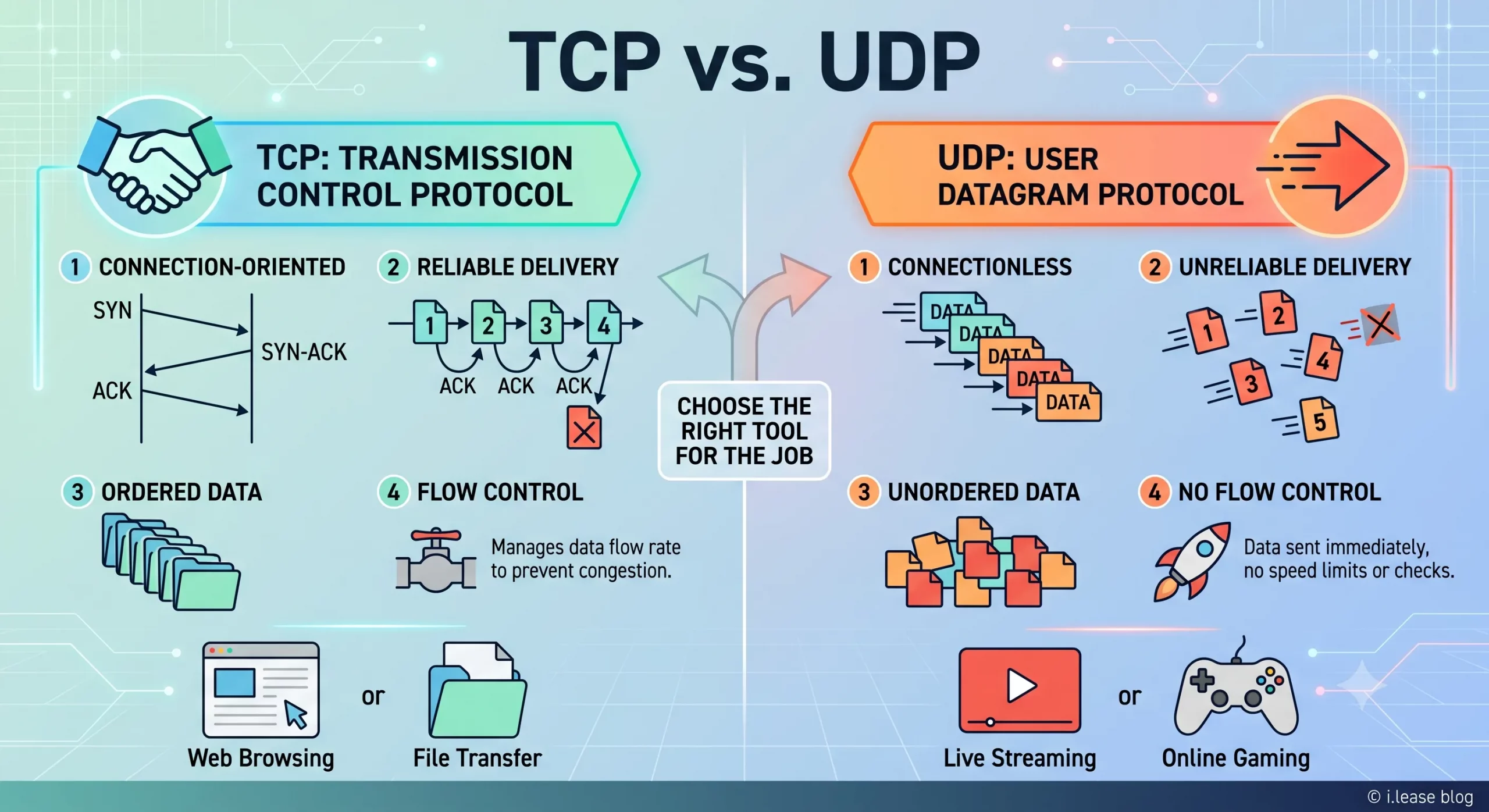
TCP 与 UDP:IPv4 租赁和企业网络指南
TCP 和 UDP 是互联网中最重要的两种传输层协议。它们决定数据如何在设备、服务器、云平台、VPN 网关、DNS 解析器、电子邮件系统、流媒体平台以及企业应用程序之间传输。 对于企业而言,TCP 和 UDP 不仅仅是技术术语,它们会直接影响实际的基础设施性能。公网 IPv4 地址提供可从互联网访问的网络端点,而 TCP 和 UDP 则决定流量如何通过该端点进行传输。 这对于租用或购买 IPv4 地址的企业尤为重要。企业租用 IPv4 地址并不是单纯为了持有这些地址,而是为了运行网站、API、VPN 隧道、DNS 服务、电子邮件平台、SaaS 应用程序、游戏服务器、流媒体系统、安全工具以及云端工作负载。不同类型的服务决定了需要使用 TCP、UDP,还是同时使用两者。 通过 i.lease,企业可以使用 IPv4 租赁服务获取用于实际网络部署的公网 IPv4 资源。需要长期控制 IP 地址资源的企业也可以购买 IP 地址,而拥有闲置 IPv4 资源的组织则可以出售 IP 地址。 TCP和UDP是什么? TCP 和 UDP 都是传输层协议。它们位于 IP 协议之上,帮助应用程序通过网络发送和接收数据。 IP 地址用于确定流量应该发送到哪里,而 TCP 和 UDP 则决定这些流量如何进行传输。 简单来说: TCP 适用于重视可靠性和按顺序传输数据的场景。 UDP 适用于重视速度、低延迟和轻量化数据传输的场景。 企业可能会使用同一个公网 IPv4 地址来运行不同的服务,但每项服务可能依赖不同的传输协议。例如,网站可能使用 TCP,VPN 网关可能使用 UDP,DNS 解析器可能同时使用 UDP 和 TCP,而游戏服务器则可能更倾向于使用 UDP,因为对于实时游戏而言,延迟造成的影响通常比少量数据包丢失更加明显。 因此,TCPRead more Related Posts 什么是电信公司?电信运营商如何为英国、美国和加拿大提供网络连接支持? 电信公司(Telco Companies),也称为电信运营商(Telecommunications Companies),提供通信与网络连接服务。这些服务包括移动通信网络、宽带互联网、光纤连接、固定电话服务、企业网络连接、云连接、托管网络服务以及数据中心连接等。 对于普通消费者而言,电信公司通常被视为移动通信或宽带互联网服务提供商。对于企业来说,电信公司远不只是一个服务品牌,更是关键的基础设施合作伙伴,帮助企业连接办公室、数据中心、云平台、远程员工、客户应用程序以及各类数字化服务。 随着企业越来越依赖云平台、SaaS 应用、AI 工具、VPN、网络安全系统以及在线服务,电信公司已成为数字基础设施规划中不可或缺的重要组成部分。 电信公司是什么? 电信公司(Telco Companies)是提供电信服务的企业。这些服务让个人、设备、企业和各种系统能够跨越距离进行通信与连接。 一家电信公司可能提供以下服务: 移动通信服务 宽带互联网 光纤连接 固定电话服务 企业互联网接入 企业广域网(WAN)服务 云连接服务 数据中心连接 VPN TCP 与 UDP:IPv4 租赁和企业网络指南 TCP 和 UDP 是互联网中最重要的两种传输层协议。它们决定数据如何在设备、服务器、云平台、VPN 网关、DNS 解析器、电子邮件系统、流媒体平台以及企业应用程序之间传输。 对于企业而言,TCP 和 UDP 不仅仅是技术术语,它们会直接影响实际的基础设施性能。公网 IPv4 地址提供可从互联网访问的网络端点,而 TCP 和 UDP 则决定流量如何通过该端点进行传输。 这对于租用或购买 IPv4 地址的企业尤为重要。企业租用 IPv4 什么是区域互联网注册管理机构(RIR) 区域互联网注册管理机构(Regional Internet Registry, RIR)是负责在特定地理区域内分配和管理互联网编号资源的组织。这些资源主要包括 IP 地址(IPv4 和 IPv6)以及自治系统号(ASN),它们是支撑设备和网络在互联网上相互通信的关键要素。 如果没有一套组织完善的系统来分配唯一的 IP 地址和路由标识符,互联网便无法正常运转。RIR 确保这一过程在各自管辖的区域内保持公平、高效与一致,从而避免冲突,并提升互联网治理的透明度。 全球五大 RIR 目前全球共有五家获官方认可的 RIR,各自负责世界上特定的区域:AFRINIC – 非洲网络信息中心(非洲)APNIC – 亚太网络信息中心(亚太地区)ARIN .related-post {} .related-post .post-list { text-align: left; } .related-post .post-list .item { margin: 5px; padding: 10px; } .related-post .headline { font-size: 18px !important; color: #999999 !important; } .related-post .post-list .item .post_thumb { max-height: 220px; margin: 10px 0px; padding: 0px; display: block; } .related-post .post-list .item .post_title { font-size: 16px; color: #3f3f3f; margin: 10px 0px; padding: 0px; display: block; text-decoration: none; } .related-post .post-list .item .post_excerpt { font-size: 13px; color: #3f3f3f; margin: 10px 0px; padding: 0px; display: block; text-decoration: none; } @media only screen and (min-width: 1024px) { .related-post .post-list .item { width: 30%; } } @media only screen and (min-width: 768px) and (max-width: 1023px) { .related-post .post-list .item { width: 90%; } } @media only screen and (min-width: 0px) and (max-width: 767px) { .related-post .post-list .item { width: 90%; } }
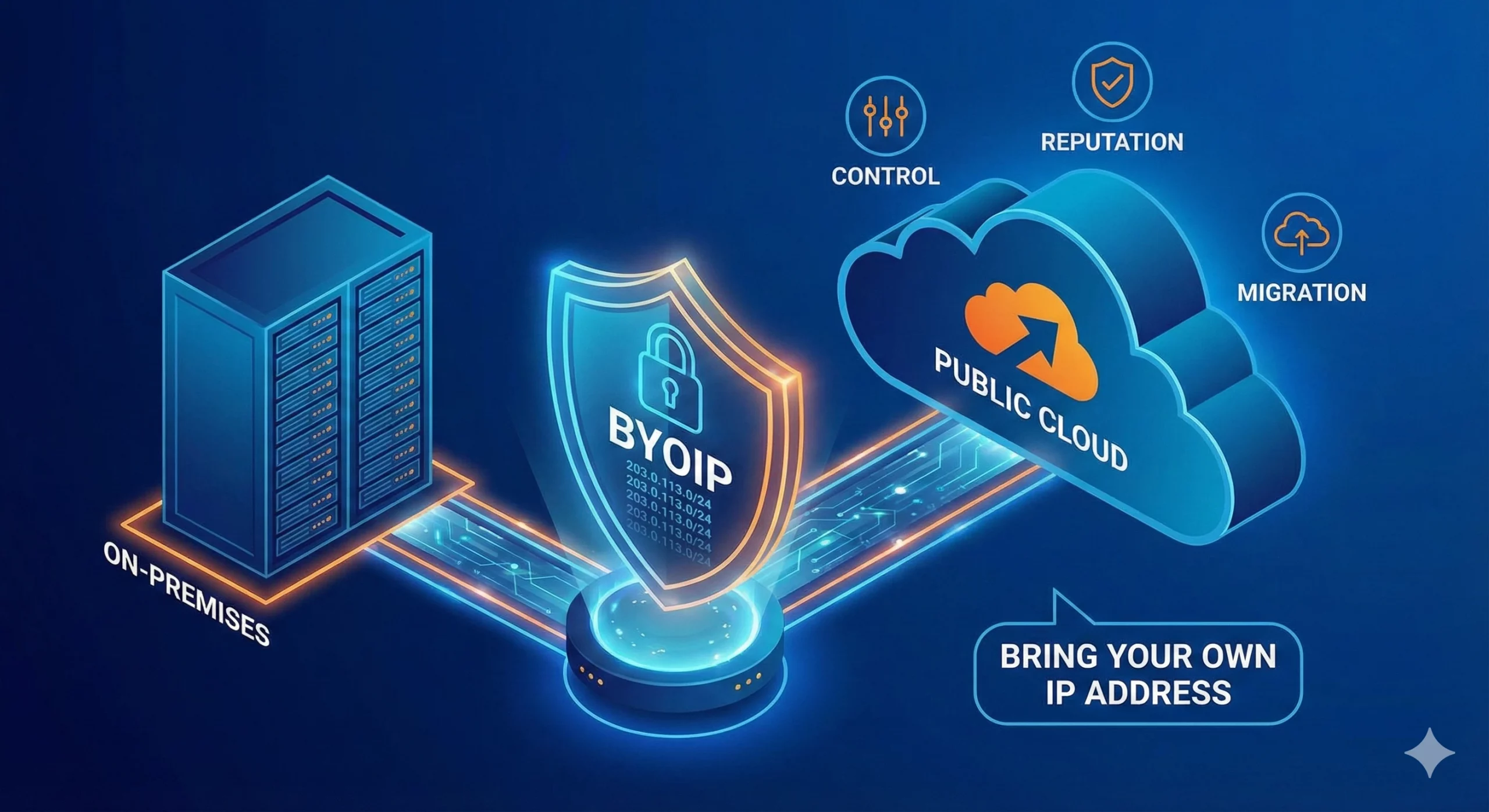
什么是BYOIP(自备IP地址)?
自带 IP(Bring Your Own IP,简称 BYOIP)是一种网络部署方式,允许企业将自己现有的公网 IP 地址段应用于云服务提供商、数据中心、内容分发网络(CDN)或其他基础设施平台。 企业无需使用服务提供商分配的新公网 IP 地址,而是可以使用自己已拥有或已获授权使用的 IPv4 或 IPv6 地址前缀。服务提供商会验证该组织对该地址段的使用权限,并在支持的情况下,通过其自身网络对该地址段进行路由公告(Advertise)。 BYOIP 有助于企业在迁移至云平台时保留现有的防火墙规则、白名单(Allowlists)、客户系统集成、IP 信誉(IP Reputation)、DNS 配置以及既有的网络身份。这不仅能够减少因更换 IP 地址而带来的业务中断,还能降低对服务提供商分配 IP 的依赖,使未来的基础设施迁移与扩展更加灵活且易于管理。 对于需要 BYOIP 地址资源的企业,可选择 购买 IPv4 地址(Buy IP),以获得长期控制权;如果更重视灵活性,也可采用 IPv4 租赁(IPv4 Leasing),按业务需求获取公网 IP 资源。 什么是BYOIP? BYOIP 是 Bring Your Own IP(自带 IP)的缩写。这是一种网络部署模式,允许组织将现有的公网 IP 地址段带入云服务提供商或其他基础设施平台使用。 在 BYOIP 模式下,组织仍然拥有或保留该 IP 地址段的使用权,而平台则获得授权,可在其基础设施中对该地址段进行路由公告(Advertise)和使用。随后,这些 IP 地址可分配给虚拟机(Virtual Machines)、负载均衡器(Load Balancers)、VPN 网关、内容分发服务(CDN)、安全平台以及公网应用程序端点等受支持的服务。 例如,一家企业将应用程序从本地数据中心迁移到云环境时,可能并不希望更换现有的公网 IP 地址。这些 IP 地址可能已经存在于客户白名单(Allowlists)、防火墙策略、DNS 记录、合作伙伴配置以及电子邮件信誉(Email Reputation)数据库中。 BYOIP 使企业能够在迁移工作负载的同时,继续使用原有的公网 IP 地址,从而保持更一致的网络身份,并减少因更换 IP 地址而带来的配置调整和业务影响。 Related Posts 什么是电信公司?电信运营商如何为英国、美国和加拿大提供网络连接支持? 电信公司(Telco Companies),也称为电信运营商(Telecommunications Companies),提供通信与网络连接服务。这些服务包括移动通信网络、宽带互联网、光纤连接、固定电话服务、企业网络连接、云连接、托管网络服务以及数据中心连接等。 对于普通消费者而言,电信公司通常被视为移动通信或宽带互联网服务提供商。对于企业来说,电信公司远不只是一个服务品牌,更是关键的基础设施合作伙伴,帮助企业连接办公室、数据中心、云平台、远程员工、客户应用程序以及各类数字化服务。 随着企业越来越依赖云平台、SaaS 应用、AI 工具、VPN、网络安全系统以及在线服务,电信公司已成为数字基础设施规划中不可或缺的重要组成部分。 电信公司是什么? 电信公司(Telco Companies)是提供电信服务的企业。这些服务让个人、设备、企业和各种系统能够跨越距离进行通信与连接。 一家电信公司可能提供以下服务: 移动通信服务 宽带互联网 光纤连接 固定电话服务 企业互联网接入 企业广域网(WAN)服务 云连接服务 数据中心连接 VPN TCP 与 UDP:IPv4 租赁和企业网络指南 TCP 和 UDP 是互联网中最重要的两种传输层协议。它们决定数据如何在设备、服务器、云平台、VPN 网关、DNS 解析器、电子邮件系统、流媒体平台以及企业应用程序之间传输。 对于企业而言,TCP 和 UDP 不仅仅是技术术语,它们会直接影响实际的基础设施性能。公网 IPv4 地址提供可从互联网访问的网络端点,而 TCP 和 UDP 则决定流量如何通过该端点进行传输。 这对于租用或购买 IPv4 地址的企业尤为重要。企业租用 IPv4 什么是区域互联网注册管理机构(RIR) 区域互联网注册管理机构(Regional Internet Registry, RIR)是负责在特定地理区域内分配和管理互联网编号资源的组织。这些资源主要包括 IP 地址(IPv4 和 IPv6)以及自治系统号(ASN),它们是支撑设备和网络在互联网上相互通信的关键要素。 如果没有一套组织完善的系统来分配唯一的 IP 地址和路由标识符,互联网便无法正常运转。RIR 确保这一过程在各自管辖的区域内保持公平、高效与一致,从而避免冲突,并提升互联网治理的透明度。 全球五大 RIR 目前全球共有五家获官方认可的 RIR,各自负责世界上特定的区域:AFRINIC – 非洲网络信息中心(非洲)APNIC – 亚太网络信息中心(亚太地区)ARIN .related-post {} .related-post .post-list { text-align: left; } .related-post .post-list .item { margin: 5px; padding: 10px; } .related-post .headline { font-size: 18px !important; color: #999999 !important; } .related-post .post-list .item .post_thumb { max-height: 220px; margin: 10px 0px; padding: 0px; display: block; } .related-post .post-list .item .post_title { font-size: 16px; color: #3f3f3f; margin: 10px 0px; padding: 0px; display: block; text-decoration: none; } .related-post .post-list .item .post_excerpt { font-size: 13px; color: #3f3f3f; margin: 10px 0px; padding: 0px; display: block; text-decoration: none; } @media only screen and (min-width: 1024px) { .related-post .post-list .item { width: 30%; } } @media only screen and (min-width: 768px) and (max-width: 1023px) { .related-post .post-list .item { width: 90%; } } @media only screen and (min-width: 0px) and (max-width: 767px) { .related-post .post-list .item { width: 90%; } }
