Comprendre la différence entre IPv4 et IPv6

StephanieStephanie
Understanding-the-Difference-Between-Ipv4-and-IPv6-Thumbnail-ilease

Lorsqu’un appareil se connecte à un réseau, il doit respecter une norme spécifique. Cette norme, appelée protocole Internet, permet à un appareil de communiquer avec d’autres appareils.

 Table of Contents

Que ce soit via Internet ou sur un réseau local (comme un réseau domestique ou professionnel), un appareil a besoin d’une adresse réseau. Il reçoit cette adresse une fois connecté au réseau, généralement par l’intermédiaire d’un routeur.

Pour communiquer sur Internet, un appareil utilise une adresse IP. Le protocole Internet (IP) normalise la structure des données et le format des adresses sur Internet afin d’acheminer les données à destination.

1.0 Types d’adresses IP

Tout appareil utilisant le protocole Internet (IP) peut communiquer avec d’autres appareils utilisant le même protocole. Il peut s’agir d’ordinateurs, de téléphones ou même de grille-pain. Les adresses IP peuvent être publiques ou privées.

a. Adresses IP publiques

Les adresses IP publiques offrent un accès direct à Internet. Un fournisseur d’accès à Internet (FAI) attribue ces adresses aux appareils, comme votre routeur domestique. Elles permettent aux appareils d’être accessibles depuis l’extérieur.

b. Adresses IP privées

Les adresses IP privées n’ont pas d’accès direct à Internet et transitent par votre routeur domestique ou professionnel. Ces adresses sont accessibles uniquement au sein de réseaux privés, tels que les réseaux locaux (LAN) ou les réseaux privés virtuels (VPN).

Votre routeur domestique ou professionnel possède une adresse IP publique. Cependant, il attribue également des adresses IP privées aux appareils de votre réseau privé. Ce processus est lié à la NAT (Network Address Translation), que nous aborderons plus loin.

Traduction d’adresses réseau (NAT)

Lorsqu’un réseau privé se connecte à Internet et envoie des données via un routeur, ce dernier utilise la traduction d’adresses réseau (NAT). La NAT permet à plusieurs appareils d’un réseau privé de partager une seule adresse IP publique.

Cependant, elle complique la fourniture de services sur Internet pour les appareils disposant d’adresses privées, car ces derniers ne sont pas facilement accessibles depuis l’extérieur.

2.0 What is IPv4? 

You can use NAT only in the fourth version of the Internet Protocol, known as IP version 4 (IPv4). An IPv4 address is made up of four blocks of numbers ranging from 0 to 255 separated by dots.

These four numbers are four groups of eight binary digits (bits). IPv4 addresses are expressed as decimal numbers for readability.For clarity, let’s look at a common IP address: 192.168.0.1.

The table below shows how IPv4 is a binary system represented by decimal digits, for easier readability.

DecimalBinary
19211000000
16810101000
000000000
100000001

3.0 What is IPv6?  

The problem with IPv4 is that it provides only approximately 4.3 billion addresses.

4.3 billion is such a small number when we factor in the increasing number of devices connecting to the internet.

To address this limitation, IPv6 was introduced. An IPv6 address is made up of eight blocks of 16-bit numbers. Each block is separated by colons and represented in hexadecimal format. IPv6 uses 128 bits for each address.

In plain speak, an IPv6 address is much longer compared to an IPv4 address. Letters and numbers make up an IPv6 address.

This is an example of an IPv6 address:2001:0db8:85a3:0000:0000:8a2e:0370:7334

4.0 Ipv4 vs IPv6 : A Comparison

IPv4 is still the most commonly used version of the Internet Protocol. That’s why there’s a huge demand for it. However, IPv6 offers more in terms of performance and security. In this section, we’ll look into IPv4 vs. IPv6.
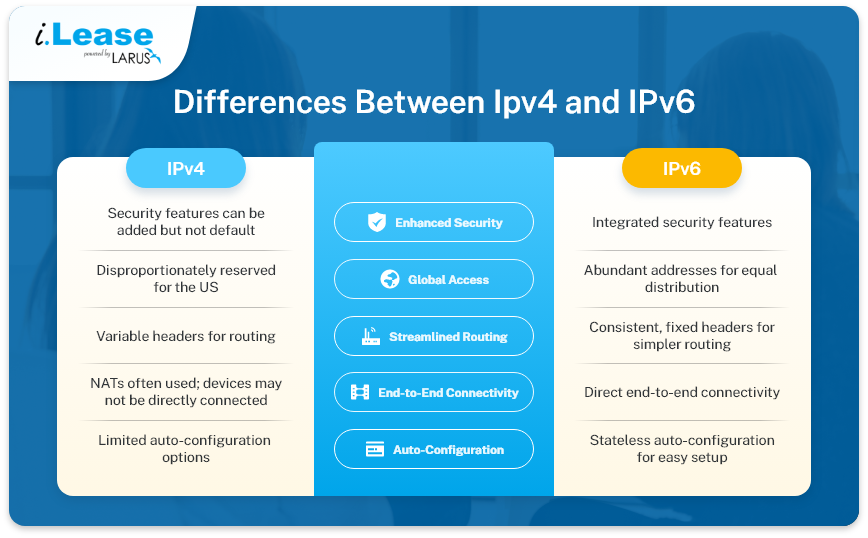
1. Enhanced Security

IPv6 was designed with integrated security features. While these features can be added to IPv4, they don’t come pre-configured as in the case with IPv6.

2. Global Access

Around 50% of IPv4 addresses were initially reserved for the US, leading to uneven distribution worldwide. In contrast, IPv6 addresses are in higher abundance. Therefore, they can be equally distributed worldwide.

3. Potential for Streamlined Routing

Each IP version has a certain number of headers (or information fields). Some of these fields tell the computers about the type of data, the size of the packet (the data being sent), the source address (where it’s coming from), and the destination address (where it’s going).

IPv6 employs consistent and fixed headers, unlike IPv4’s variable headers. This could simplify the routing code and reduce hardware processing requirements.

4. Direct End-to-End Connectivity

There is enough IPv6 to go around, leaving NATs unnecessary.

With IPv6, each device can directly connect to the internet and communicate with websites without intermediary network address translations.

However, this creates a potential downside: devices that use IPv6 might be more vulnerable if they use the same address over the Internet all the time. The fix is to use a temporary IPv6 address that changes regularly.

5. Effortless Auto-Configuration

IPv6 offers a feature called stateless auto-configuration. Devices can autonomously assign themselves IP addresses based on their unique MAC addresses. Self-configuration makes it easy for devices to find and connect within the same network.
Articles connexes

TCP vs UDP : guide de location IPv4 et de réseau d’entreprise

TCP vs UDP : guide de location IPv4 et de réseau d’entreprise

TCP et UDP sont deux des protocoles de transport les plus importants sur Internet. Ils déterminent la circulation des données entre les appareils, les serveurs, les plateformes cloud, les passerelles VPN, les résolveurs DNS, les systèmes de messagerie, les plateformes de streaming et les applications métier. Pour les entreprises, TCP et UDP ne sont pas de simples termes techniques. Ils ont un impact direct sur les performances de l’infrastructure. Related Posts TCP 与 UDP:IPv4 租赁和企业网络指南 TCP 和 UDP 是互联网中最重要的两种传输层协议。它们决定数据如何在设备、服务器、云平台、VPN 网关、DNS 解析器、电子邮件系统、流媒体平台以及企业应用程序之间传输。 对于企业而言,TCP 和 UDP 不仅仅是技术术语,它们会直接影响实际的基础设施性能。公网 IPv4 地址提供可从互联网访问的网络端点,而 TCP 和 UDP 则决定流量如何通过该端点进行传输。 这对于租用或购买 IPv4 地址的企业尤为重要。企业租用 IPv4 什么是BYOIP(自备IP地址)? 自带 IP(Bring Your Own IP,简称 BYOIP)是一种网络部署方式,允许企业将自己现有的公网 IP 地址段应用于云服务提供商、数据中心、内容分发网络(CDN)或其他基础设施平台。 企业无需使用服务提供商分配的新公网 IP 地址,而是可以使用自己已拥有或已获授权使用的 IPv4 或 IPv6 地址前缀。服务提供商会验证该组织对该地址段的使用权限,并在支持的情况下,通过其自身网络对该地址段进行路由公告(Advertise)。 BYOIP 有助于企业在迁移至云平台时保留现有的防火墙规则、白名单(Allowlists)、客户系统集成、IP 信誉(IP Reputation)、DNS 配置以及既有的网络身份。这不仅能够减少因更换 如何使用 i.Lease 将闲置的 IPv4 地址转化为持续的收入来源 通过 i.Lease 释放闲置 IPv4 地址的隐藏价值,将未被充分利用的数字基础设施转化为持续性收入来源,同时妥善应对市场需求、合规要求和相关风险。 租赁闲置的 IPv4 地址区块,可以在不放弃所有权的情况下,创造稳定的长期收入。 像 i.Lease 全球 IPv4 市场这样的平台,可以简化地址变现流程,并协助管理 IP 声誉与合规要求。 为什么 IPv4 地址仍然重要 尽管 IPv4 .related-post {} .related-post .post-list { text-align: left; } .related-post .post-list .item { margin: 5px; padding: 10px; } .related-post .headline { font-size: 18px !important; color: #999999 !important; } .related-post .post-list .item .post_thumb { max-height: 220px; margin: 10px 0px; padding: 0px; display: block; } .related-post .post-list .item .post_title { font-size: 16px; color: #3f3f3f; margin: 10px 0px; padding: 0px; display: block; text-decoration: none; } .related-post .post-list .item .post_excerpt { font-size: 13px; color: #3f3f3f; margin: 10px 0px; padding: 0px; display: block; text-decoration: none; } @media only screen and (min-width: 1024px) { .related-post .post-list .item { width: 30%; } } @media only screen and (min-width: 768px) and (max-width: 1023px) { .related-post .post-list .item { width: 90%; } } @media only screen and (min-width: 0px) and (max-width: 767px) { .related-post .post-list .item { width: 90%; } }

Malaysia Data Centre

Pourquoi la Malaisie devient-elle un pôle de centres de données pour les infrastructures cloud et d’intelligence artificielle ?

La Malaisie devient l’un des marchés de croissance les plus importants d’Asie du Sud-Est dans le secteur des centres de données. La demande en cloud computing, intelligence artificielle, applications d’entreprise, paiements numériques, commerce électronique, cybersécurité et services régionaux à faible latence pousse les entreprises à construire davantage d’infrastructures au plus près des utilisateurs. Cette croissance ne repose pas uniquement sur un effet de mode. La Malaisie a attiré desRead more Related Posts TCP 与 UDP:IPv4 租赁和企业网络指南 TCP 和 UDP 是互联网中最重要的两种传输层协议。它们决定数据如何在设备、服务器、云平台、VPN 网关、DNS 解析器、电子邮件系统、流媒体平台以及企业应用程序之间传输。 对于企业而言,TCP 和 UDP 不仅仅是技术术语,它们会直接影响实际的基础设施性能。公网 IPv4 地址提供可从互联网访问的网络端点,而 TCP 和 UDP 则决定流量如何通过该端点进行传输。 这对于租用或购买 IPv4 地址的企业尤为重要。企业租用 IPv4 什么是BYOIP(自备IP地址)? 自带 IP(Bring Your Own IP,简称 BYOIP)是一种网络部署方式,允许企业将自己现有的公网 IP 地址段应用于云服务提供商、数据中心、内容分发网络(CDN)或其他基础设施平台。 企业无需使用服务提供商分配的新公网 IP 地址,而是可以使用自己已拥有或已获授权使用的 IPv4 或 IPv6 地址前缀。服务提供商会验证该组织对该地址段的使用权限,并在支持的情况下,通过其自身网络对该地址段进行路由公告(Advertise)。 BYOIP 有助于企业在迁移至云平台时保留现有的防火墙规则、白名单(Allowlists)、客户系统集成、IP 信誉(IP Reputation)、DNS 配置以及既有的网络身份。这不仅能够减少因更换 什么是区域互联网注册管理机构(RIR) 区域互联网注册管理机构(Regional Internet Registry, RIR)是负责在特定地理区域内分配和管理互联网编号资源的组织。这些资源主要包括 IP 地址(IPv4 和 IPv6)以及自治系统号(ASN),它们是支撑设备和网络在互联网上相互通信的关键要素。 如果没有一套组织完善的系统来分配唯一的 IP 地址和路由标识符,互联网便无法正常运转。RIR 确保这一过程在各自管辖的区域内保持公平、高效与一致,从而避免冲突,并提升互联网治理的透明度。 全球五大 RIR 目前全球共有五家获官方认可的 RIR,各自负责世界上特定的区域:AFRINIC – 非洲网络信息中心(非洲)APNIC – 亚太网络信息中心(亚太地区)ARIN .related-post {} .related-post .post-list { text-align: left; } .related-post .post-list .item { margin: 5px; padding: 10px; } .related-post .headline { font-size: 18px !important; color: #999999 !important; } .related-post .post-list .item .post_thumb { max-height: 220px; margin: 10px 0px; padding: 0px; display: block; } .related-post .post-list .item .post_title { font-size: 16px; color: #3f3f3f; margin: 10px 0px; padding: 0px; display: block; text-decoration: none; } .related-post .post-list .item .post_excerpt { font-size: 13px; color: #3f3f3f; margin: 10px 0px; padding: 0px; display: block; text-decoration: none; } @media only screen and (min-width: 1024px) { .related-post .post-list .item { width: 30%; } } @media only screen and (min-width: 768px) and (max-width: 1023px) { .related-post .post-list .item { width: 90%; } } @media only screen and (min-width: 0px) and (max-width: 767px) { .related-post .post-list .item { width: 90%; } }

ipv4-addresses

Comment transformer des adresses IPv4 inutilisées en source de revenus récurrents avec i.Lease

Libérez la valeur cachée des adresses IPv4 inutilisées avec i.Lease, en transformant une infrastructure numérique inactive en source de revenus récurrents, tout en tenant compte de la demande du marché, de la conformité et des risques. La location de blocs IPv4 inutilisés peut générer des revenus réguliers à long terme sans renoncer à leur propriété. Des plateformes telles que la place de marché mondiale IPv4 i.Lease facilitent la monétisationRead more Related Posts TCP 与 UDP:IPv4 租赁和企业网络指南 TCP 和 UDP 是互联网中最重要的两种传输层协议。它们决定数据如何在设备、服务器、云平台、VPN 网关、DNS 解析器、电子邮件系统、流媒体平台以及企业应用程序之间传输。 对于企业而言,TCP 和 UDP 不仅仅是技术术语,它们会直接影响实际的基础设施性能。公网 IPv4 地址提供可从互联网访问的网络端点,而 TCP 和 UDP 则决定流量如何通过该端点进行传输。 这对于租用或购买 IPv4 地址的企业尤为重要。企业租用 IPv4 什么是BYOIP(自备IP地址)? 自带 IP(Bring Your Own IP,简称 BYOIP)是一种网络部署方式,允许企业将自己现有的公网 IP 地址段应用于云服务提供商、数据中心、内容分发网络(CDN)或其他基础设施平台。 企业无需使用服务提供商分配的新公网 IP 地址,而是可以使用自己已拥有或已获授权使用的 IPv4 或 IPv6 地址前缀。服务提供商会验证该组织对该地址段的使用权限,并在支持的情况下,通过其自身网络对该地址段进行路由公告(Advertise)。 BYOIP 有助于企业在迁移至云平台时保留现有的防火墙规则、白名单(Allowlists)、客户系统集成、IP 信誉(IP Reputation)、DNS 配置以及既有的网络身份。这不仅能够减少因更换 什么是区域互联网注册管理机构(RIR) 区域互联网注册管理机构(Regional Internet Registry, RIR)是负责在特定地理区域内分配和管理互联网编号资源的组织。这些资源主要包括 IP 地址(IPv4 和 IPv6)以及自治系统号(ASN),它们是支撑设备和网络在互联网上相互通信的关键要素。 如果没有一套组织完善的系统来分配唯一的 IP 地址和路由标识符,互联网便无法正常运转。RIR 确保这一过程在各自管辖的区域内保持公平、高效与一致,从而避免冲突,并提升互联网治理的透明度。 全球五大 RIR 目前全球共有五家获官方认可的 RIR,各自负责世界上特定的区域:AFRINIC – 非洲网络信息中心(非洲)APNIC – 亚太网络信息中心(亚太地区)ARIN .related-post {} .related-post .post-list { text-align: left; } .related-post .post-list .item { margin: 5px; padding: 10px; } .related-post .headline { font-size: 18px !important; color: #999999 !important; } .related-post .post-list .item .post_thumb { max-height: 220px; margin: 10px 0px; padding: 0px; display: block; } .related-post .post-list .item .post_title { font-size: 16px; color: #3f3f3f; margin: 10px 0px; padding: 0px; display: block; text-decoration: none; } .related-post .post-list .item .post_excerpt { font-size: 13px; color: #3f3f3f; margin: 10px 0px; padding: 0px; display: block; text-decoration: none; } @media only screen and (min-width: 1024px) { .related-post .post-list .item { width: 30%; } } @media only screen and (min-width: 768px) and (max-width: 1023px) { .related-post .post-list .item { width: 90%; } } @media only screen and (min-width: 0px) and (max-width: 767px) { .related-post .post-list .item { width: 90%; } }